Learn how to protect company data on BYOD devices with Microsoft Intune, using app protection policies, Conditional Access, MAM, and selective wipe.

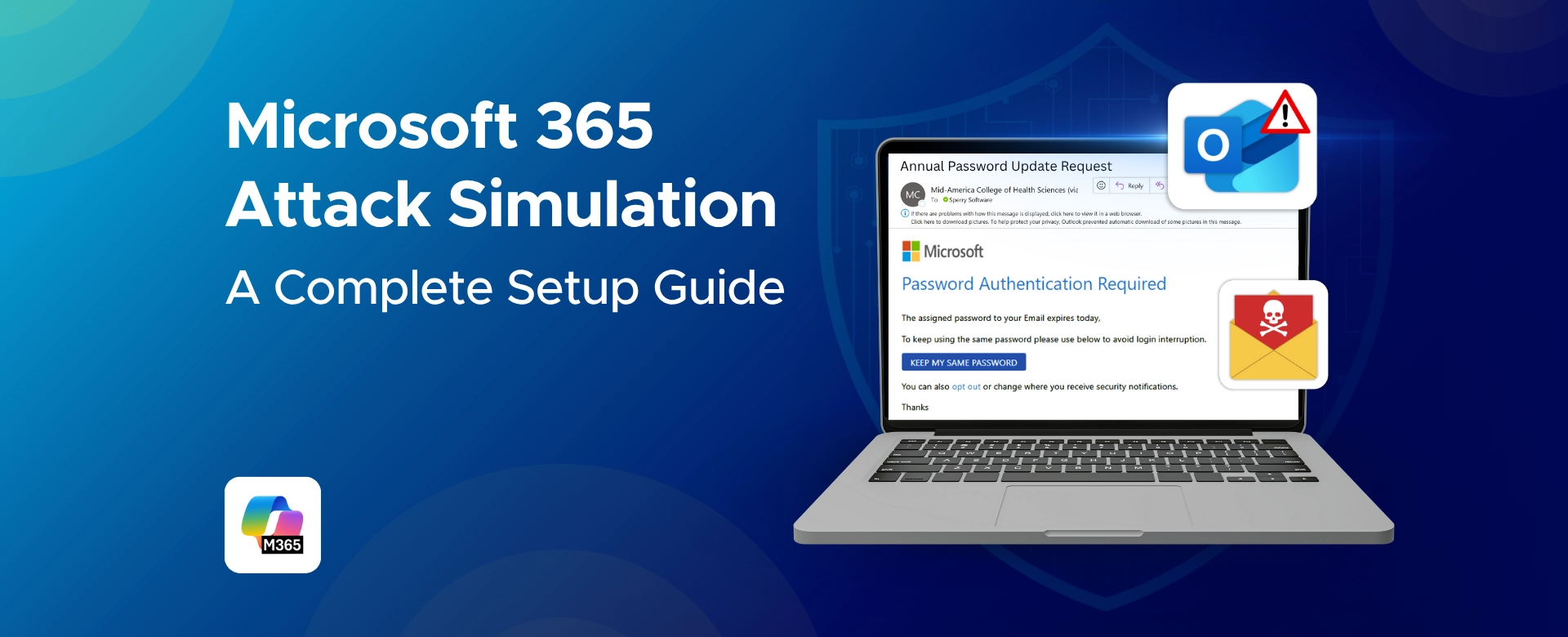
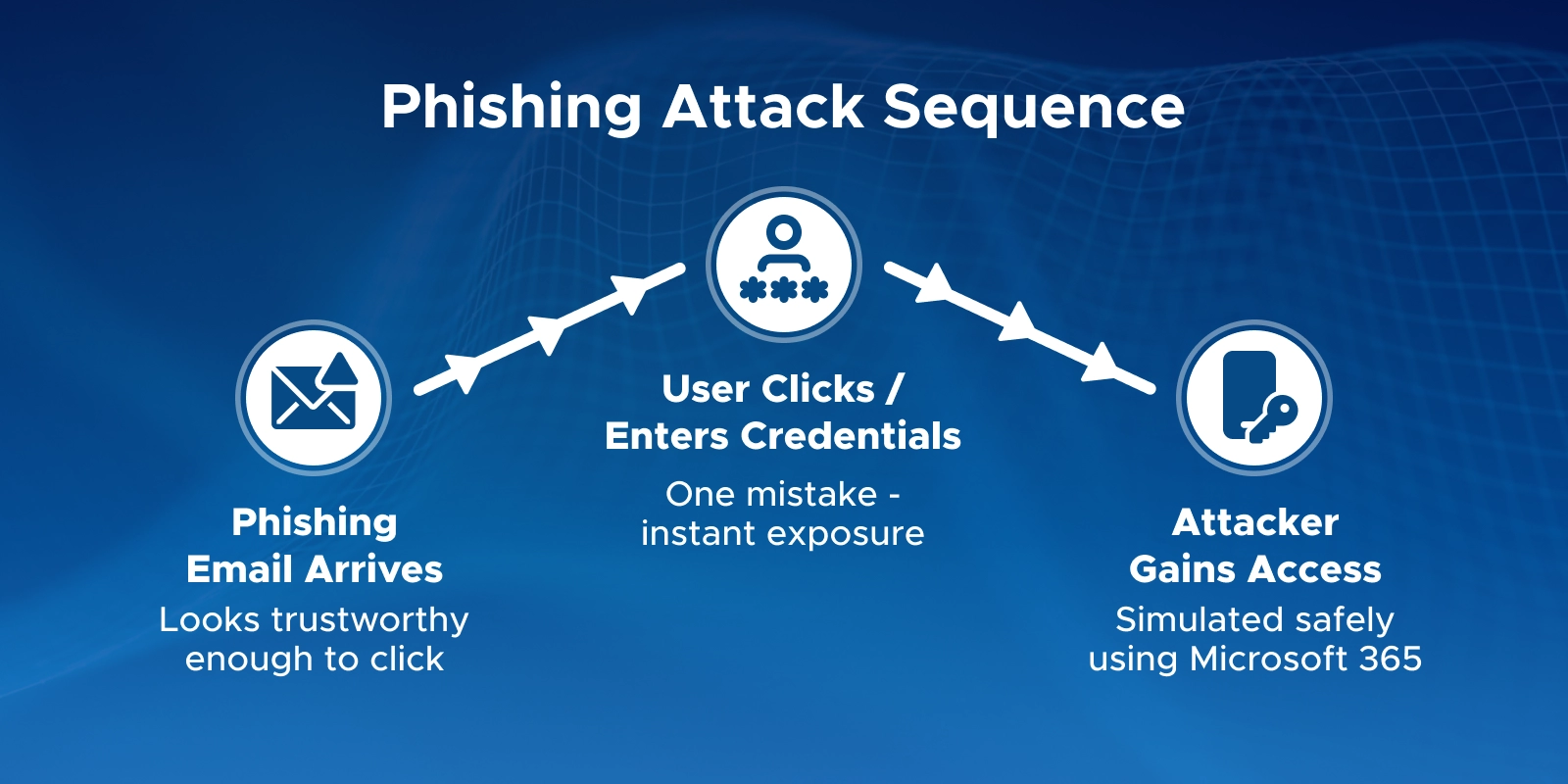
Most attacks don’t start with advanced malware.
They start with a simple email that looks trustworthy enough to click.
This is why phishing and social engineering remain the easiest ways into an organization. Even with strong defenses, one quick mistake can open the door.
Microsoft 365 Attack Simulation Training helps you test these threats safely. It recreates real attacks so you can see how users respond before a real one occurs.
These simulations matter because:
With simulations, you can catch risky behavior early, provide targeted training, and measure your organization’s readiness.
This guide gives you a clear, step-by-step setup process, along with best practices and common pitfalls to avoid - so you can run effective Microsoft 365 attack simulations with confidence.
Before you set up attack simulations, it’s important to confirm that your environment has the right license, permissions, and settings enabled. Getting these prerequisites in place ensures that the feature appears in your tenant and that simulation results are captured correctly.
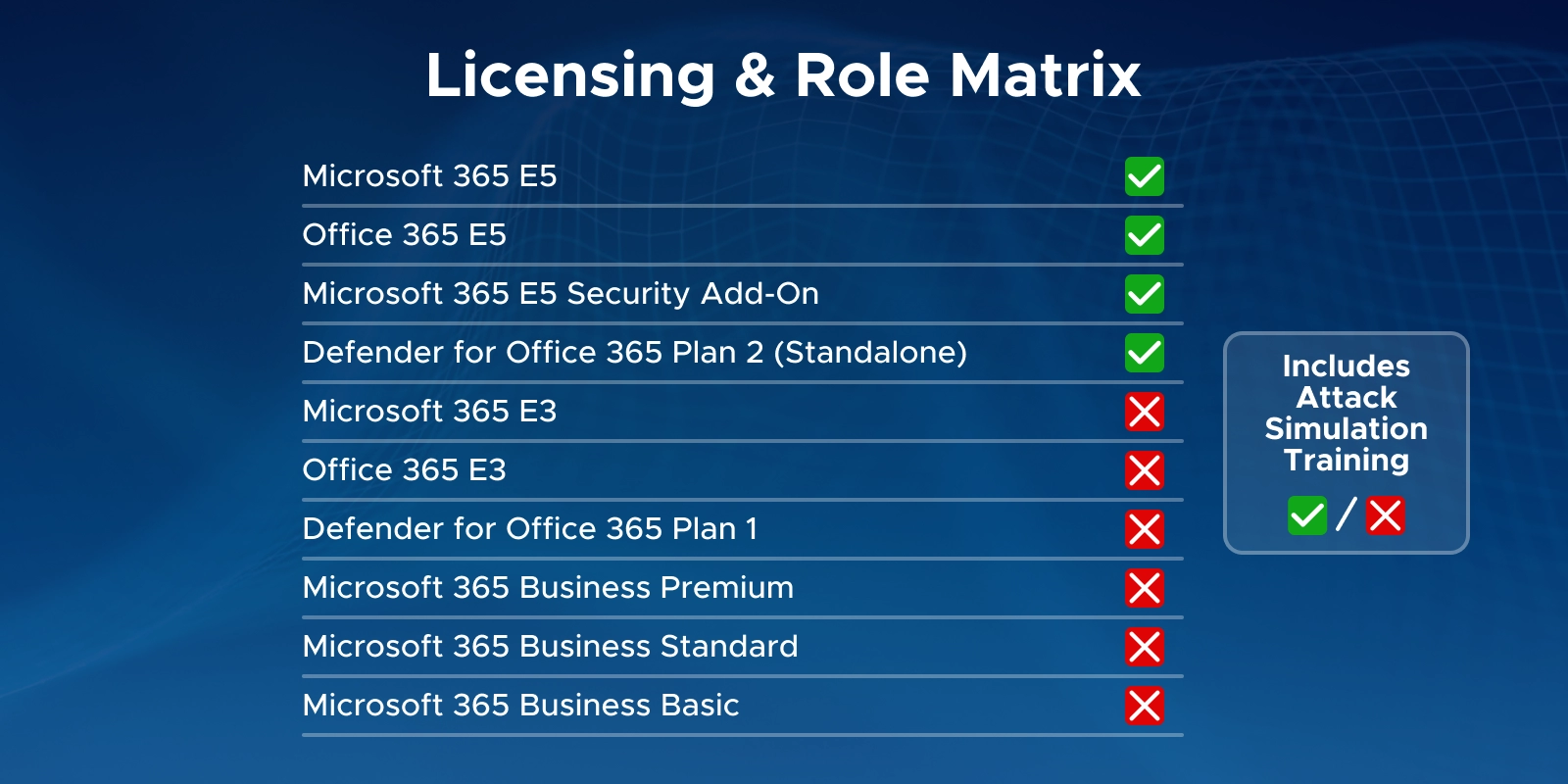
Microsoft 365 Attack Simulation Training requires Microsoft Defender for Office 365 Plan 2.
It is included in:
If your organization uses Microsoft 365 E3 or another plan without Plan 2, the Attack Simulation feature will not appear.
Important Tip: Admins can use the 90-day Defender for Office 365 Plan 2 trial to test all related capabilities if needed.
You also need the correct role to create or run simulations.
The following roles have the required access:
Using the dedicated Attack Simulation roles is recommended when you want to follow least-privilege access principles.
Unified Audit Logging must be turned on for simulation activity to appear in reports.
If audit logging is disabled, user actions - such as opening an email or clicking a link - will not be recorded.
To enable audit logging:
This ensures all simulation events and user responses are tracked correctly.
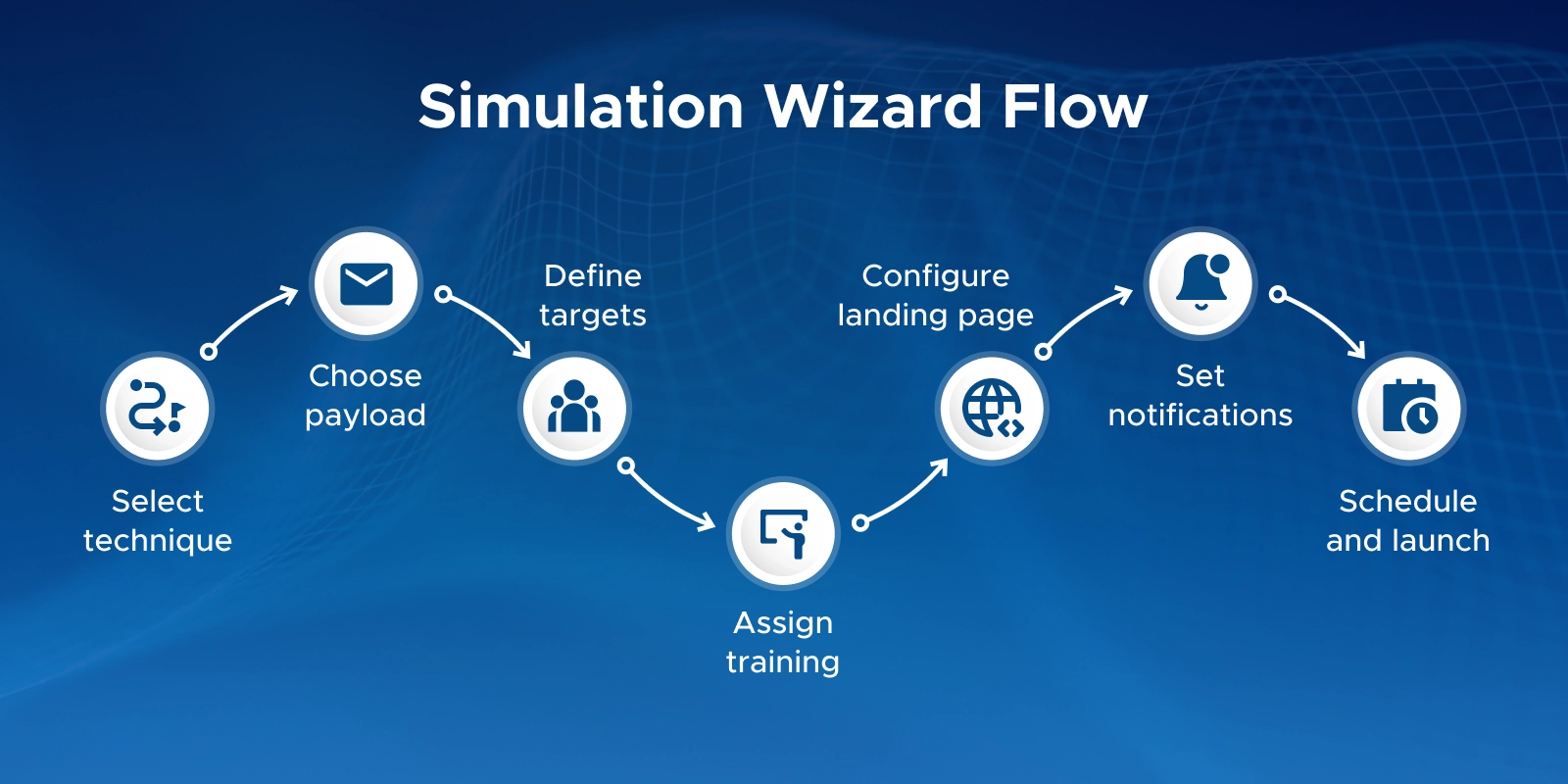
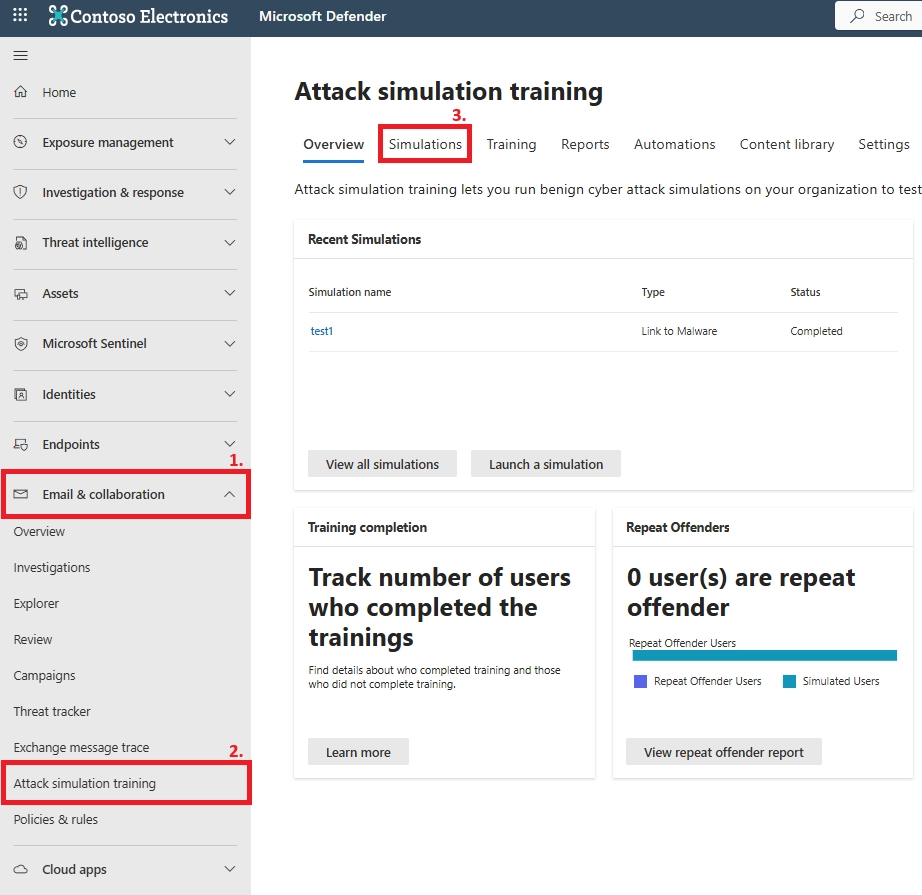
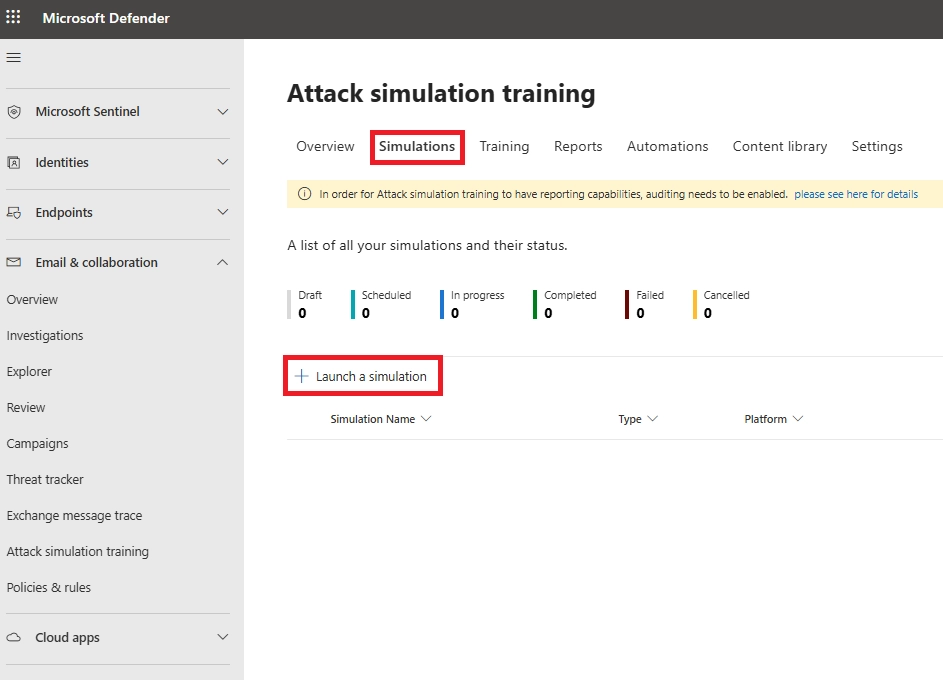
Choose an attack type:
Most phishing tests start with Credential Harvest.
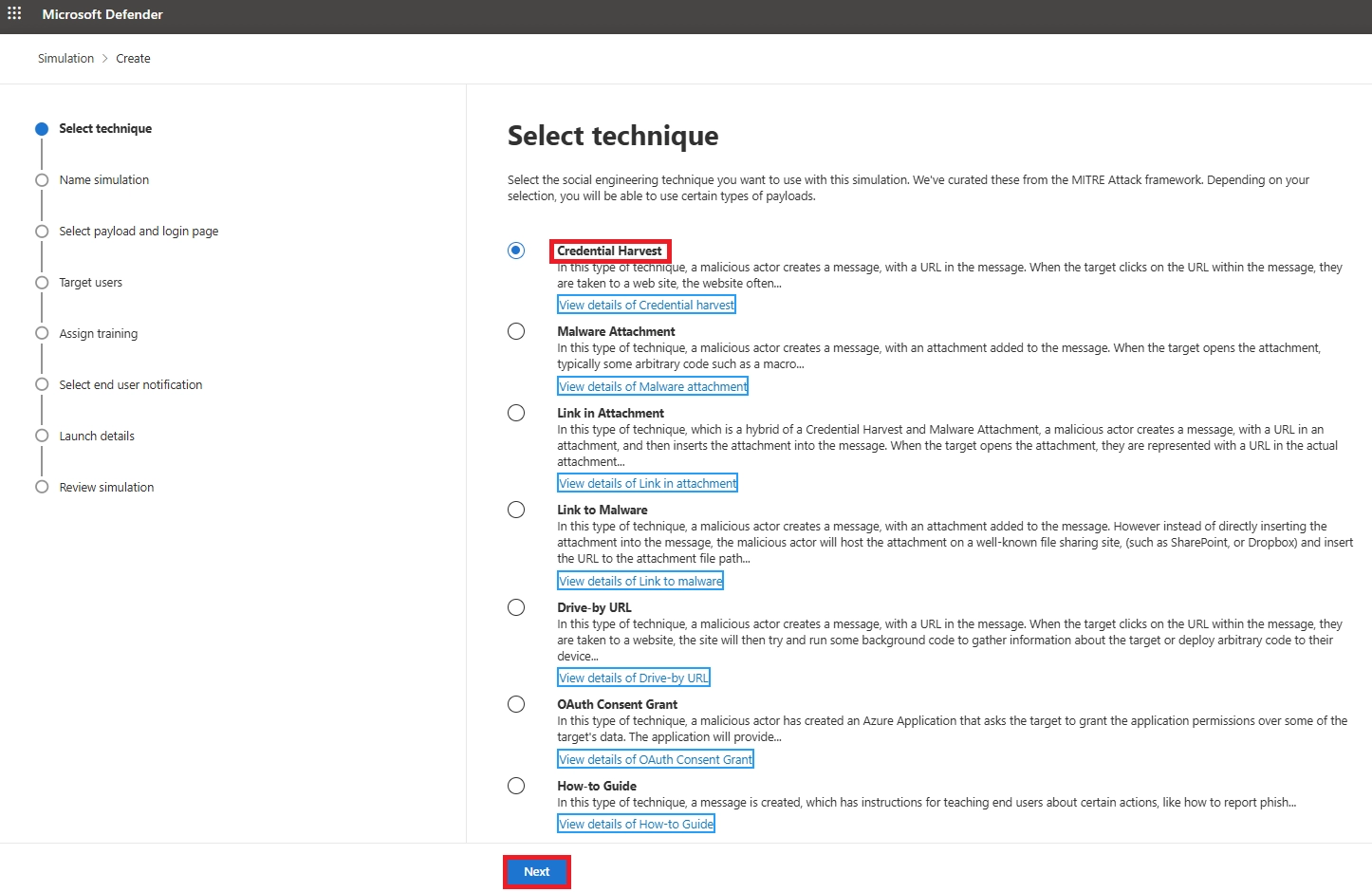
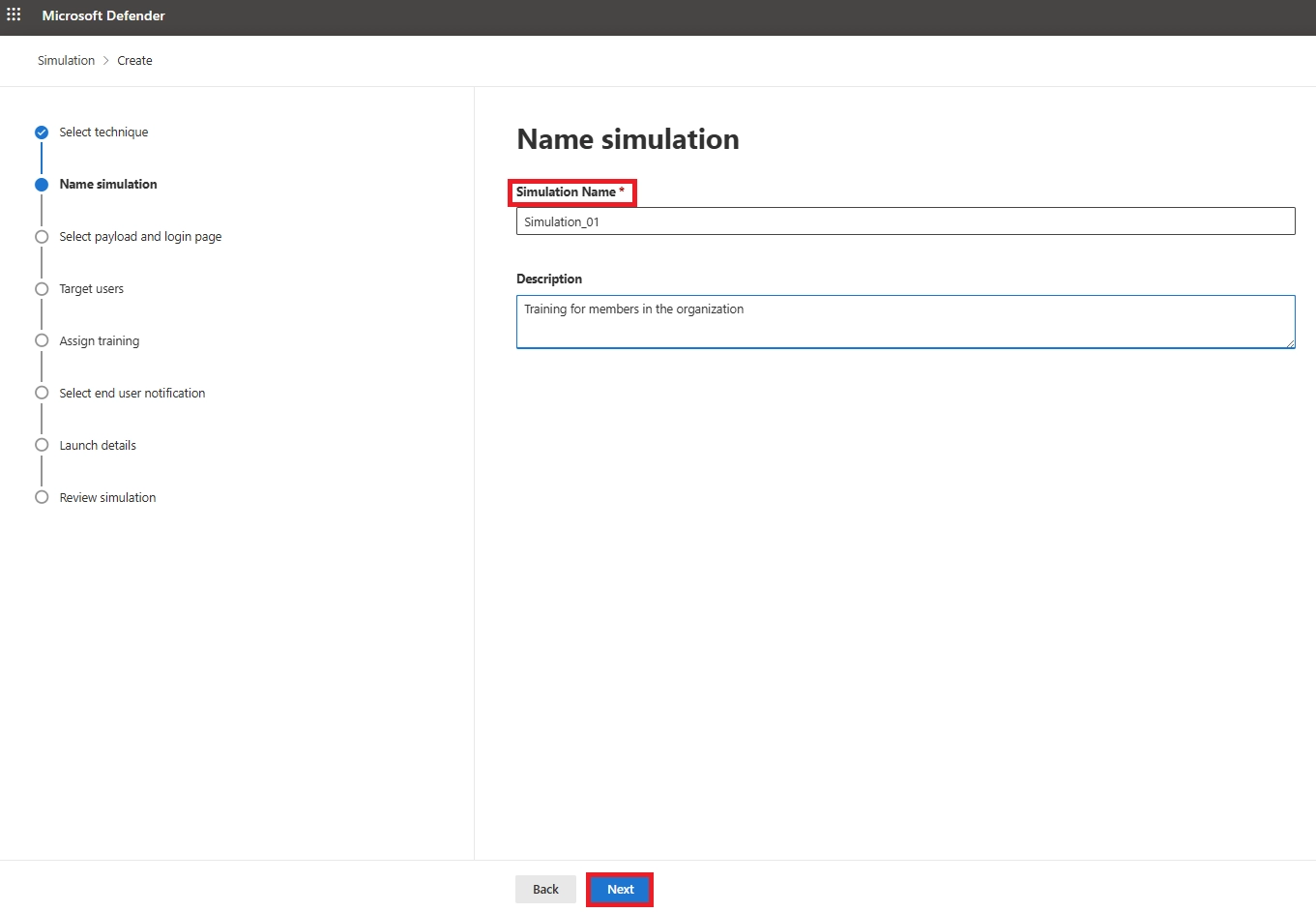
Enter a simple, clear name such as: “CompanyWide Credential Harvest – Nov 2025”
Add a short description if needed.
This helps keep multiple campaigns organized.
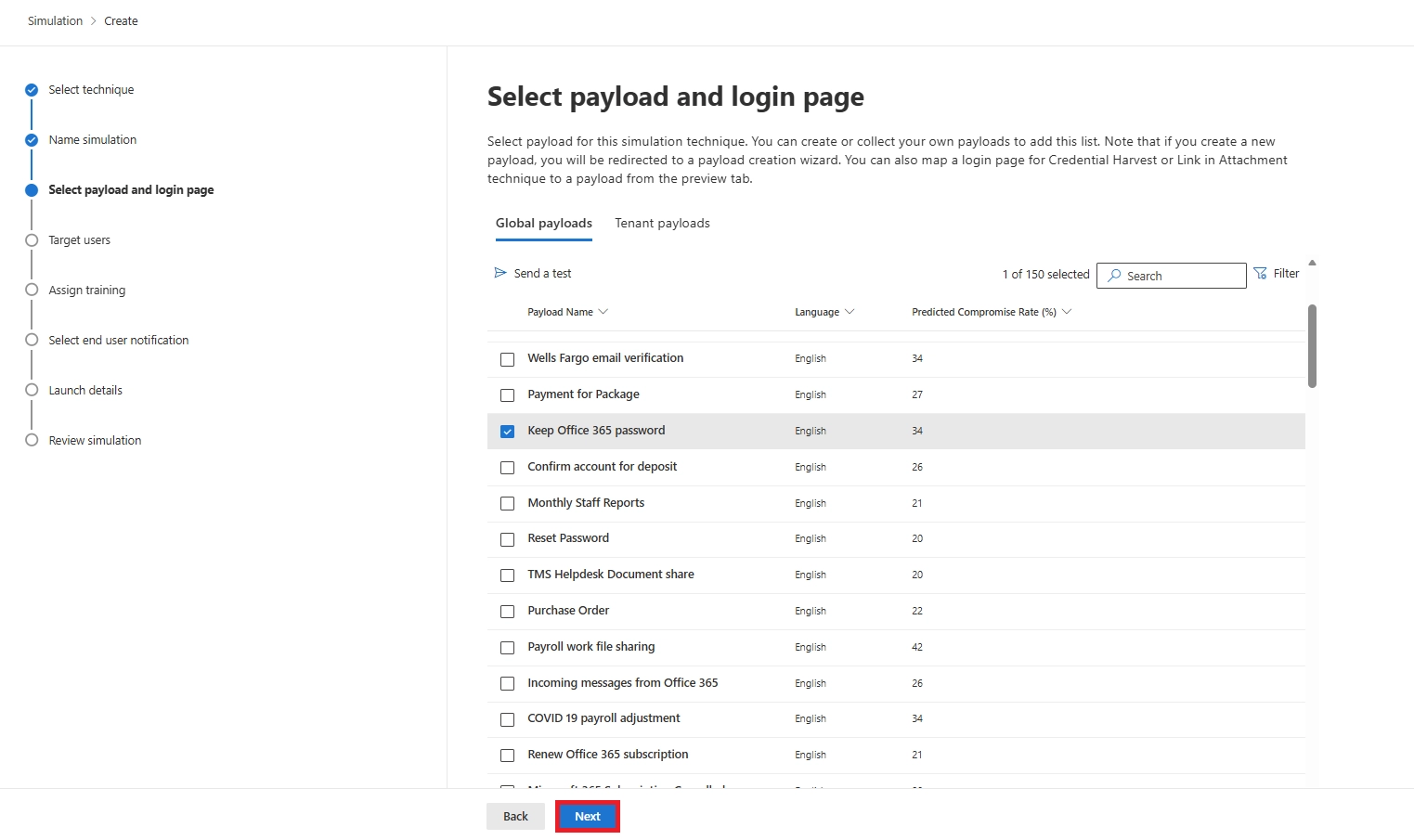
4. Select the Phishing Payload & Login Page
Choose the email template users will receive:
If the technique involves credential entry, pick a matching login page.
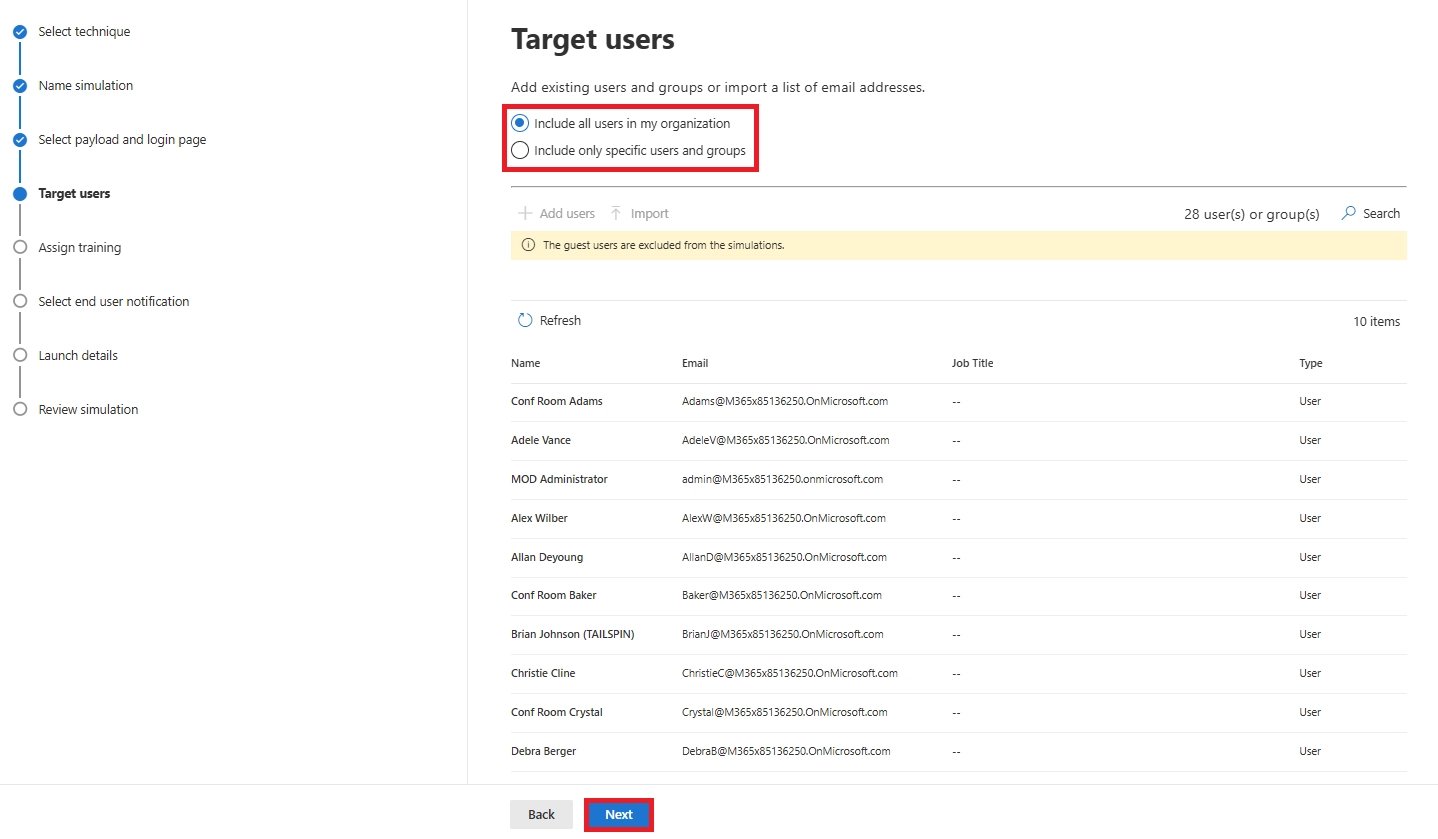
Select who should receive the simulation:
Guest accounts are excluded automatically.
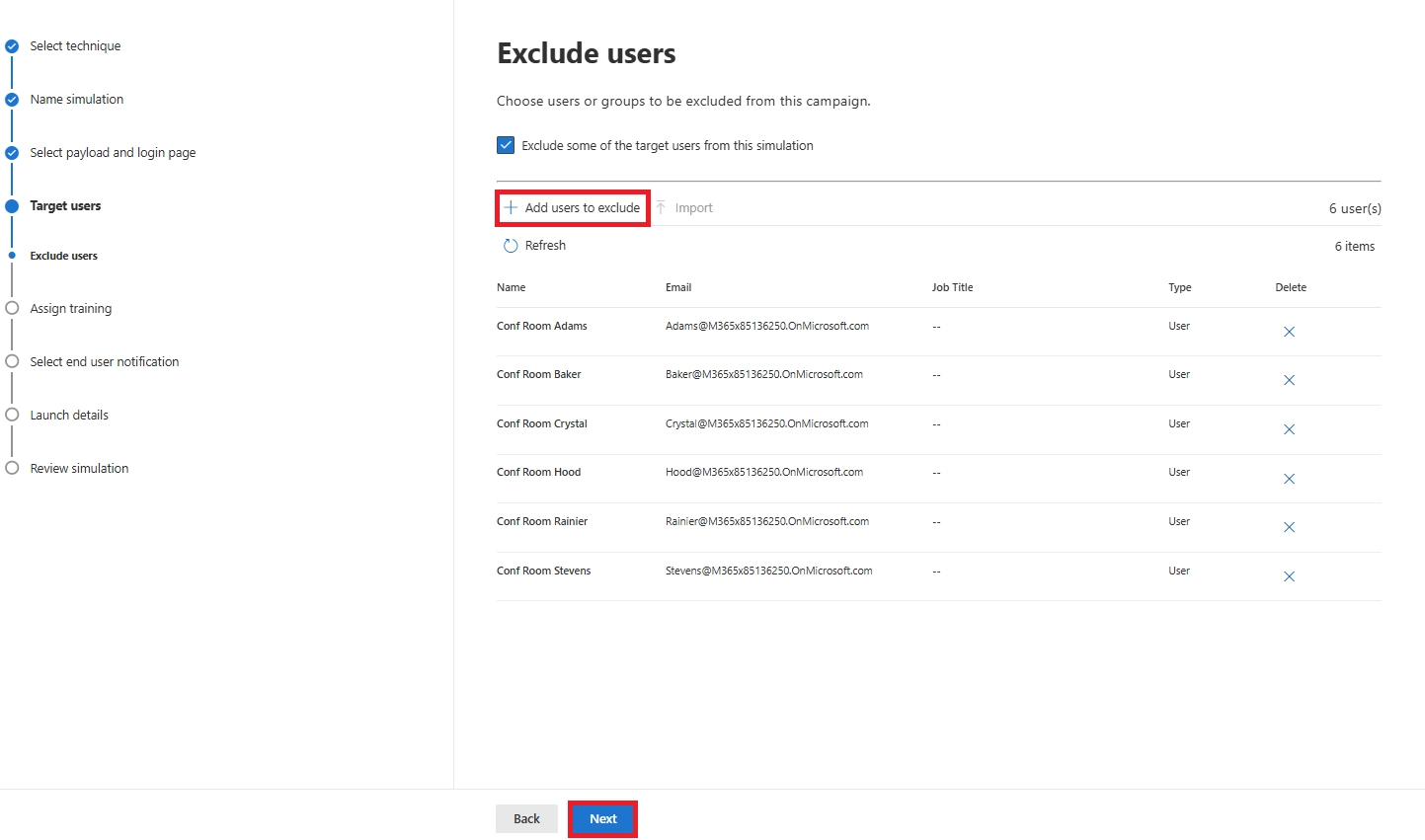
Choose what happens if users fall for the simulation:
Set a training due date (7, 15, or 30 days).

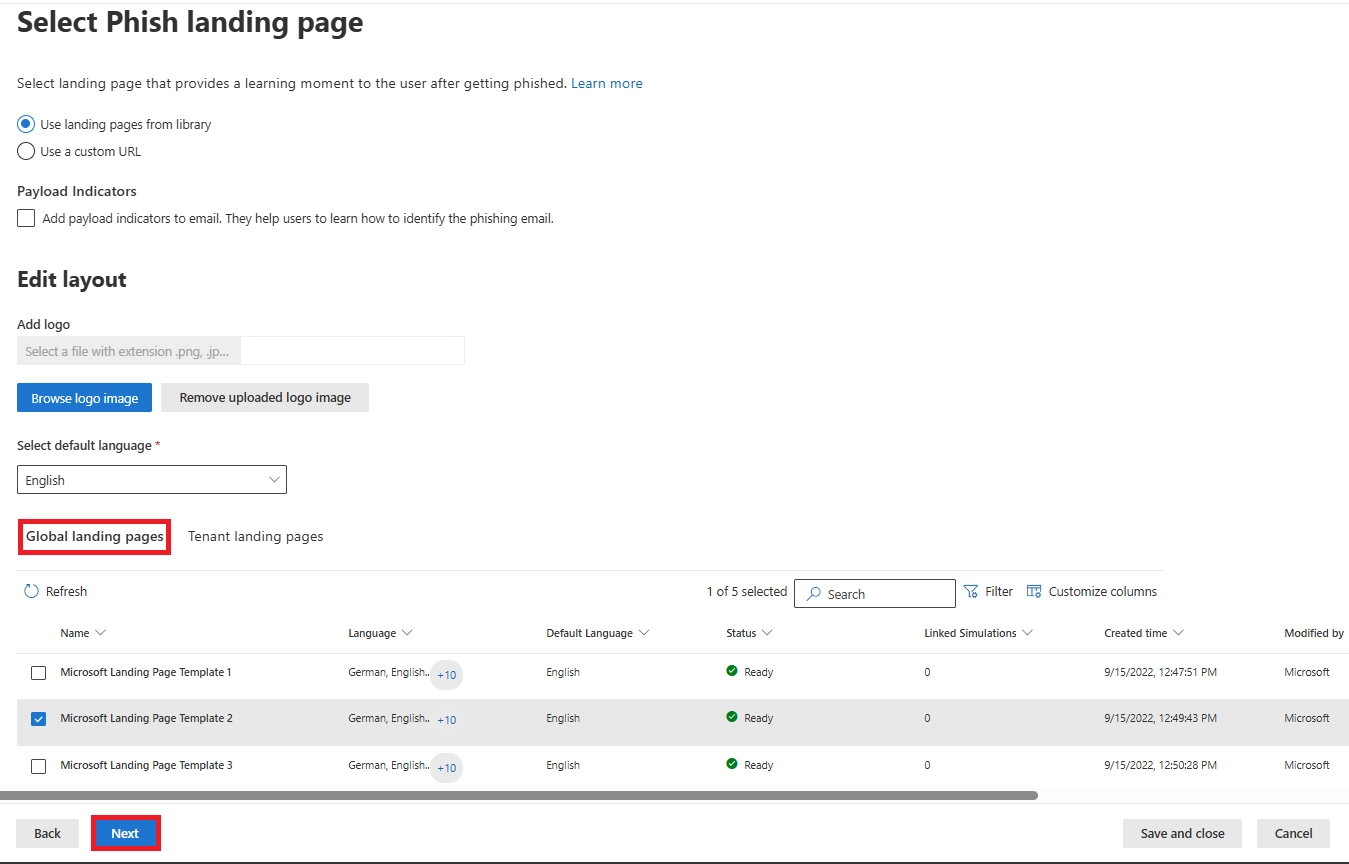
Choose what users see after clicking:
Optionally enable payload indicators to highlight phishing clues users missed.
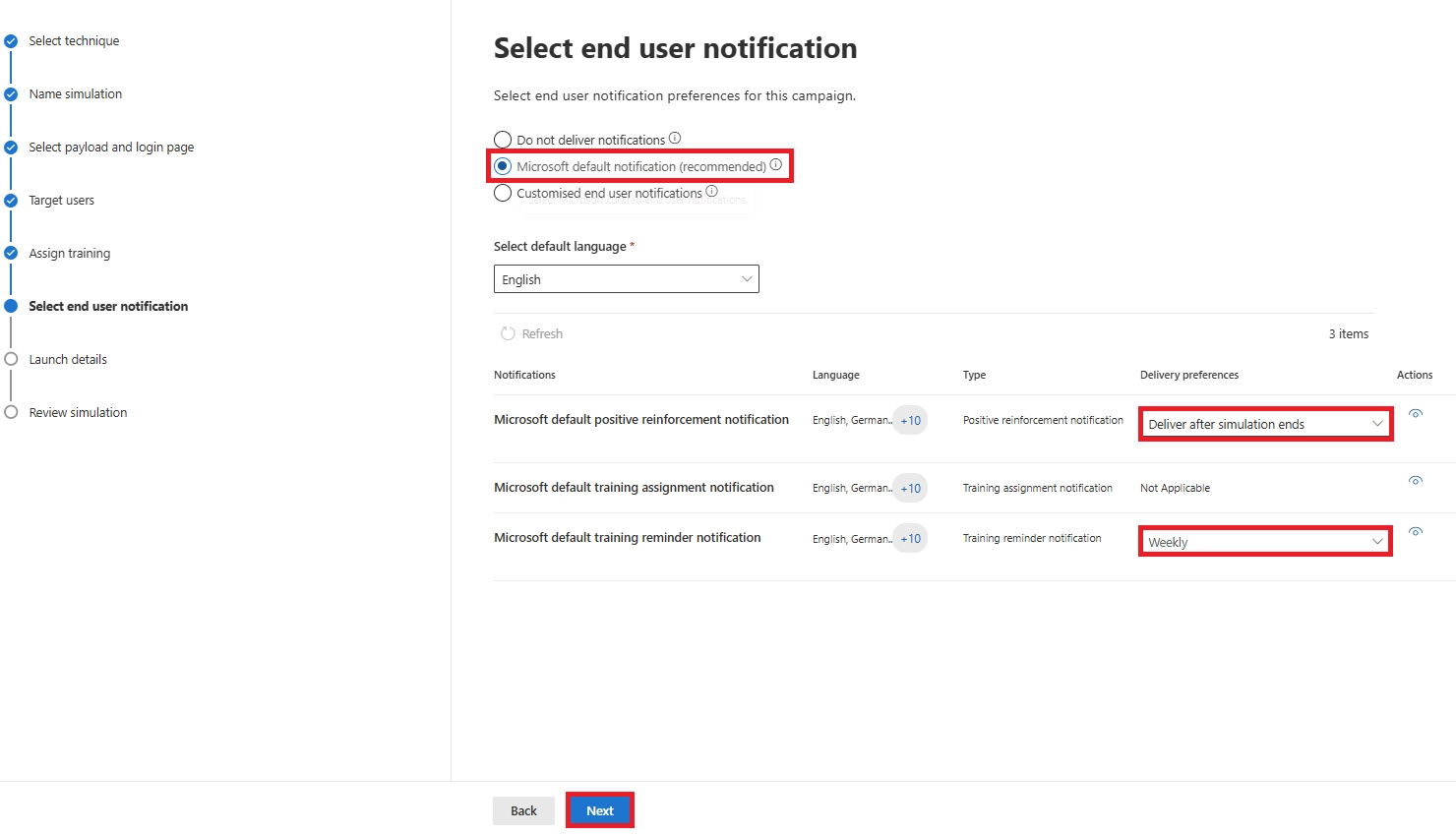
Decide whether users receive follow-up messages:
You can delay kudos emails until after the campaign ends to avoid tipping off others.
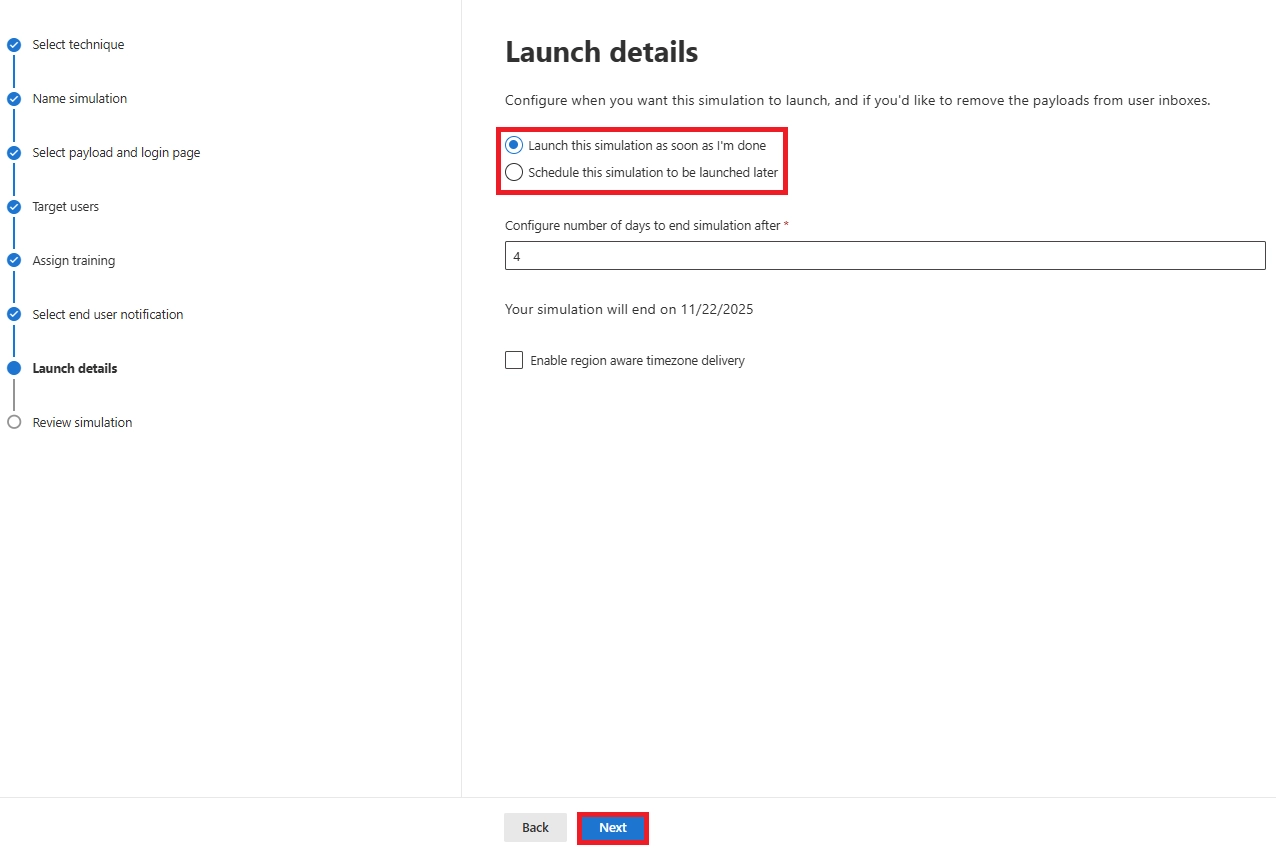
Set:
A 5–7 day window works well for most tests.
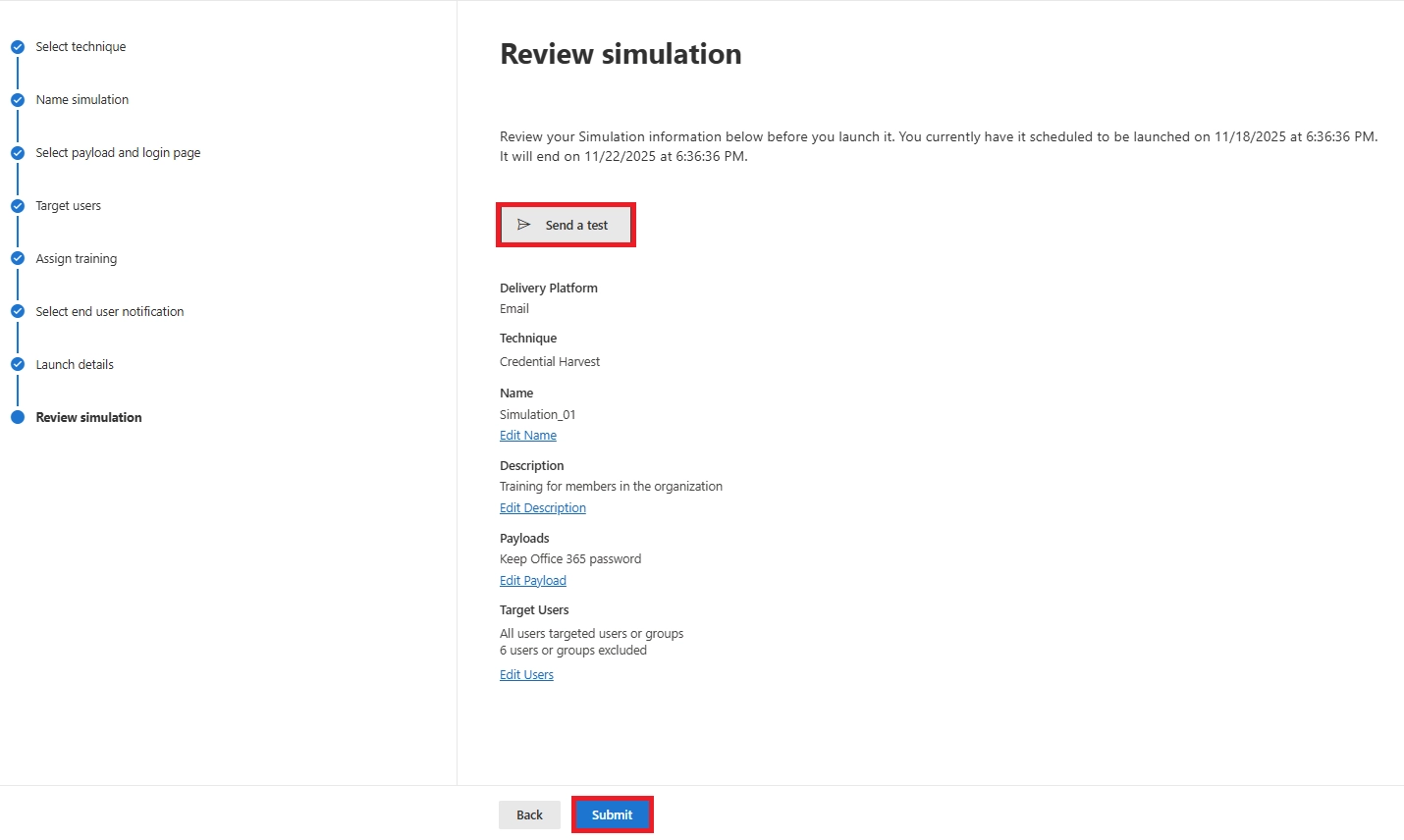
Check your settings, optionally send a test, then select Launch.
Your simulation will start immediately or at the scheduled time.
Launching a simulation is only step one.
Monitoring and interpreting results is where the real value comes.
Below are short, actionable steps to check progress and extract useful insights.
Real-Time Monitoring During the Campaign
How to view it:
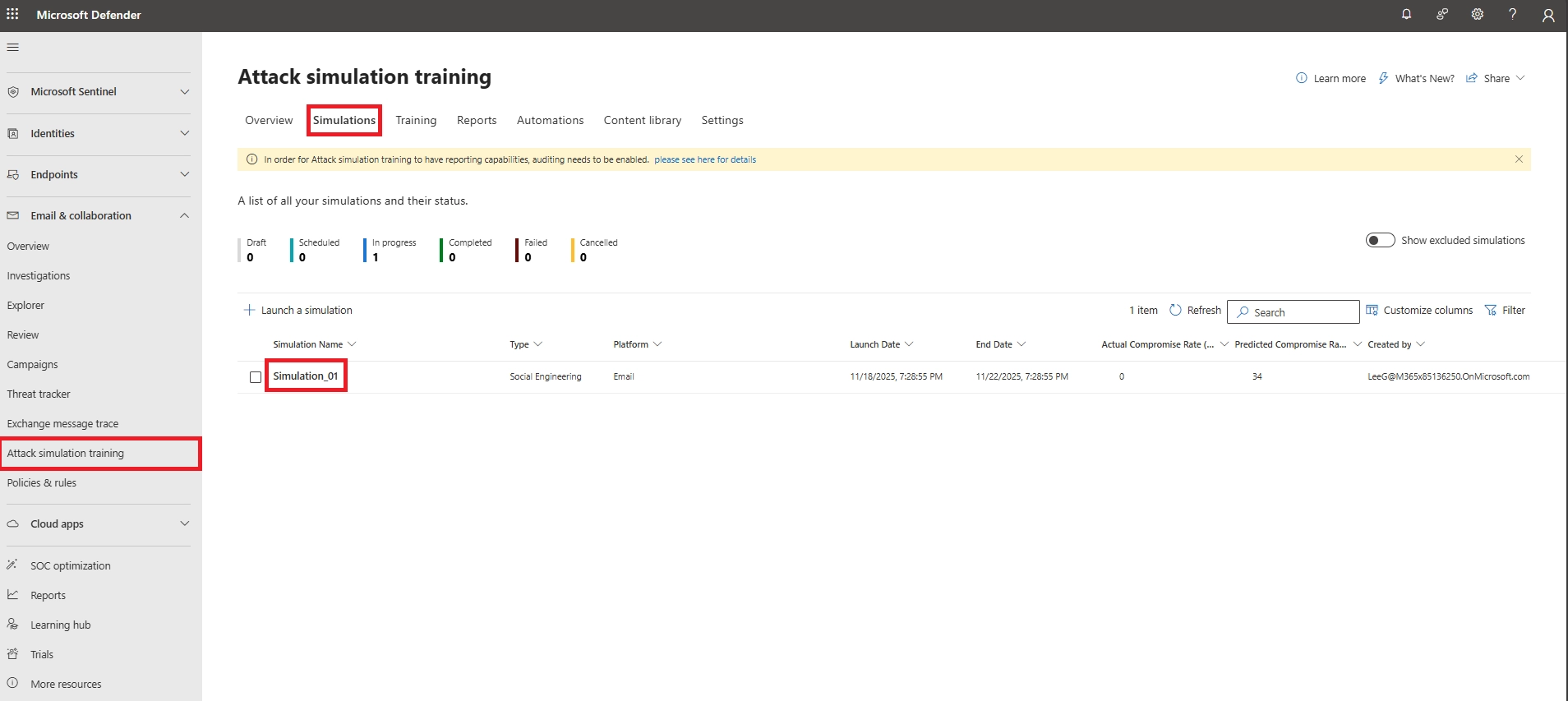
What you’ll see (updated near real-time):
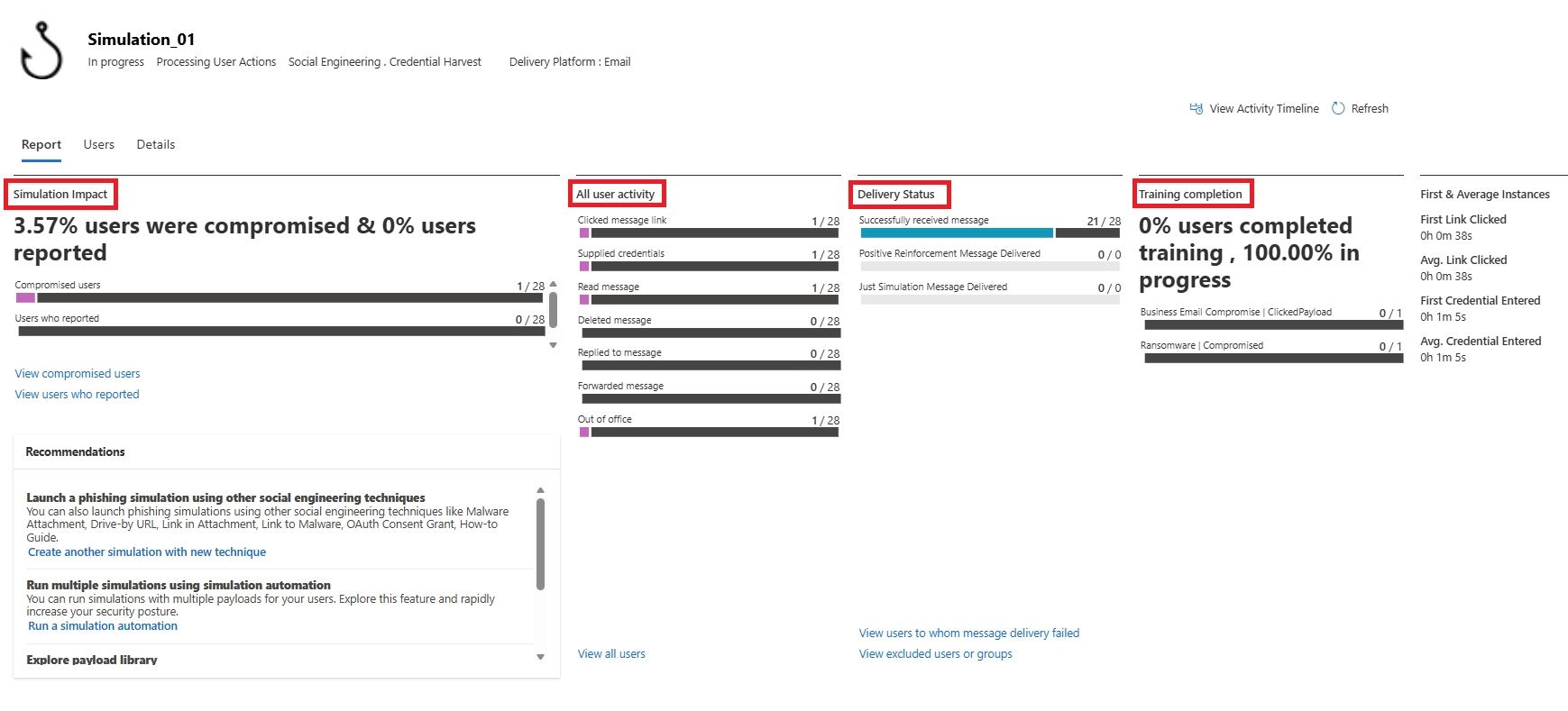
Tip: If no deliveries appear, pause and check filters/whitelists or scheduling.
Detailed Simulation Results & Reporting
After (or during) the run, open the simulation details and review:

Tip: Export the Users list for follow-up and records.
Aggregated Insights Across Simulations
For ongoing programs, use the overview/reports to track trends:
These aggregated views show whether awareness programs are working or need adjustment.
Interpreting Results & Next Steps
Make the data actionable:
A good phishing simulation isn’t just about admin settings.
It’s also about understanding what employees will see.
This helps you predict questions, support your users, and design simulations that feel realistic.
Below video demonstrates the end-user perspective of our cybersecurity phishing simulation - showing exactly how the simulated email appears, how a user might interact with it, and what happens when a user is marked as compromised during the test.

Users will receive an email based on the payload you selected.
It will look legitimate and often urgent - for example:
The sender may look familiar or slightly altered (sometimes using look-alike domains).
When users interact:
After failing the simulation, users are shown the landing page you configured.
This page explains that it was a simulation and teaches what clues they missed.
Important reassurance:
These emails are safe, do not infect devices, and do not capture actual passwords - only the behavior.

If a user recognizes the phishing attempt and uses the Report Phishing button in Outlook:
Reporting is the best possible outcome, and it contributes to your organization’s awareness metrics.
If a user falls for the simulation and training was assigned:
This training is lightweight but effective - helping users understand what happened and how to avoid similar threats in the future.
Manual simulations are useful, but long-term awareness requires consistency.
Microsoft Defender for Office 365 includes Simulation Automations, which automatically launch phishing simulations on a schedule - monthly, quarterly, or even randomly.
This keeps your program ongoing without constant admin effort.
To set it up:
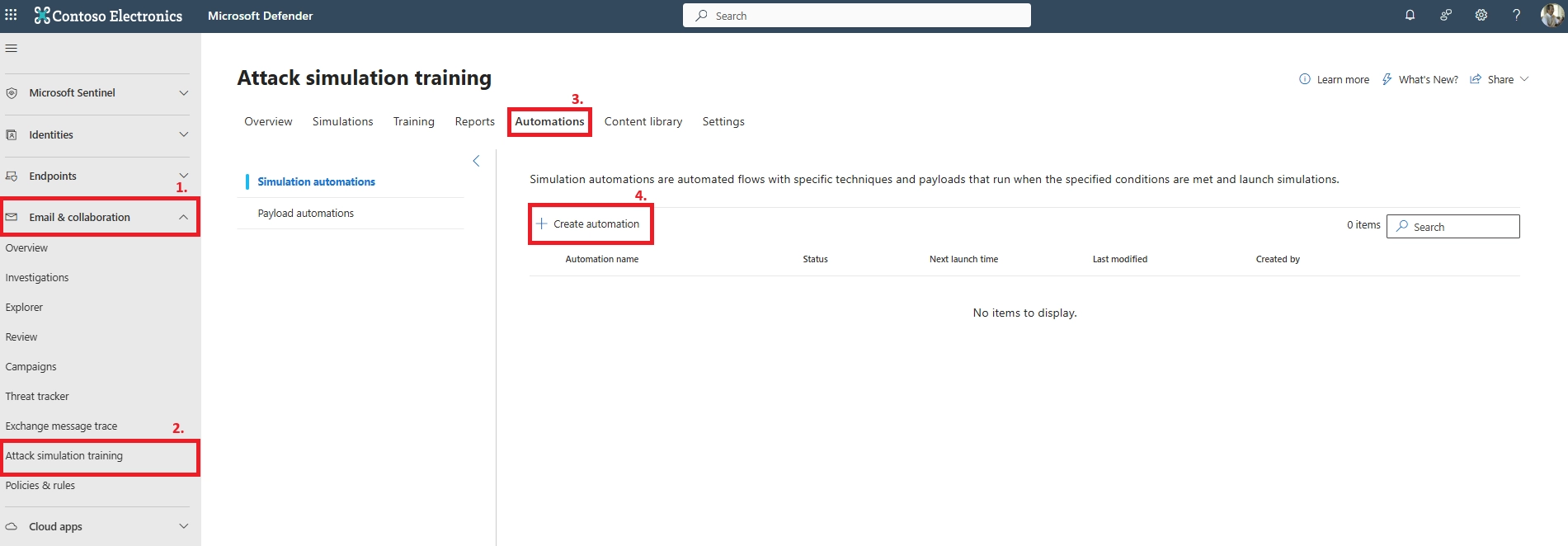

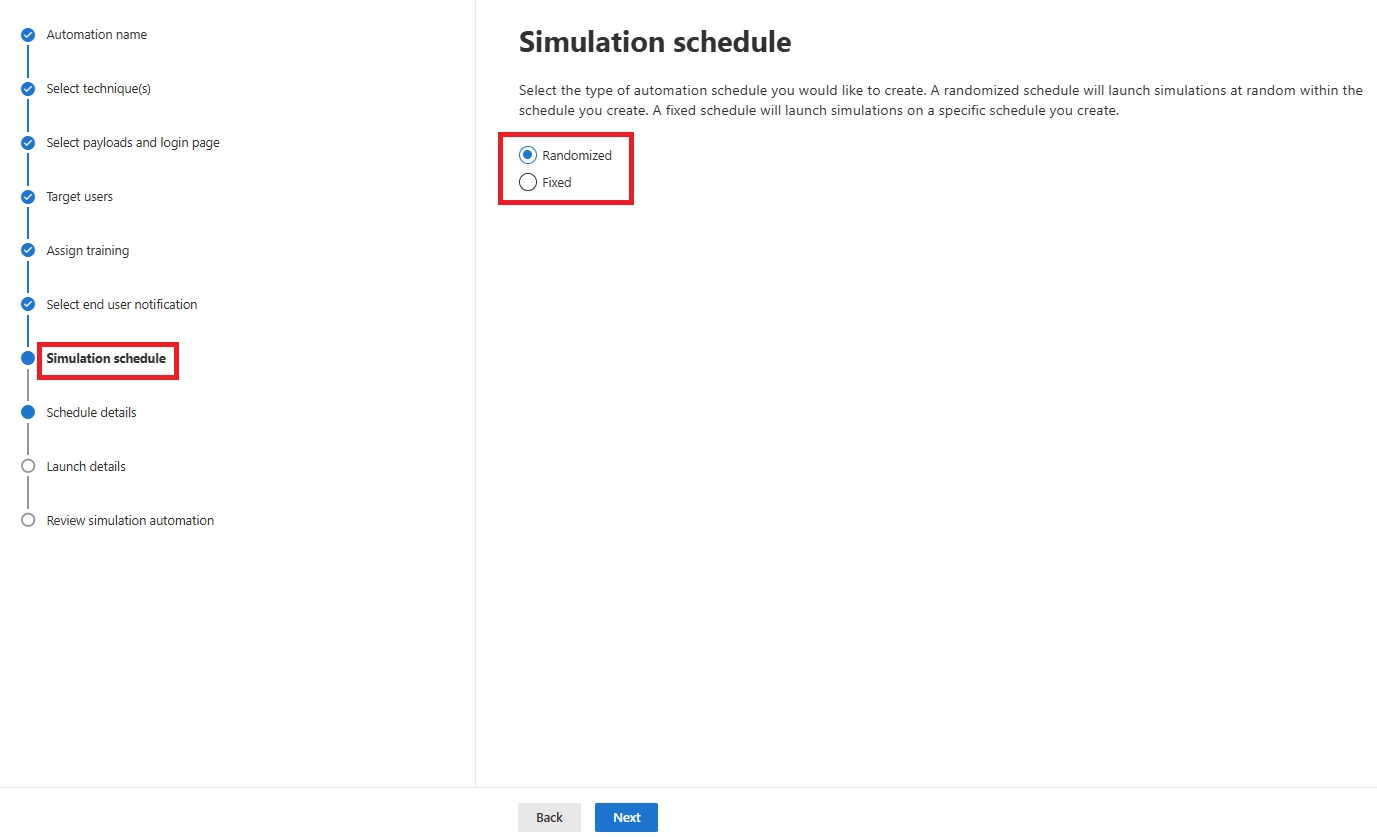
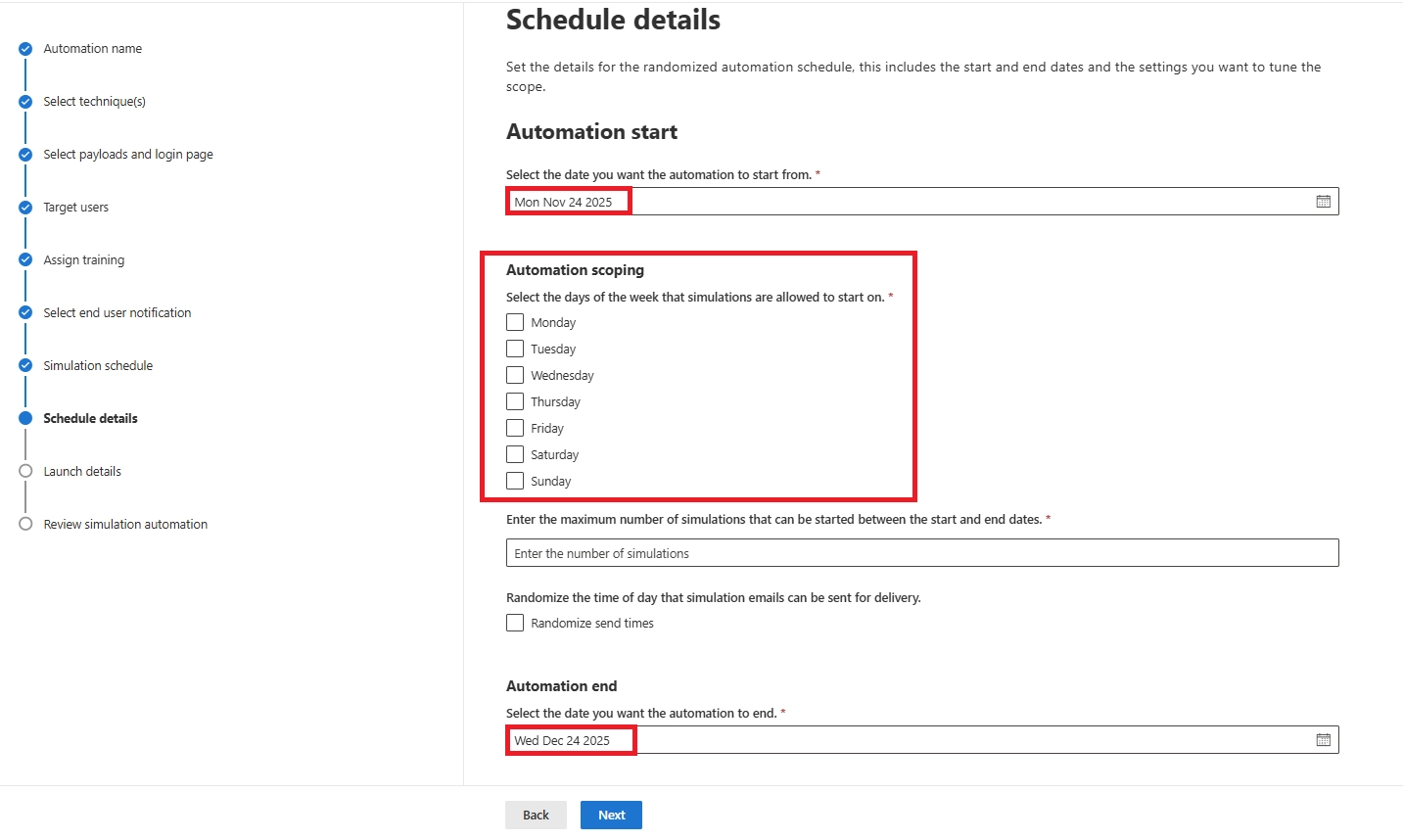
Why use it:
Recurring simulations reinforce awareness, reduce predictability, and ensure every user - including new hires - is tested over time.
Using Dynamic Targeting
Automation becomes even more powerful when combined with dynamic groups in Entra ID.
Dynamic Groups
Dynamic groups update automatically as users join teams or the organization.
Examples:
Create the dynamic group in Entra ID, then pick it as the target group when building simulations or automations.
This ensures the right people receive the right tests at the right time - with no manual updates.
Focusing on Repeat Offenders
Microsoft 365 can flag repeat offenders - users who fail multiple simulations.
Key points:
This helps security teams address risky behavior early and reduce long-term exposure.
Once your simulation surfaces users or departments that are particularly vulnerable, configuring anti-phishing policies with stricter impersonation protection is the natural hardening step to take next.

Ready to strengthen your organization’s phishing defense?
Schedule a free consultation and let our experts build a tailored, effective attack simulation program for your Microsoft 365 environment.
Microsoft 365 Attack Simulation Training gives you a simple, effective way to strengthen user awareness and reduce phishing risk. With the setup steps, monitoring guidance, and best practices covered in this guide, you now have everything you need to run impactful simulations with confidence.
Next steps are straightforward: Start a simulation, review the results, and keep refining your approach.
Make simulations regular, keep training consistent, and stay updated as Microsoft adds new features.
Strong security comes from repetition, awareness, and steady improvement - and these simulations help you build exactly that.
Q1. Why can’t I see Microsoft 365 Attack Simulation Training in my portal?
You need Microsoft Defender for Office 365 Plan 2. Also ensure you have the Attack Simulation Administrator or Security Administrator role.
Q2. Why are users not receiving my Microsoft 365 phishing simulation emails?
Check delivery status. Filters may block attack simulation domains, or targets may lack Plan 2 licenses. Guest or non-mailbox users are automatically excluded.
Q3. Why did the phishing simulation email go to Junk or appear as External?
Exchange Online flagged it. Add approved attack simulation domains to the allow list or use a Tenant notification internal sender.
Q4. Why do users see browser warnings when clicking the phishing link?
Browsers like Chrome may block simulation URLs. The click still appears in the Microsoft 365 attack simulation report, but the landing page may not load.
Q5. Why does the report show a user was targeted but they never saw the email?
Check Junk, Focused Inbox, and the campaign’s delivery log. This can occur in large Microsoft 365 simulated attack campaigns.
Q6. Why do reports show instant clicks that users deny?
Automated scanners or secure gateways often click URLs before users do. The IP in logs will reveal this.
Q7. Why didn’t some users get training after failing a phishing simulation?
If you selected No Training or the user completed that module recently, training may not trigger. Check Training Campaigns status.
Q8. Do replies or forwards count as failing the Microsoft 365 attack simulation?
No. Only clicks, credential submissions, or opening malicious attachments count in Microsoft 365 phishing simulation setup.
Q9. How often should we run Microsoft 365 phishing simulations?
Minimum: twice a year. Recommended: quarterly. For strong programs, use Simulation Automations to run monthly.
Q10. How do we handle repeat offenders in Microsoft 365 Attack Simulation Training?
Use the repeat offender threshold, assign deeper training, or provide one-on-one coaching.
Q11. Which license is needed for Microsoft 365 Attack Simulation Training?
Defender for Office 365 Plan 2 or any E5 SKU. E3 users can add Plan 2 or activate a 90-day trial.
Q12. What is Microsoft Attack Simulation Training?
A built-in Microsoft 365 security simulation tool for phishing, malware, and social engineering testing, paired with awareness training.
Q13. Is notification@attacksimulationtraining.com a legit Microsoft sender?
Yes. It is used for official Microsoft 365 attack simulation email notifications.
Q14. Which Microsoft 365 workloads support phishing simulation?
Exchange Online, Defender for Office 365, Entra ID groups, and Microsoft security training modules.
Q15. Does Microsoft offer phishing training?
Yes - through Microsoft Defender Attack Simulation Training with built-in phishing awareness courses.
Q16. What attack types can I use in Microsoft 365 Attack Simulation?
Credential Harvest, Malware Attachment, Link in Attachment, Drive-by URL, OAuth Consent Grant, and training-only “How-to Guide” scenarios.
Q17. What is the best phishing simulation type for beginners?
Credential Harvest - a classic, high-impact phishing test used in most Microsoft 365 attack simulation setup guides.
Q18. Can I customize the phishing payload in Microsoft 365 Attack Simulation?
Yes. You can create custom payloads and login pages to match internal workflows, brands, or departments.
Q19. Can I target only specific departments or groups?
Yes. You can use Entra ID groups, Microsoft 365 groups, or dynamic groups for advanced targeting.
Q20. Does Attack Simulation Training support automated recurring campaigns?
Yes - through Simulation Automations, allowing monthly or randomized phishing tests.
Q21. Can I customize the landing page shown to users who click?
Yes. Use the default Microsoft landing page or upload your own branded phish landing page.
Q22. Can Safe Links or Safe Attachments interfere with simulations?
Sometimes. Safe Links rewriting or external proxies may trigger false clicks. Whitelisting simulation URLs helps.
Q23. Do simulations store real passwords when users enter credentials?
No. Microsoft never stores or uses real passwords - only the action is logged.
Q24. Can I download detailed Microsoft 365 attack simulation reports?
Yes. You can export detailed user actions, click rates, and compromise rates as CSV.
Q25. How do I improve low report rates in phishing simulations?
Enable “Report Phishing” add-ins, run awareness sessions, and reward users who report - key steps in Microsoft Defender attack simulation training best practices.
Monthly updates, news & events from Microsoft to help your business grow.

CEO at Penthara Technologies


 Protecting Company Data on BYOD Devices with Intune
Learn how to protect company data on BYOD devices with Microsoft Intune, using app protection policies, Conditional Access, MAM, and selective wipe.
 How to Block Unsafe Websites on Work Devices
Protect work devices from phishing, malware, and risky web content by using Microsoft Defender and Intune to block unsafe websites across your organization.
 Your Microsoft 365 Tenant Has a Silent Data Leak. It Requires No Malware.
Your Microsoft 365 tenant can leak data silently - no malware, no alerts. Learn how simple misconfigurations enable ongoing email and data exfiltration.