
What's new in Microsoft | March 2026 Updates

Explore the latest Microsoft 365 updates including Copilot enhancements, AI meeting recaps, Teams improvements, and new productivity features.

SHARE THIS BLOG:
Table of contents
A. Microsoft Copilot
1. Microsoft 365 Copilot: Designer tools for image creation
2. Generate Excel spreadsheets from Copilot Notebooks
3. Microsoft Edge for Business: Copilot-inspired new tab page
4. Microsoft 365 Copilot: New output formats for Researcher
5. Microsoft SharePoint: AI in SharePoint (formerly Knowledge Agent)
B. Microsoft Teams
1. Microsoft Teams: Automatic spoken language detection in multilingual meetings
2. Microsoft Teams: Video-based meeting recaps
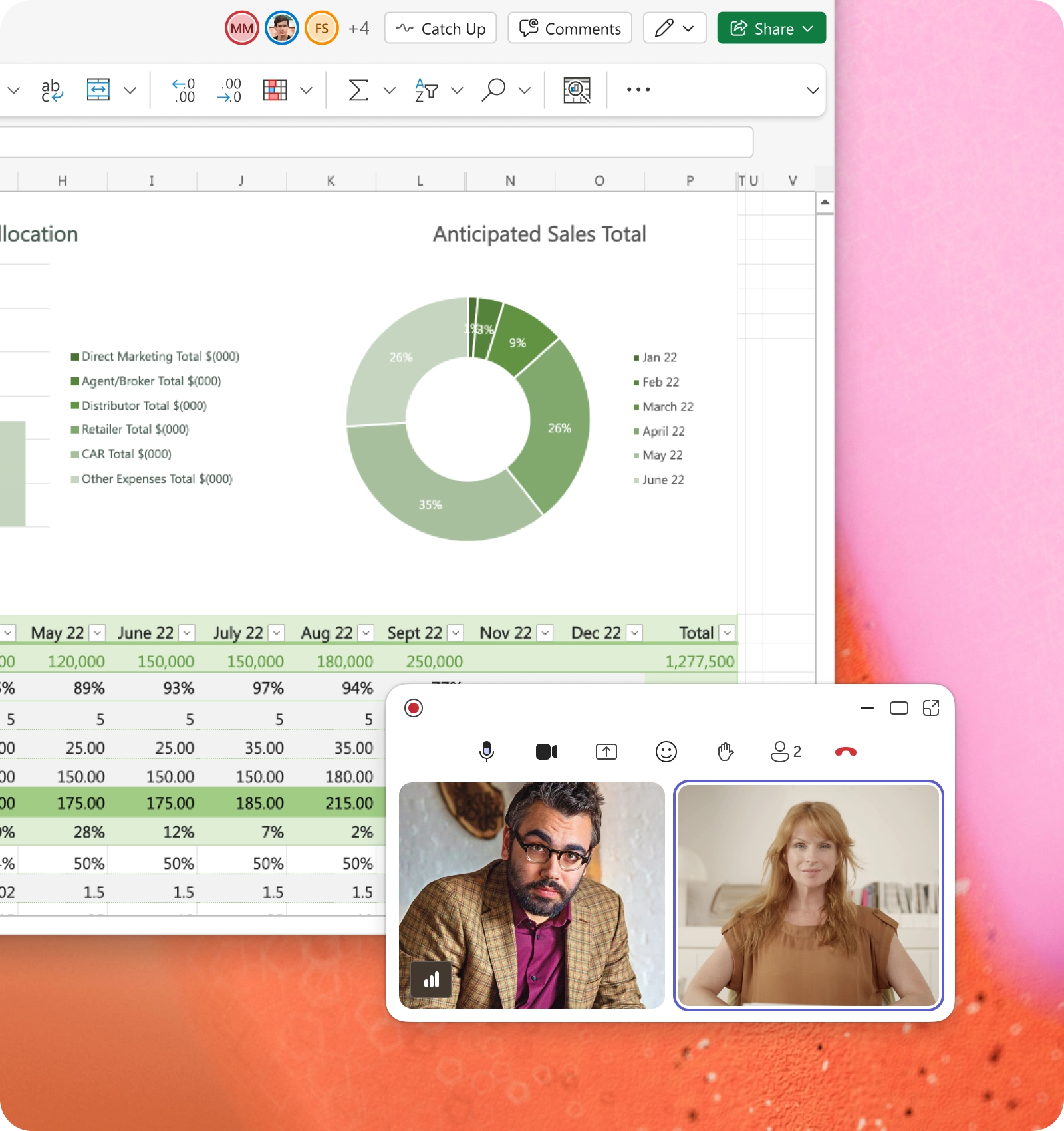
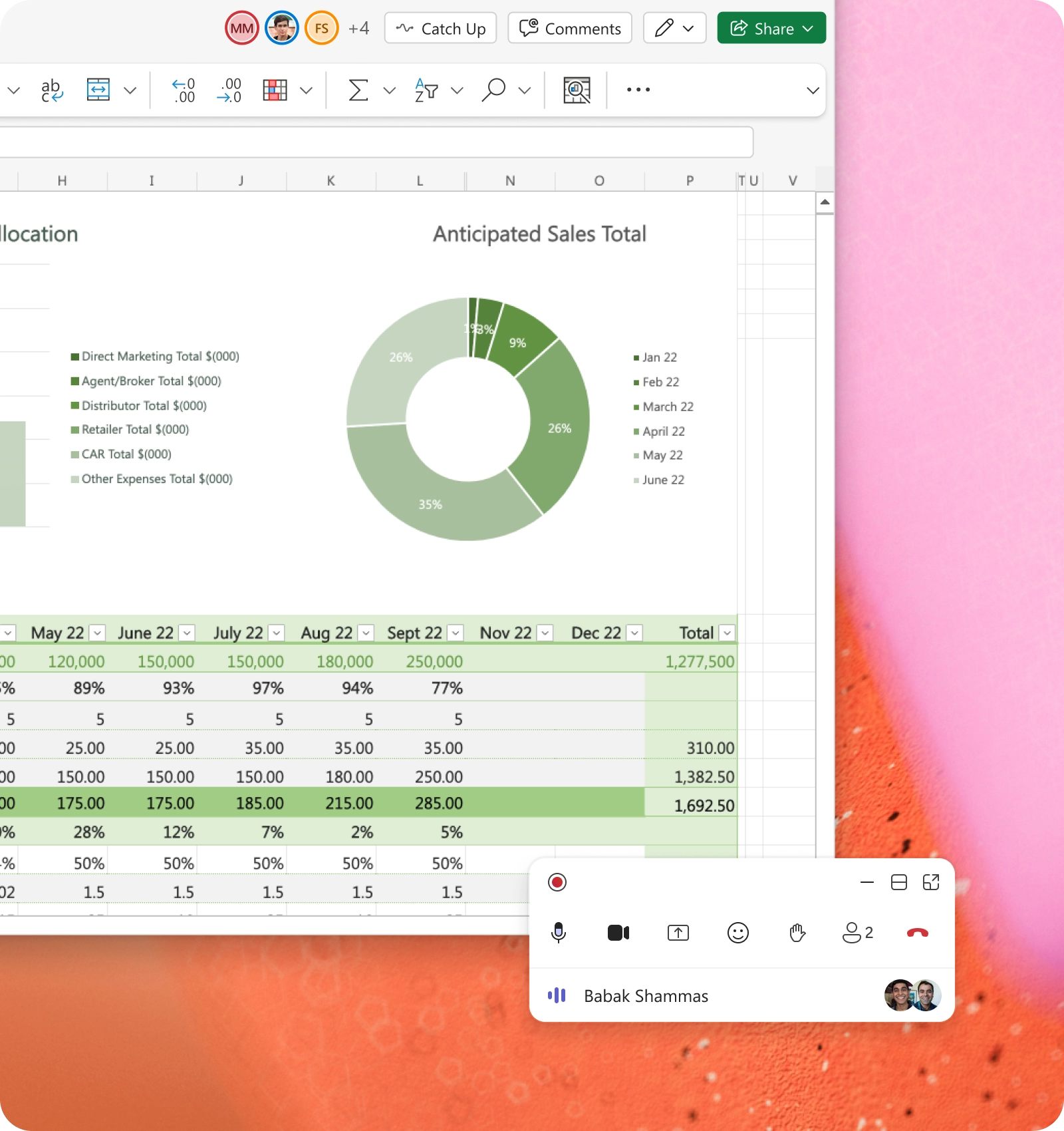
3. Microsoft Teams: Enhanced minimized meeting experience
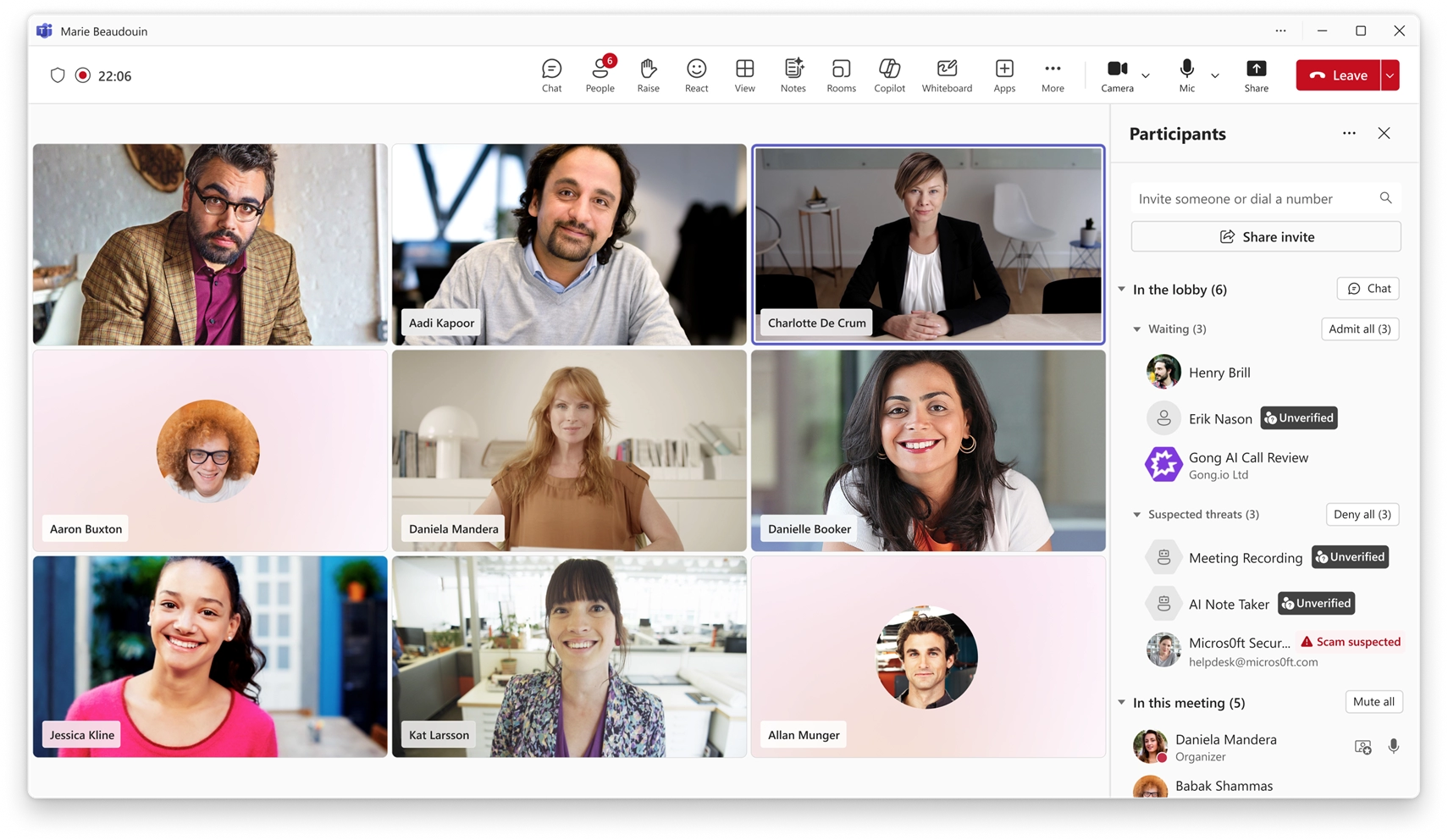
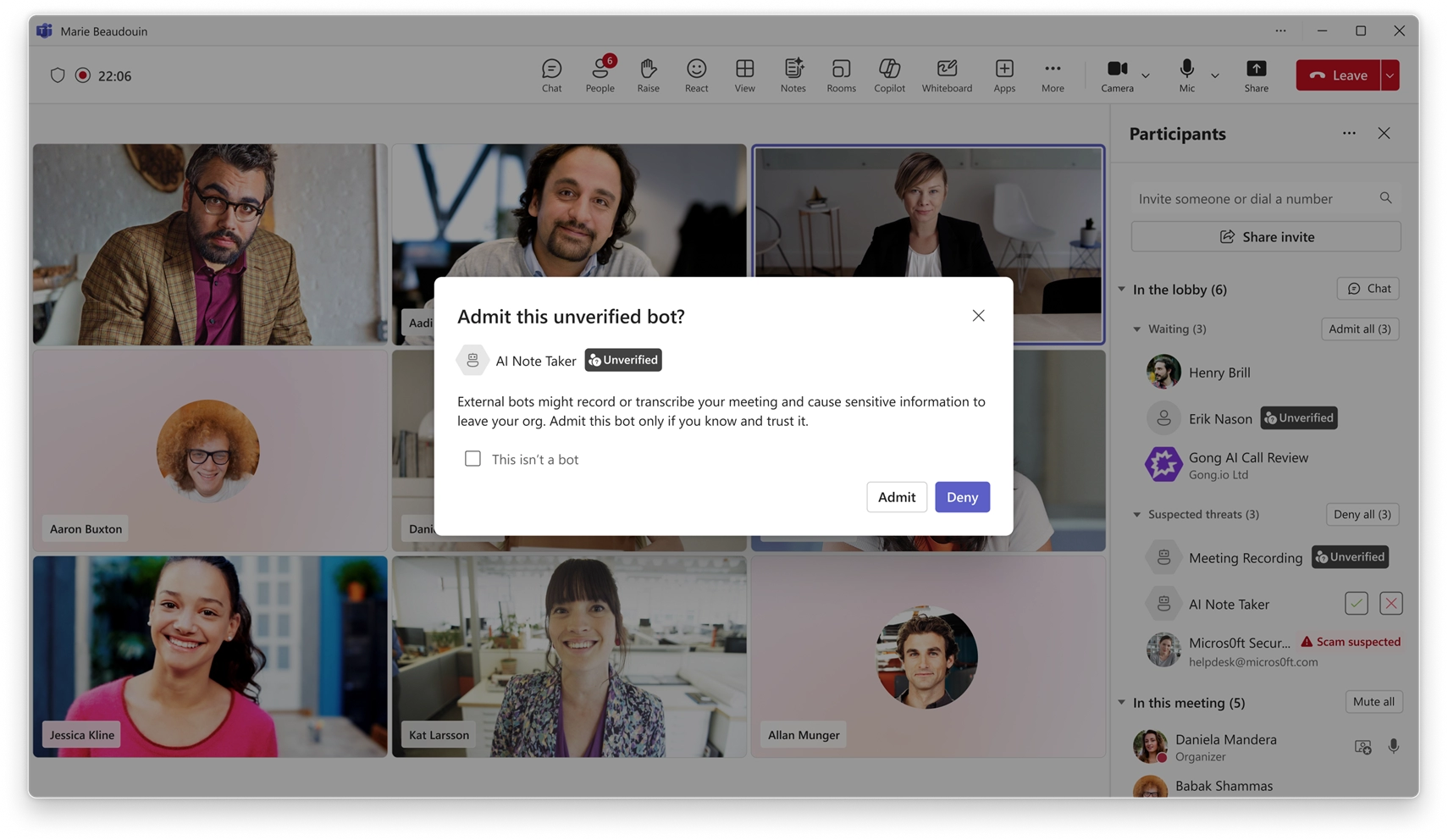
4. Microsoft Teams: Detection and control of external meeting assistant bots
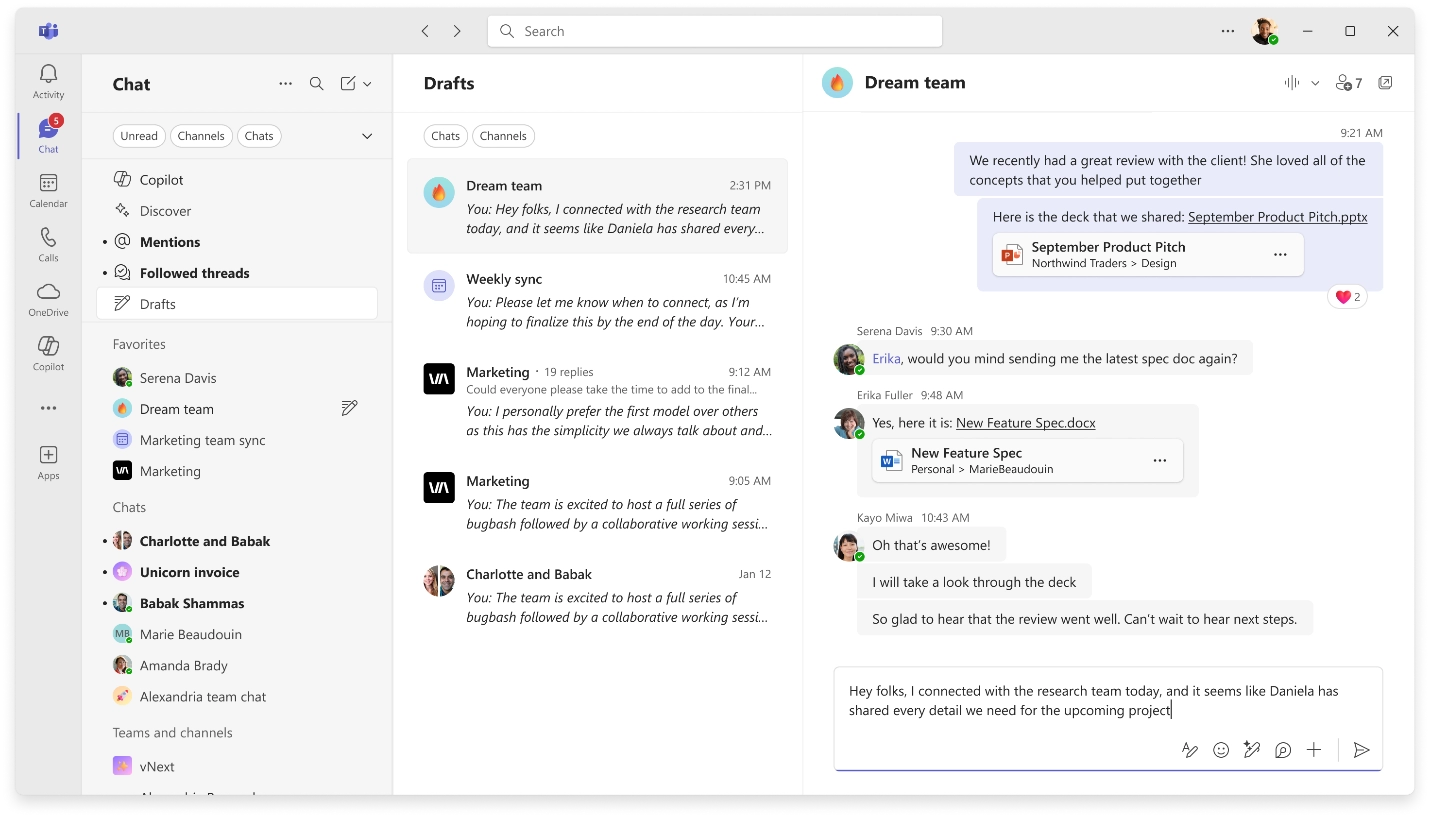
5. Microsoft Teams: Drafts quick view for unsent messages
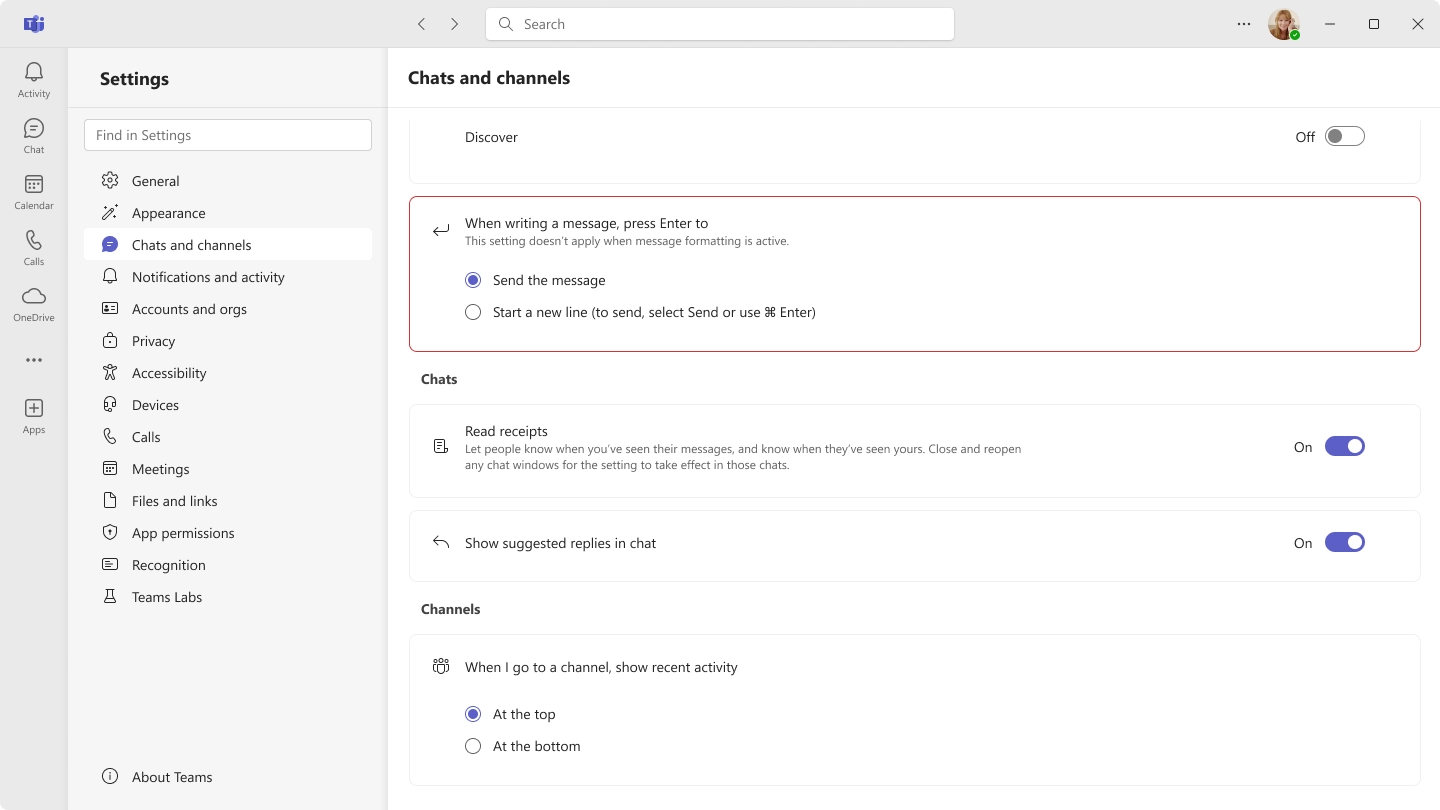
6. Microsoft Teams: Control Enter key behavior in chat

A. Microsoft Copilot

1. Microsoft 365 Copilot: Designer tools for image creation

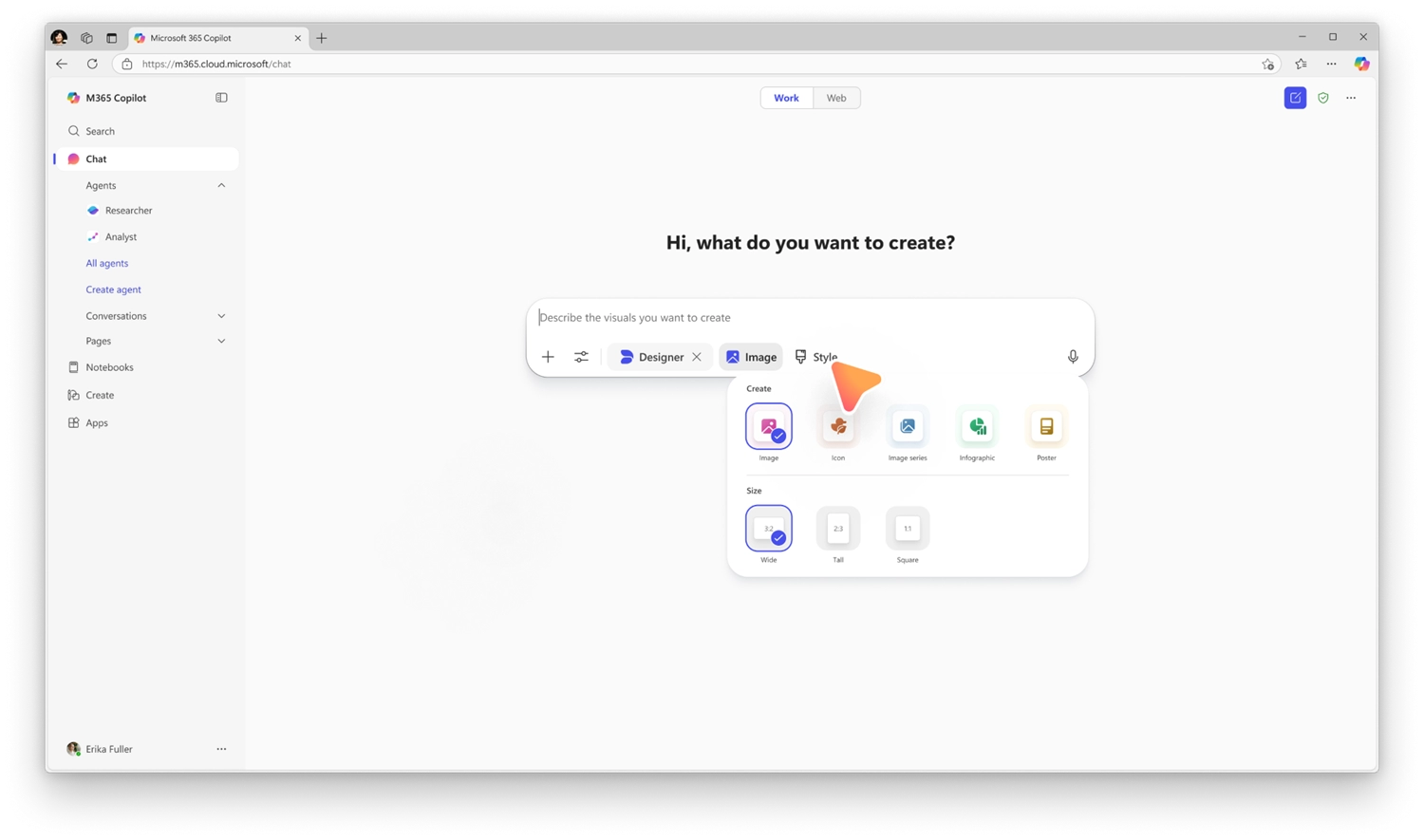
Designer tools in Copilot introduce a new set of UX-based controls that provide greater control over how images and visual artifacts are created. These tools help users refine prompts, adjust visual outputs, and iterate more effectively, improving quality and reducing trial and error.

When this will happen
General Availability (Worldwide): Rollout began in mid-February 2026 and is expected to complete by early April 2026.

How this affects your organization

Who is affected:
All users with access to Copilot image creation experiences across Microsoft 365 workloads.

What will happen:

  • New designer-style controls will appear when creating images or visual artifacts in Copilot.
  • Users can refine prompts and adjust visual characteristics using guided UX elements.
  • The feature is enabled by default for eligible users.
  • Existing security, privacy, and Copilot policies continue to apply.
Designer tools for image creation

2. Generate Excel spreadsheets from Copilot Notebooks

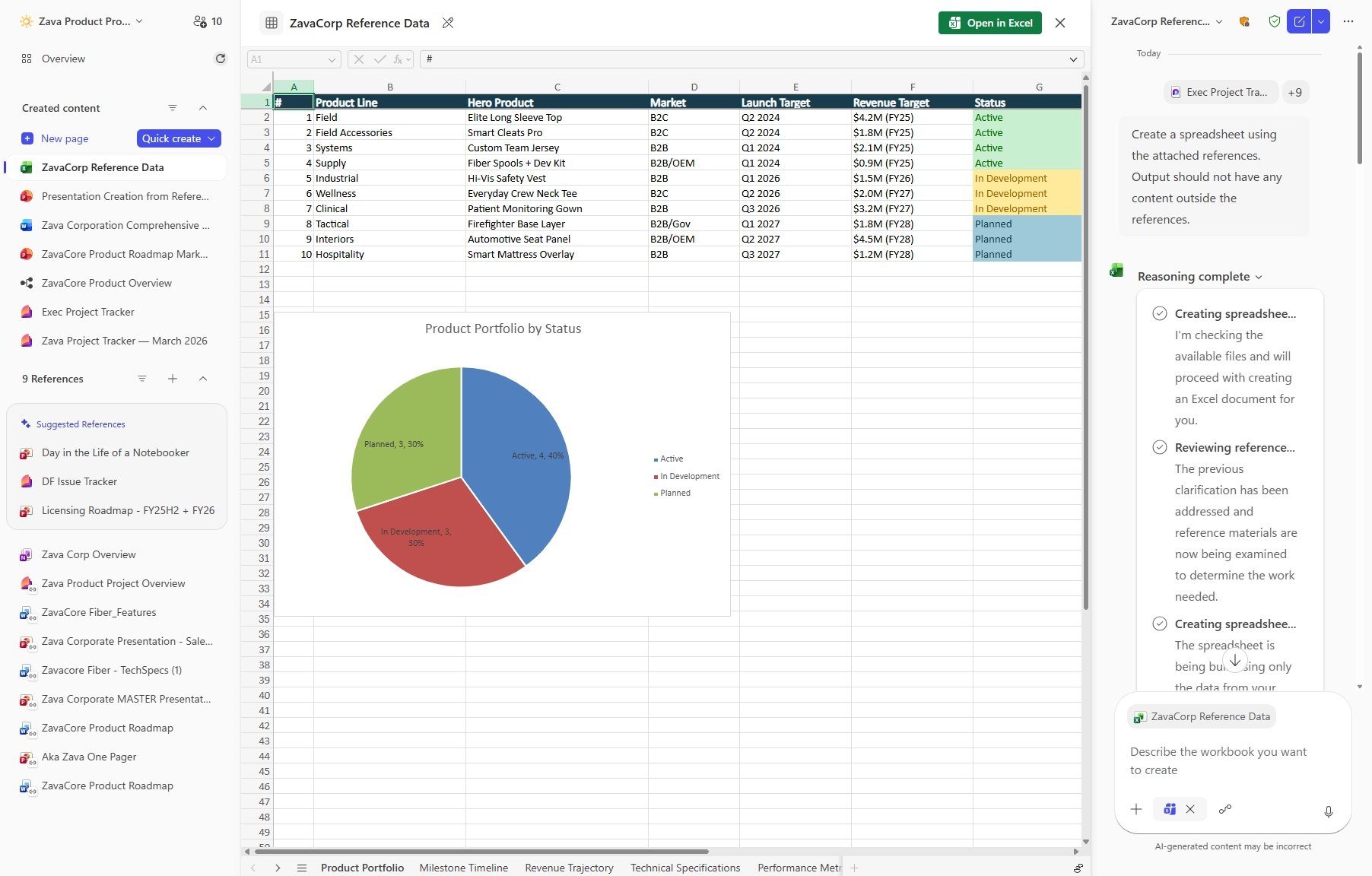
Copilot Notebooks will enable users to generate Excel spreadsheets directly from the content and references collected in a notebook. Copilot creates a structured spreadsheet based on the notebook’s context, which can then be opened and edited in Excel. This capability reduces manual setup and formatting, streamlining the transition from source material to a usable spreadsheet.

When this will happen

  • Public Preview (Frontier): Rollout begins in late March 2026 and is expected to complete by late April 2026.
  • General Availability (Worldwide): Rollout begins in late May 2026 and is expected to complete by late May 2026.

How this affects your organization

Who is affected:

  • Users with access to Microsoft Copilot and Copilot Notebooks
  • Organizations using Excel in Microsoft 365
  • A Microsoft 365 Copilot (Premium) license is required

What will happen:

  • Users will be able to generate an Excel spreadsheet from content and references stored in a Copilot Notebook.
Generate Excel spreadsheets from Copilot Notebooks

3. Microsoft Edge for Business: Copilot-inspired new tab page

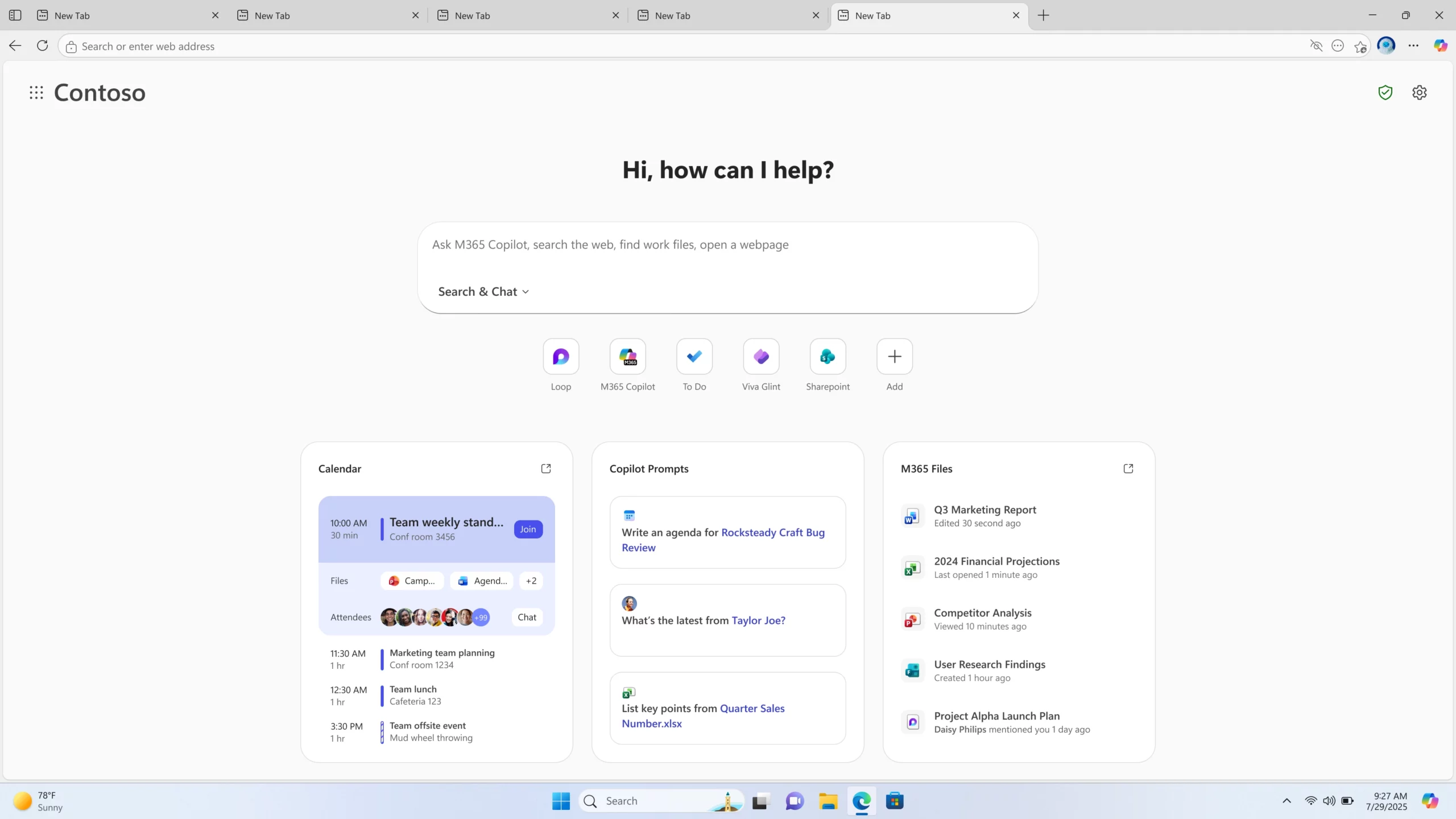
Microsoft Edge for Business is introducing a refreshed new tab page inspired by Copilot. This experience brings search, chat, and web exploration into a single search box, along with Copilot-suggested actions and curated work content to help users stay focused and complete tasks more efficiently. Users can also view personalized news and activity.

When this will happen

  • Public Preview: Began mid-November 2025 and will complete by early April 2026.
  • General Availability (Worldwide): Begins early May 2026 and will complete by late May 2026.

How this affects your organization

Who is affected:
Microsoft Edge for Business users.

What will happen:

  • A redesigned new tab page will combine search, chat, and web exploration into a unified experience.
  • Copilot-suggested actions and curated work content will be surfaced on the page.
  • Users will see personalized news and activity alongside work-related content.
Microsoft Edge for Business: Copilot-inspired new tab page

4. Microsoft 365 Copilot: New output formats for Researcher

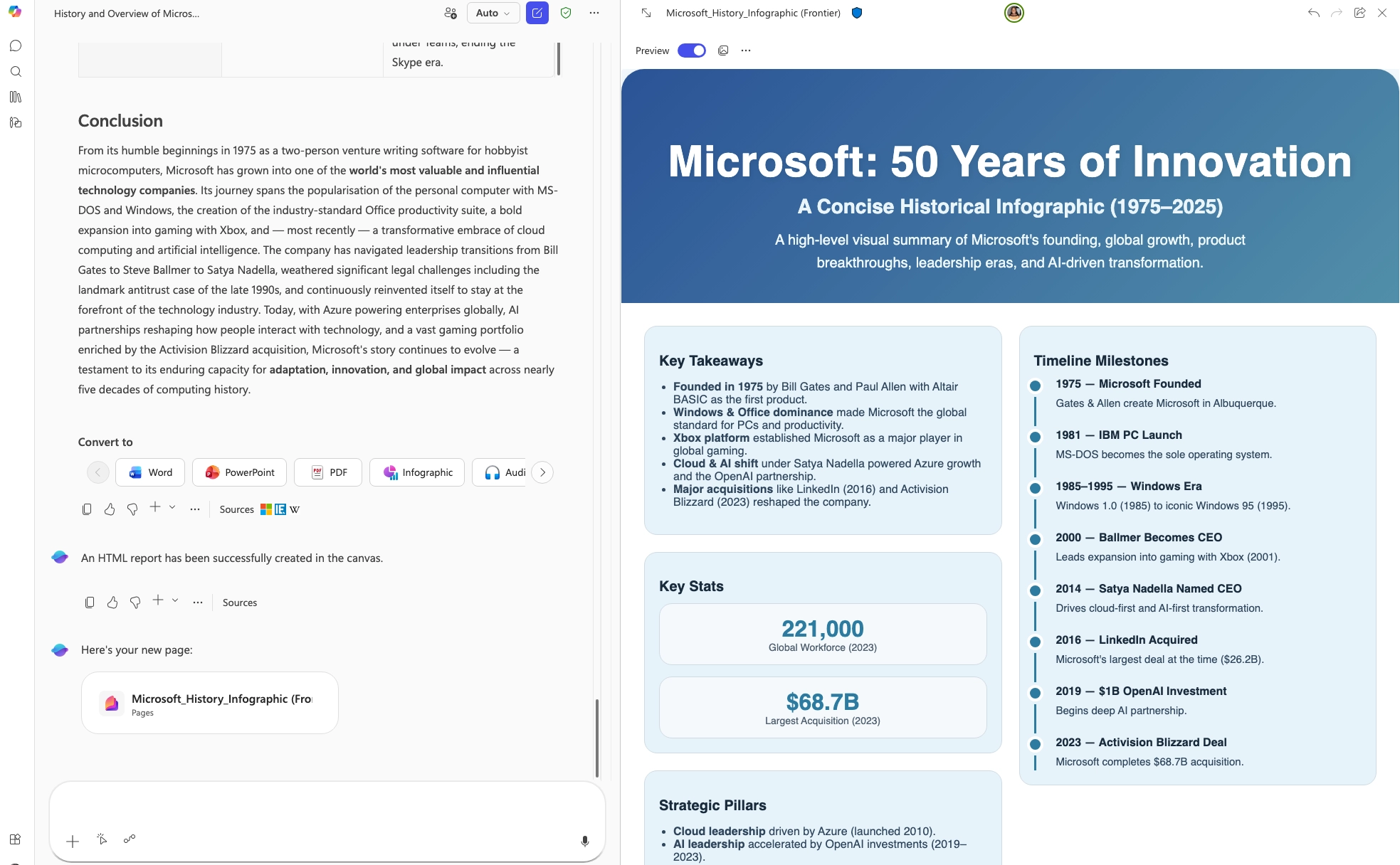
Researcher in Microsoft 365 Copilot now supports multiple output formats, allowing users to generate polished reports tailored to different audiences. Reports can be converted into formats such as PowerPoint presentations, PDFs, infographics, or audio overviews without recreating the content.

When this will happen
Rolled out in March.

How this affects your organization

Who is affected:
Users with access to Researcher in Microsoft 365 Copilot.

What will happen:

  • Users can convert Researcher reports into multiple output formats.
  • Supported formats include PowerPoint, PDF, infographic, and audio overview.
  • Content can be adapted for different audiences without reworking the original report.
Microsoft 365 Copilot: New output formats for Researcher

5. Microsoft SharePoint: AI in SharePoint (formerly Knowledge Agent)

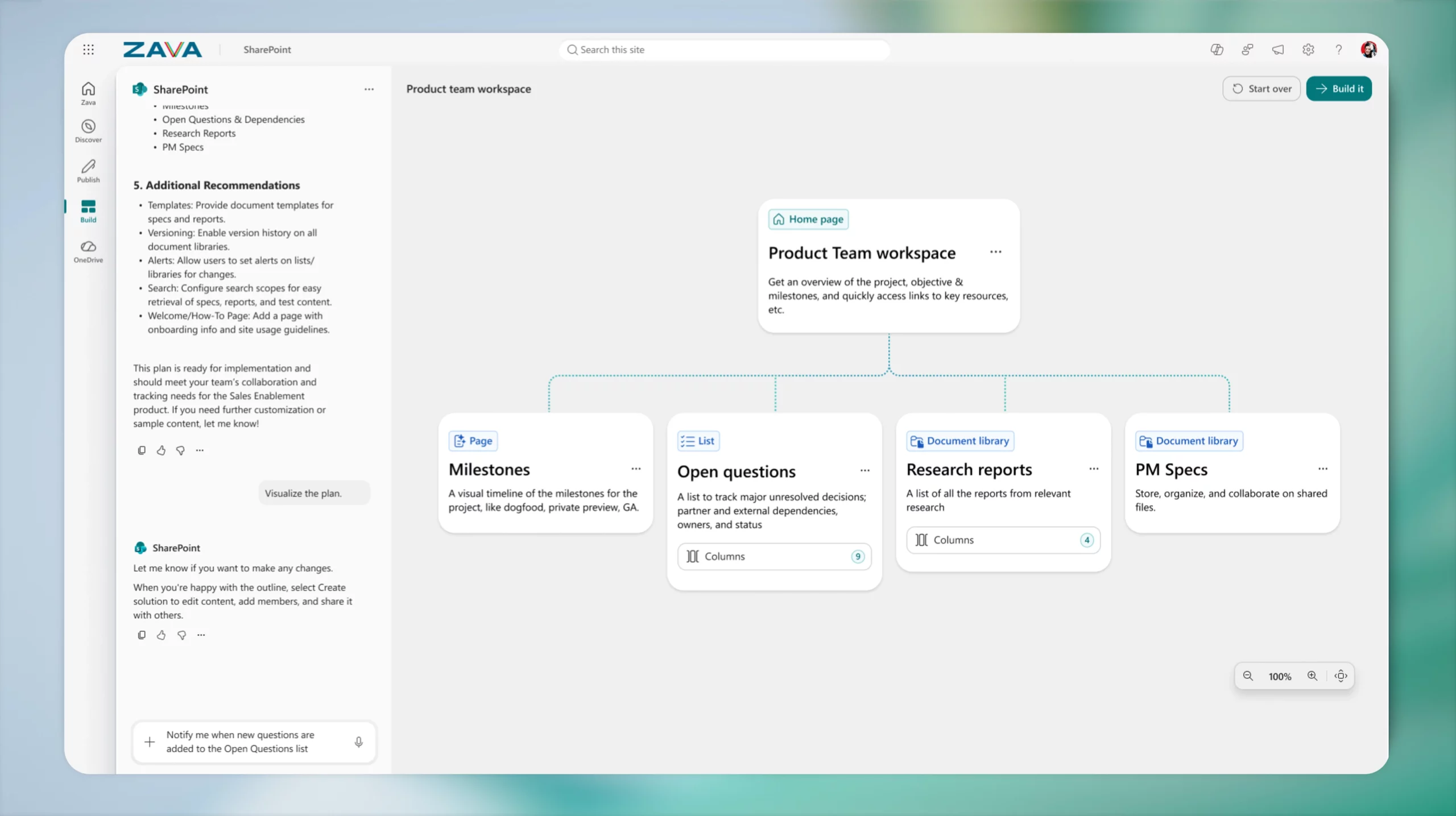
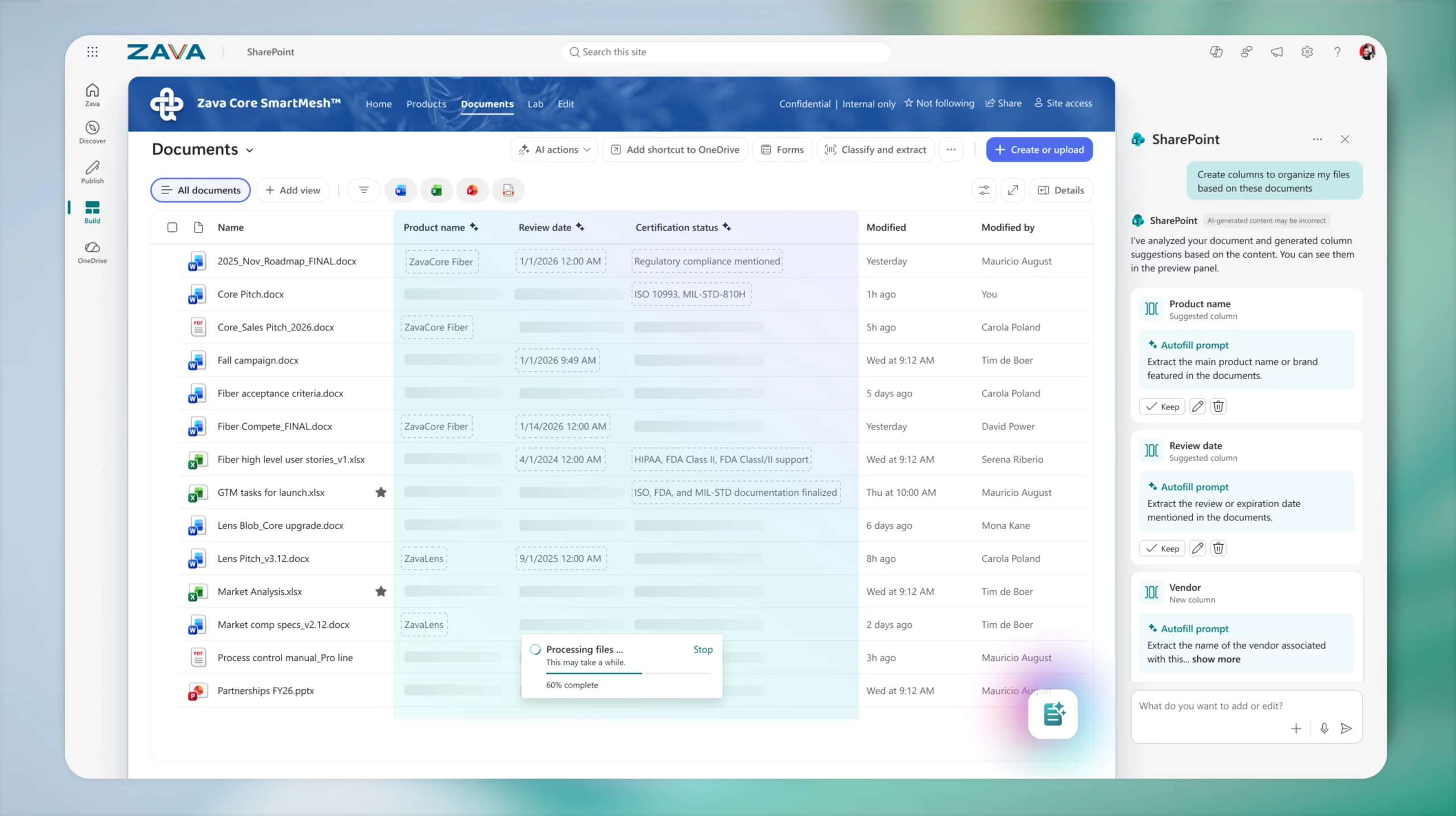
AI in SharePoint introduces agentic building and content intelligence directly into SharePoint. Previously released as Knowledge Agent, this refreshed experience enables users to plan and build sites, libraries, pages, and lists using natural language, making SharePoint more accessible without requiring technical expertise.

In addition, AI in SharePoint enhances content management by automatically extracting and applying metadata, adapting libraries as content evolves, and structuring information to support more accurate Copilot and agent experiences across Microsoft 365. The preview experience is powered by Anthropic’s Claude model.

When this will happen

  • Public Preview: Rolled out in March.
  • General Availability (Worldwide): Rolling out in May.

How this affects your organization

Who is affected:
Users working in SharePoint with access to AI capabilities.

What will happen:

  • Users can create and configure SharePoint sites, libraries, pages, and lists using natural language.
  • Metadata extraction and application will occur automatically to improve content organization.
  • Libraries will adapt dynamically as content changes.
  • Content will be structured to improve Copilot and agent responses across Microsoft 365.
AI in SharePoint
AI in SharePoint 2

B. Microsoft Teams

1. Microsoft Teams: Automatic spoken language detection in multilingual meetings

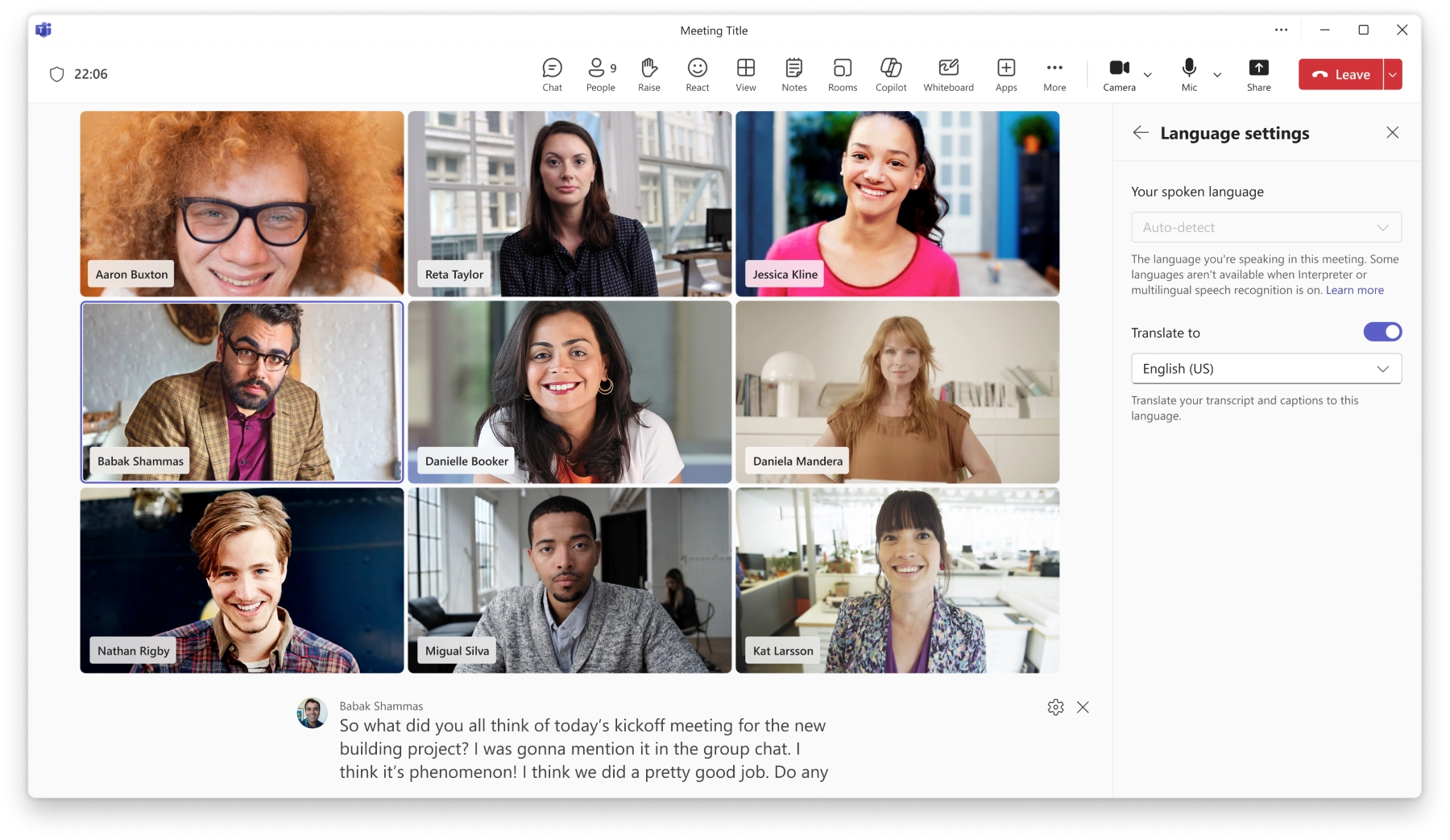
Microsoft Teams is introducing automatic spoken language detection to improve caption, transcript, and interpretation accuracy in multilingual meetings. Teams will detect each speaker’s language in real time and update it dynamically as the conversation progresses, removing the need for manual language selection.

When this will happen

  • Targeted Release: Early April 2026
  • General Availability (Worldwide): Mid-April 2026

How this affects your organization

Who is affected:
Users participating in multilingual meetings in Microsoft Teams when Interpreter is enabled by a user licensed for Microsoft 365 Copilot, or when multilingual speech recognition is enabled by a meeting organizer or co-organizer licensed for Microsoft 365 Copilot or Teams Premium, across Android, Desktop, iOS, Mac, and Web.

What will happen:

  • Teams will automatically detect each speaker’s language and update it in real time during meetings.
  • Manual spoken language selection will no longer be available in supported multilingual meeting scenarios.
  • Captions and transcripts will automatically reflect detected languages when Interpreter or multilingual speech recognition is enabled.
  • Meeting setup will be simplified with more consistent spoken language handling.
  • Interpretation accuracy may improve, including recognition of names and industry-specific terminology.
  • Interpreter will support the organization’s Custom Dictionary configured in the Microsoft 365 admin center.
  • Traditional Chinese is now supported.
  • Supported languages include: English, Spanish, Portuguese, Japanese, Simplified Chinese, Traditional Chinese, Italian, German, French, and Korean.
  • The feature will be enabled by default for tenants already using multilingual meeting capabilities.
Automatic spoken language detection in multilingual meetings

2. Microsoft Teams: Video-based meeting recaps

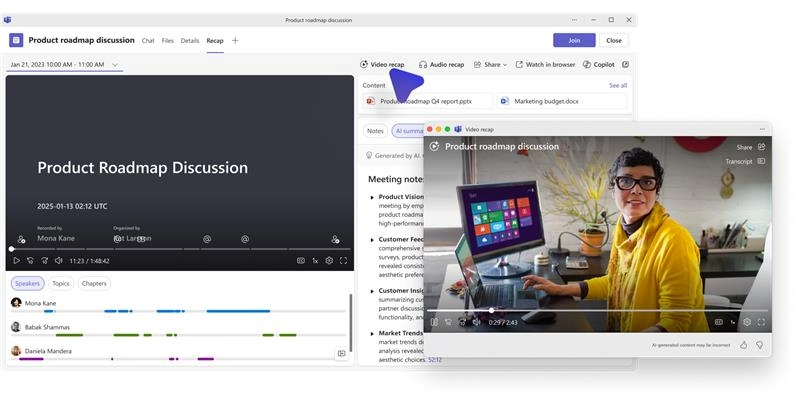
Video-based meeting recaps are being introduced in Microsoft Teams to help users quickly catch up on missed meetings or revisit key moments. Video recap generates narrated highlights using short video clips and key takeaways, improving efficiency and information retention.

When this will happen

  • Targeted Release: Early April 2026 – mid-April 2026
  • General Availability: Late April 2026 – early May 2026

How this affects your organization

Who is affected:

  • Users who view recorded Microsoft Teams meetings
  • Organizations with users licensed for Microsoft 365 Copilot
  • Only users with a Microsoft 365 Copilot license can access video recap

What will happen:

  • Availability and eligibility:
    • Video recap will be available for recorded meetings conducted in English.
    • Users with a Microsoft 365 Copilot license will see the Video recap option in the meeting recap page.
    • For meetings in other spoken languages, the Video recap option will not appear.
    • The feature is enabled by default for eligible users.
  • Video recap experience:
    • A single video recap is generated per meeting.
    • All eligible users receive the same video recap with identical content.
    • The recap includes narrated highlights and short video clips of key moments.
    • Narration is generated using AI based on the meeting recording and transcript.
  • Sharing and administration:
    • Organizers can share the meeting recap page.
    • Participants with access to the recap will also have access to the video recap, based on permissions and licensing.
    • No new admin configuration or policy changes are required.
Microsoft Teams: Video-based meeting recaps

3. Microsoft Teams: Enhanced minimized meeting experience

Microsoft Teams is improving the meeting experience when the active meeting window is minimized. This update allows users to stay engaged in meetings while working in other applications by enabling key in-meeting actions without restoring the full meeting window. This change does not affect the experience when users are sharing their screen.

When this will happen

  • Targeted Release: Mid-April 2026
  • General Availability (Worldwide): Late April 2026 – early May 2026

How this affects your organization

Who is affected:
All users who join and participate in Microsoft Teams meetings on Windows desktop and Mac desktop.

What will happen:

  • A new minimized meeting experience will appear automatically when the meeting window is minimized.
  • Users can raise their hand and send reactions directly from the minimized view.
  • Users can choose between two minimized views:
    • Expanded view: Displays up to four participant videos.
Expanded view: Displays up to four participant videos.
    • Compact view: Hides participant video and uses less screen space.
Compact view: Hides participant video and uses less screen space.

4. Microsoft Teams: Detection and control of external meeting assistant bots

Microsoft Teams is introducing a capability to detect external AI-powered meeting assistant bots, such as transcription and summarization services, as they attempt to join meetings. This enhancement improves visibility, security, and control by helping organizers identify automated participants and manage their access.

When this will happen

  • Targeted Release: Mid-May 2026 – early June 2026
  • General Availability (Worldwide, GCC): Early June 2026 – mid-June 2026

How this affects your organization

Who is affected:

  • Organizations using Microsoft Teams meetings, including GCC tenants
  • Meeting organizers and Teams administrators

What will happen:

  • Teams will detect external meeting assistant bots when they attempt to join meetings.
  • Detected bots will be labeled in the meeting lobby.
  • Organizers can:
    • Approve or deny bots from the lobby
    • Identify participants flagged as bots
    • Remove detected bots during meetings
  • A new meeting policy in the Teams admin center will allow admins to configure how detected bots are handled (for example, disable detection or require approval).
  • Bot detection will be enabled by default for all tenants.
  • Detection accuracy will continue to improve, but some bots may not be identified in all scenarios.
Detection and control of external meeting assistant bots
Detection and control of external meeting assistant bots 2

5. Microsoft Teams: Drafts quick view for unsent messages

A new Drafts quick view makes it easier to find, edit, and send unsent messages across chats and channels. This enhancement improves visibility of draft messages and reduces the need to search through conversations.

When this will happen
Availability details will be shared in a future update.

How this affects your organization

Who is affected:
Microsoft Teams users.

What will happen:

  • Users can access all unsent draft messages in a single location.
  • Drafts can be easily edited and sent without navigating through chats or channels.
  • This feature improves efficiency when completing partially written messages.
Microsoft Teams: Drafts quick view for unsent messages

6. Microsoft Teams: Control Enter key behavior in chat

Microsoft Teams now allows users to customize how the Enter key behaves when composing messages in chat. This update provides greater flexibility when writing messages and helps prevent accidental sends.

What will happen:

  • Users can choose whether pressing Enter sends a message or inserts a new line.
  • This setting helps users compose longer or structured messages more easily.
  • The change reduces the likelihood of sending incomplete messages accidentally.
Microsoft Teams: Control Enter key behavior in chat
Jasjit Chopra
Jasjit Chopra

CEO at Penthara Technologies

About the Author

Microsoft MVP LogoLinked-in

Jasjit Chopra is the CEO of Penthara Technologies and a Microsoft Most Valuable Professional (MVP) with over two decades of hands-on experience in Microsoft 365, SharePoint, and Security. He has led 100+ digital transformation projects across six countries, securing 50,000+ users, migrating 250+ TB of data, and automating processes that save organizations thousands of hours each year. A recognized leader at the crossroads of AI, security, and workplace modernization, Jasjit is passionate about simplifying complexity, mentoring technology professionals, and helping businesses build secure, intelligent, and future-ready digital environments.

Leave a Reply

Your email address will not be published. Required fields are marked *

More From This Category

What's new in Microsoft | February 2026 Updates

Explore the latest Microsoft 365 updates including Copilot enhancements, AI meeting recaps, Teams improvements, and new productivity features.

Read More
What's new in Microsoft | January 2026 Updates

Discover the latest Microsoft 365 and Copilot updates, including AI agents, smarter email tools, Teams enhancements, and admin improvements.
Read More
What's new in Microsoft | December 2025 Updates

Discover the latest Microsoft 365 and Copilot updates, including smarter Copilot search, AI-powered Teams meetings, PowerPoint enhancements, and improved image generation tools.

Read More
1 2 3 5
chevron-right