What's new in Microsoft | July 2026 Updates

Explore the latest Microsoft 365 updates including Copilot enhancements, AI meeting recaps, Teams improvements, and new productivity features.

Table of contents
A. Microsoft Copilot
1. Microsoft 365 Copilot: Add agents directly in Copilot Chat
2. Microsoft 365 Copilot: GPT-5.6 model family now available
3. Microsoft 365 Copilot: More concise answers in Copilot Search
4. Microsoft 365 Copilot mobile app: Push notifications for work updates
5. Microsoft 365 Copilot: Cowork browser automation with Microsoft Edge
6. Microsoft 365 Copilot: Event-triggered tasks in Cowork
7. Microsoft 365 Copilot: Easier customization of Cowork with skills and plugins
8. Microsoft Word: Copilot improvements for document formatting
9. Microsoft Excel: Brand Kit skill for Copilot
10. Microsoft Excel: Theme Design skill for Copilot
B. Microsoft Teams
1. Microsoft Teams: Meeting Recaps app
2. Microsoft Teams: Planner tabs in Shared and Private channels

A. Microsoft Copilot

1. Microsoft 365 Copilot: Add agents directly in Copilot Chat

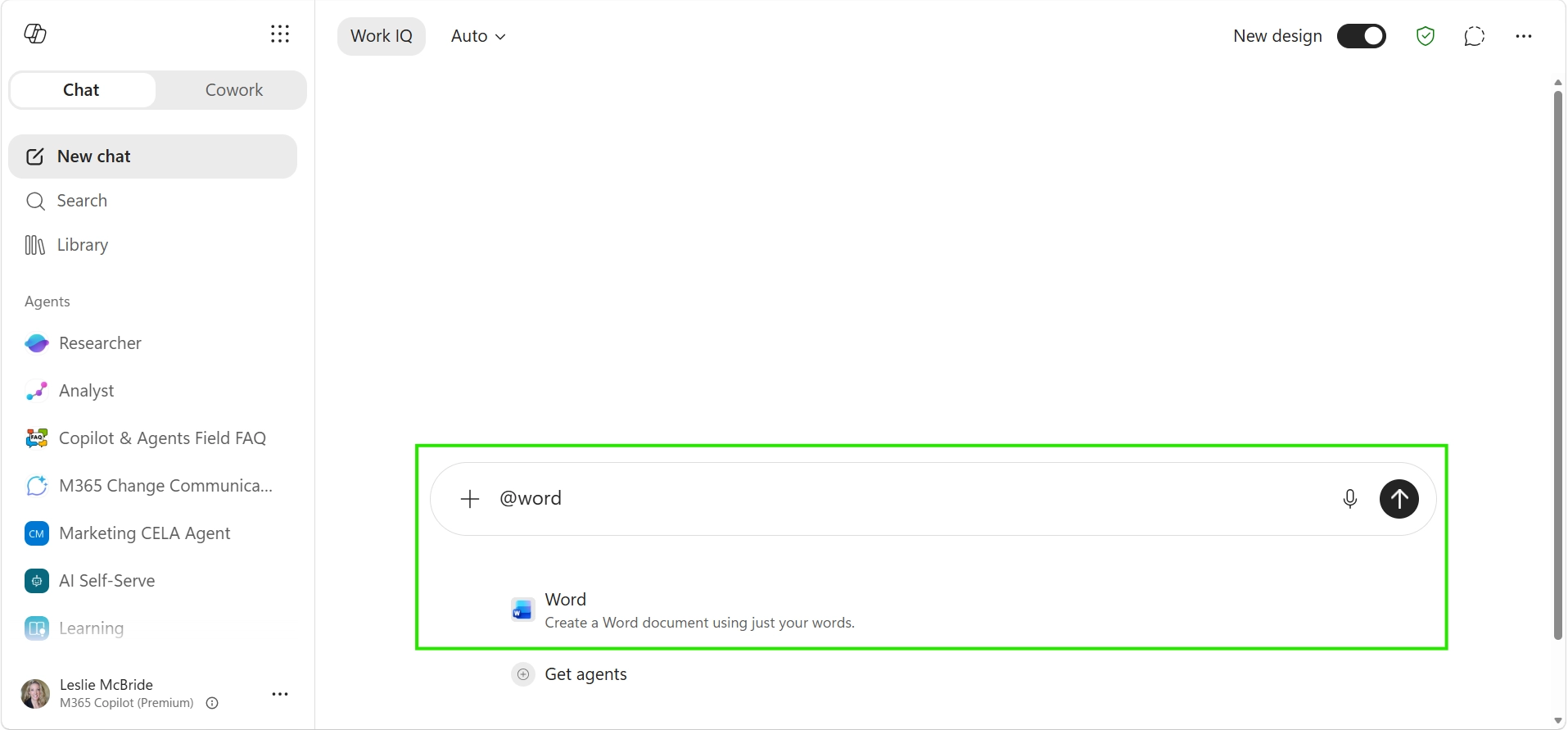
Users can now add Word, Excel, and PowerPoint agents directly to their Copilot Chat conversations. By @mentioning an agent in the prompt, users can access its capabilities without leaving the Copilot app.

When this will happen
Rolled out in July.

How this affects your organization

What will happen:

  • Users can @mention Word, Excel, or PowerPoint agents directly in Copilot Chat.
  • The selected agent will be added to the conversation.
  • Users can create documents, spreadsheets, and presentations without leaving the Copilot app.

2. Microsoft 365 Copilot: GPT-5.6 model family now available

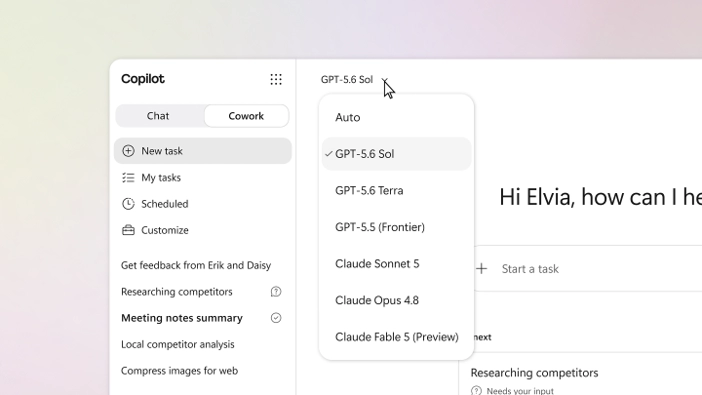
OpenAI's GPT-5.6 family of models is now available in Microsoft 365 Copilot. The models provide stronger reasoning for complex, multi-step tasks and are optimized for knowledge work across Microsoft 365.

When this will happen
Rolled out in July.

How this affects your organization

What will happen:

  • GPT-5.6 supports more complex, multi-step tasks across Microsoft 365 Copilot.
  • In Word, it can help turn initial ideas into polished drafts.
  • In Excel, it can support deeper analysis and reasoning.
  • In PowerPoint, it can help generate richer presentations.
  • In Copilot Chat, it can provide clearer responses.
  • In Cowork, it can support end-to-end deliverables.
  • GPT-5.6 can use users' work context to support knowledge work.

3. Microsoft 365 Copilot: More concise answers in Copilot Search

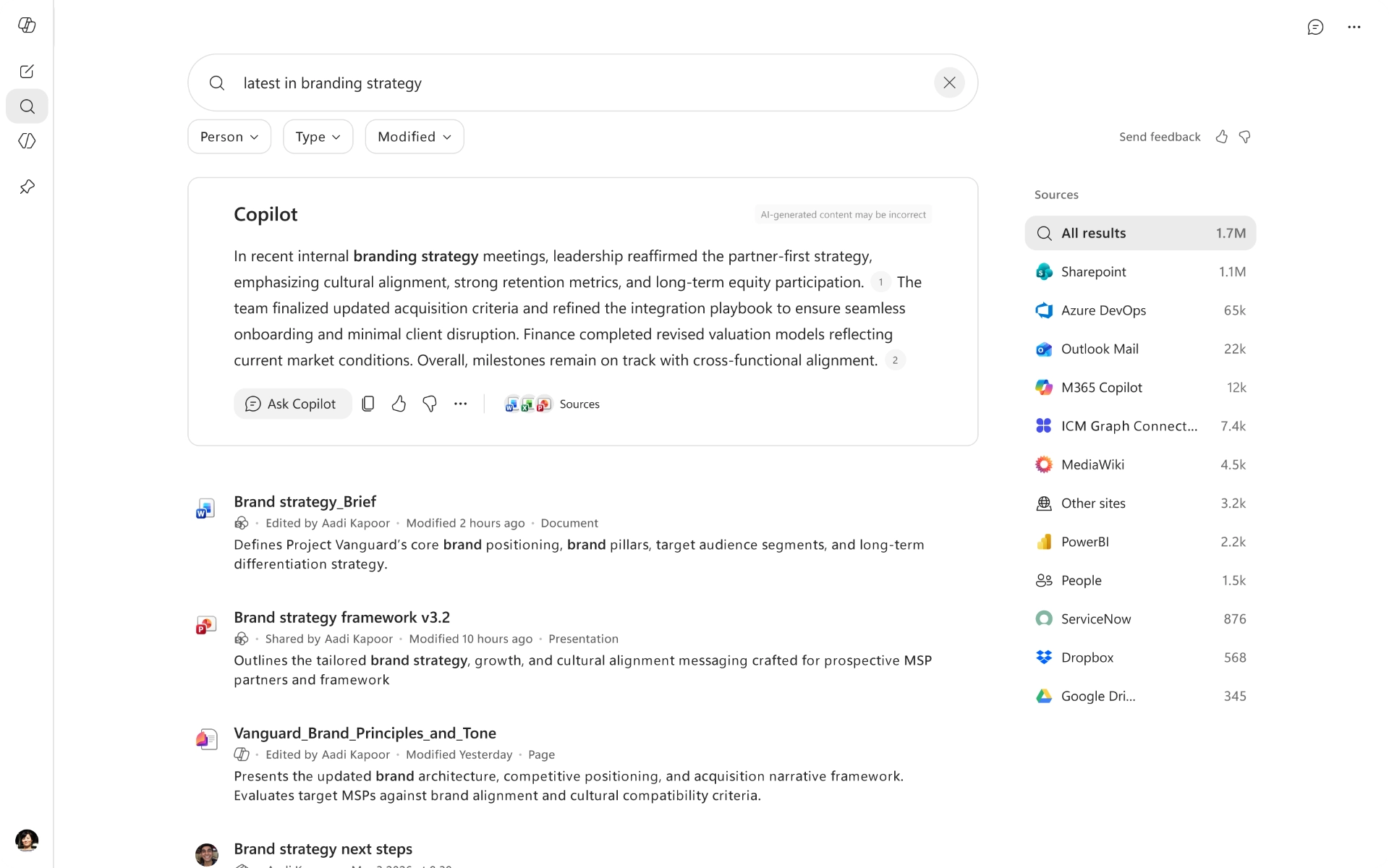
Copilot Search now provides more concise answers, helping users find the information they need more quickly. The updated experience also makes it easier to continue a search conversation in Copilot Chat.

When this will happen
Rolled out in July.

How this affects your organization

What will happen:

  • Copilot answers in the Copilot Search module are now more concise.
  • The option to continue the conversation in Copilot Chat is displayed more prominently in the sidebar.
  • Users can move more easily from search results to a continued Copilot Chat conversation.

4. Microsoft 365 Copilot mobile app: Push notifications for work updates

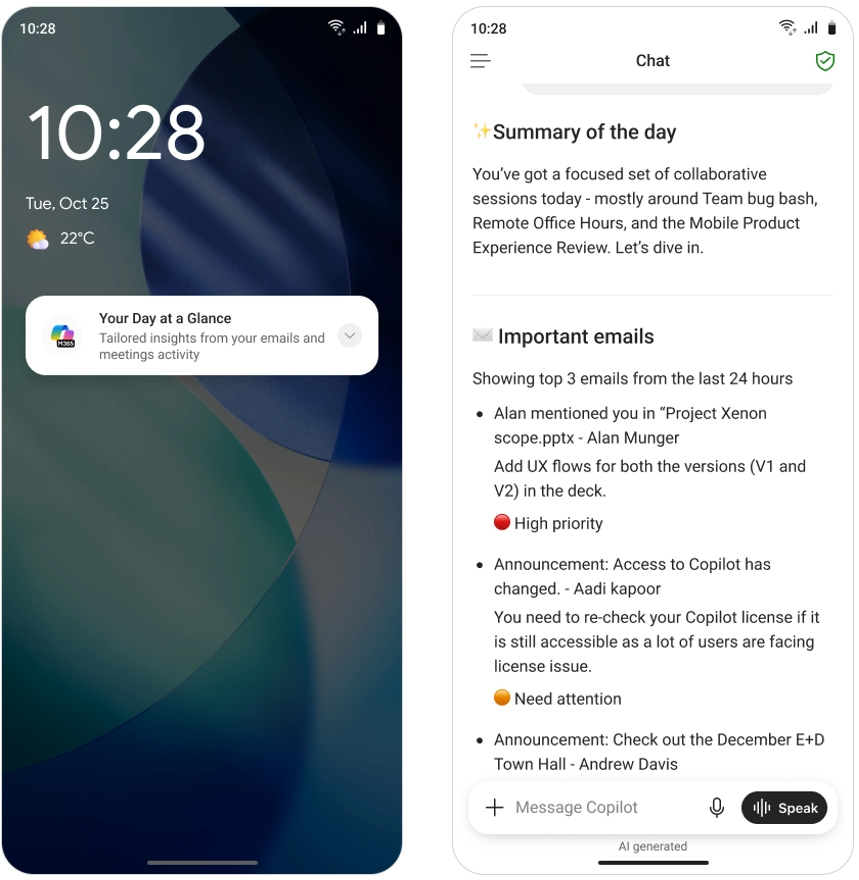
The Microsoft 365 Copilot mobile app now provides push notifications to help users catch up on important work items from their iOS and Android devices. This reduces the need to manually check Outlook, Teams, and other Microsoft 365 experiences.

How this affects your organization

Who is affected:
Users with Microsoft 365 Copilot licenses.

What will happen:

  • Users can receive Copilot prompts such as Your Day at a Glance and Items waiting for you as mobile push notifications.
  • Notifications are available on iOS and Android devices.
  • Opening a notification takes users directly to the Copilot mobile app.
  • The corresponding Copilot response will already be displayed when the app opens.

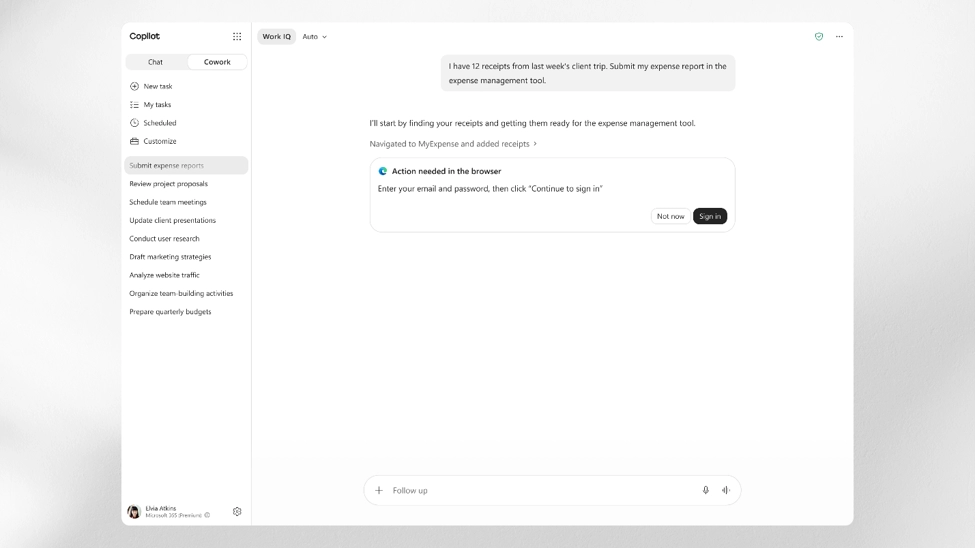
5. Microsoft 365 Copilot: Cowork browser automation with Microsoft Edge

Copilot Cowork now supports local browser automation with Microsoft Edge. Users signed into Edge can use Cowork to work across web-based systems such as SaaS tools and internal portals, reducing the need to manually switch between tabs.

When this will happen
Rolled out in July.

How this affects your organization

What will happen:

  • Cowork can perform tasks across web-based systems through Microsoft Edge.
  • Users must be signed into Edge to use this capability.
  • Cowork can work across SaaS tools, internal portals, and other websites on the user's behalf.
  • Users can complete work across websites with less manual tab switching.

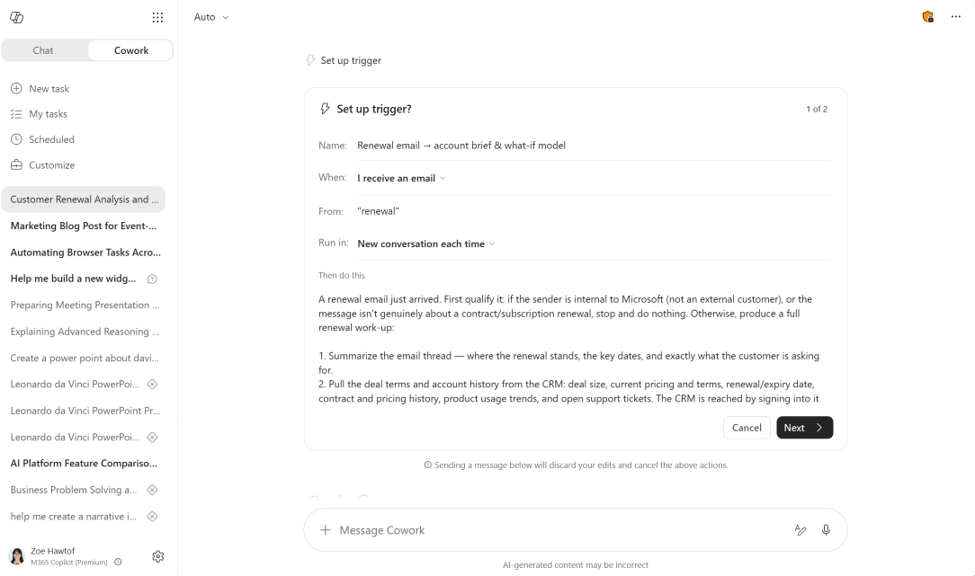
6. Microsoft 365 Copilot: Event-triggered tasks in Cowork

Copilot Cowork now supports event-triggered tasks that can act when specific activity occurs across Teams and Outlook. Users can describe a trigger in plain language, allowing Cowork to watch for relevant events and prepare a response when they occur.

When this will happen
Rolled out to Frontier in July.

How this affects your organization

What will happen:

  • Users can create event-driven tasks in Cowork using natural language.
  • Tasks can be triggered by a specific sender, @mention, keyword, topic, or event name.
  • Triggers can work across Teams chats, channels, Outlook email, and meetings.
  • Cowork can detect relevant activity and have a response ready when the specified event occurs.

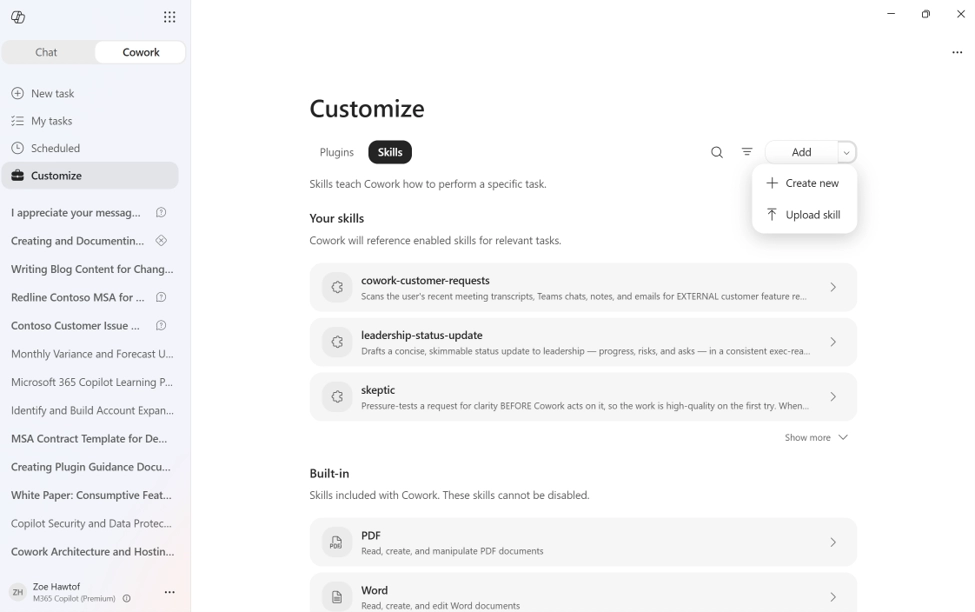
7. Microsoft 365 Copilot: Easier customization of Cowork with skills and plugins

Copilot Cowork now makes it easier for users to customize their experience with skills and plugins through the Customize tab. Users can create new skills, upload existing ones, and add plugins with less manual setup.

When this will happen
Rolled out in July.

How this affects your organization

What will happen:

  • Users can create skills through a guided Create new experience.
  • Existing .md, .zip, or .skill files can be added using Upload skill.
  • Claude or Open-Plugin zip files can be automatically converted into publishable plugin packages.
  • Plugin packages can include bundled skills and MCP connectors.
  • Users can share skills and plugins with specific people across the organization while remaining the owner.
  • Updates made by the owner automatically flow to people the skill or plugin has been shared with.

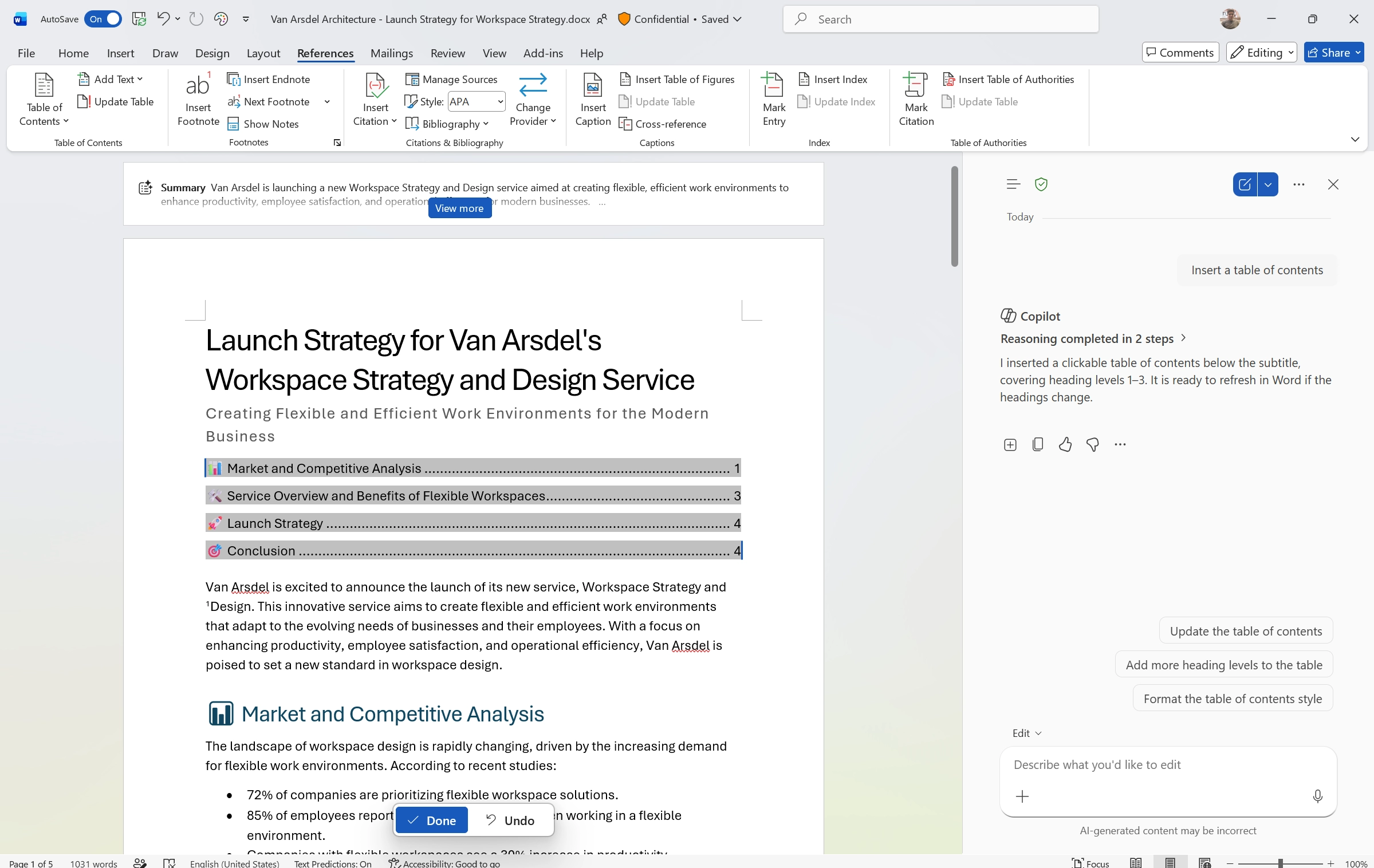
8. Microsoft Word: Copilot improvements for document formatting

Copilot can now help users manage common document formatting tasks as part of drafting workflows. This makes it easier to keep documents organized and consistently formatted as content changes.

When this will happen
Rolled out in July.

How this affects your organization

What will happen:

  • Copilot can insert and update tables of contents.
  • Users can use Copilot to manage headers and footers.
  • Copilot can help manage page numbers and dates.
  • Copilot can also manage footnotes.
  • These capabilities reduce the manual work required to format and maintain documents.

9. Microsoft Excel: Brand Kit skill for Copilot

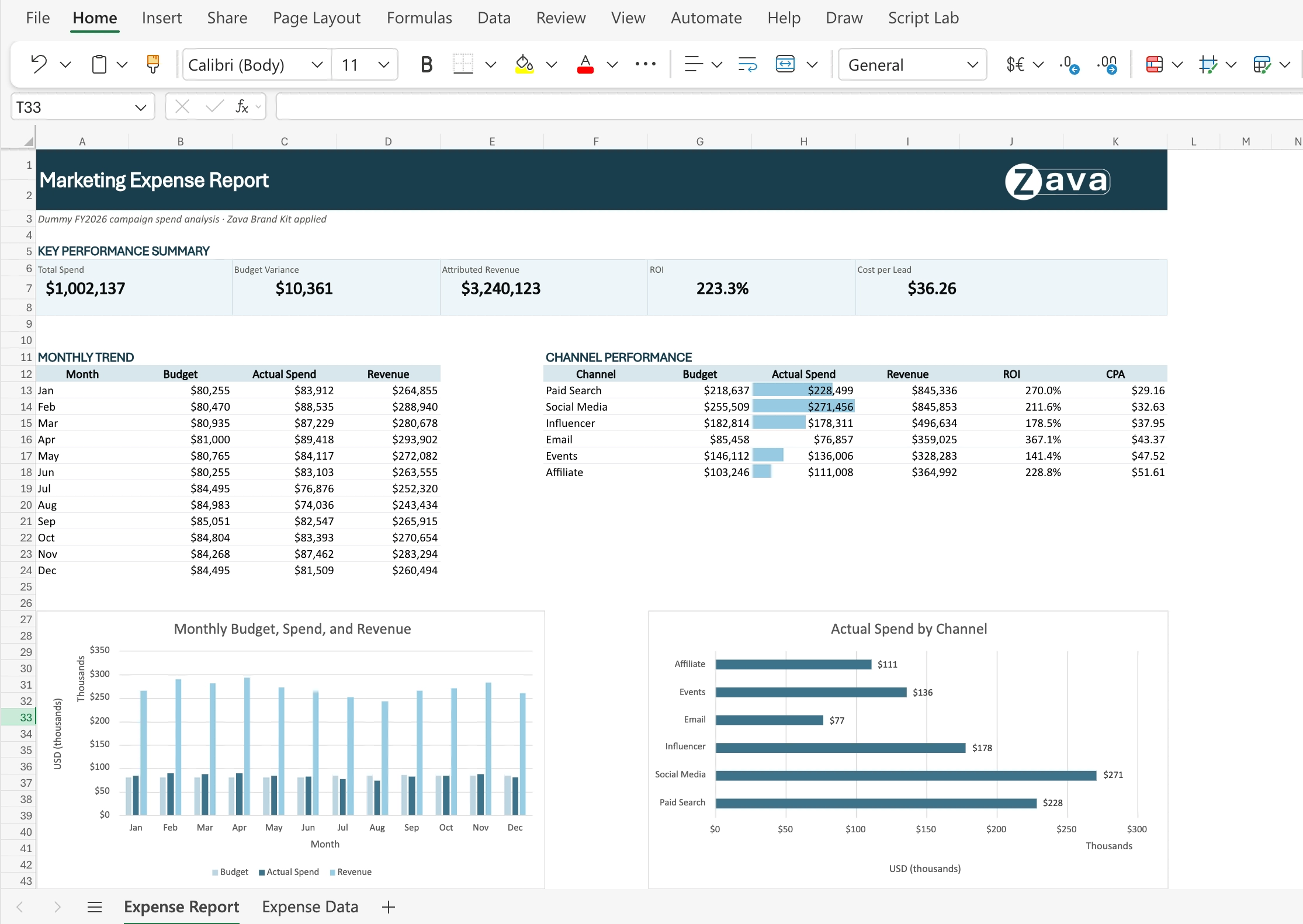
Copilot in Excel now includes a Brand Kit skill that helps users format workbooks using their organization's approved branding from the Microsoft 365 brand center. This makes it easier to create polished, presentation-ready reports without manually applying brand formatting.

When this will happen
Rolled out in July.

How this affects your organization

What will happen:

  • Users can ask Copilot to apply their organization's Brand Kit to an Excel sheet.
  • Copilot can apply approved colors, fonts, and logos to tables and charts.
  • Workbooks can follow the organization's branding guidelines without manual formatting.
  • The Brand Kit skill helps users create consistent, on-brand reports in Excel.

10. Microsoft Excel: Theme Design skill for Copilot

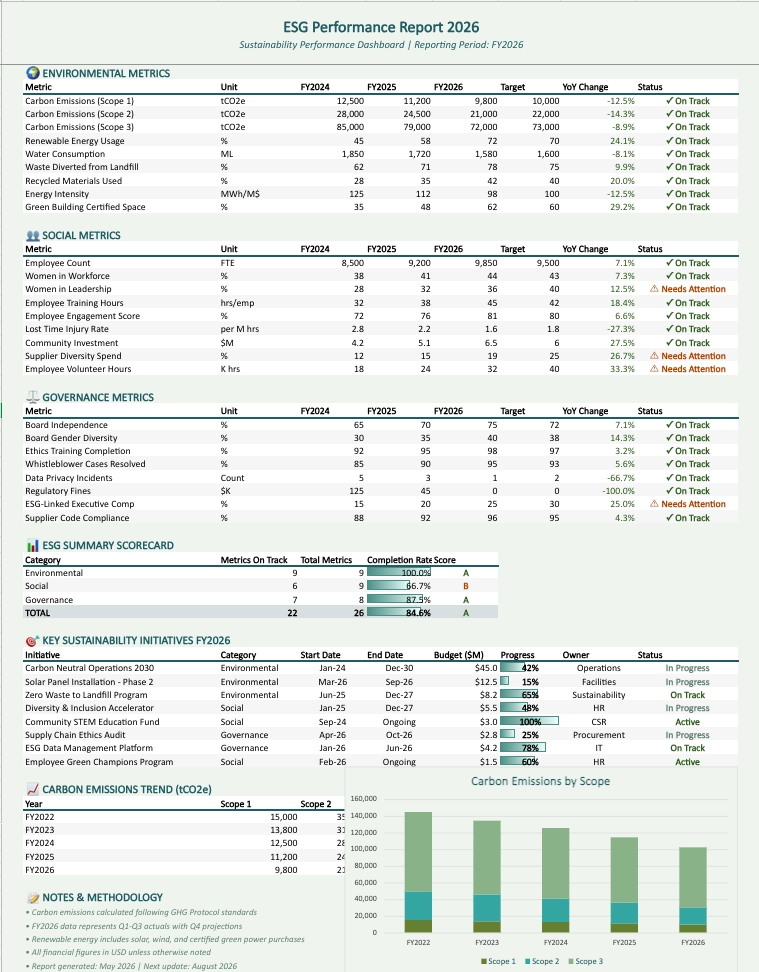
Copilot in Excel is introducing a Theme Design skill that helps users apply a coordinated visual design to their spreadsheets. It can organize the layout, apply a consistent color palette, and style charts to make important insights easier to understand.

When this will happen
Rolling out in August.

How this affects your organization

What will happen:

  • Users can use the @theme-design skill to design or polish an Excel sheet.
  • Copilot can apply a coordinated color palette to spreadsheet data.
  • Charts can be styled to match the overall design.
  • Copilot can structure the layout to create a clear visual hierarchy.
  • Raw data can be turned into cleaner, more readable reports with less manual formatting.

B. Microsoft Teams

1. Microsoft Teams: Meeting Recaps app

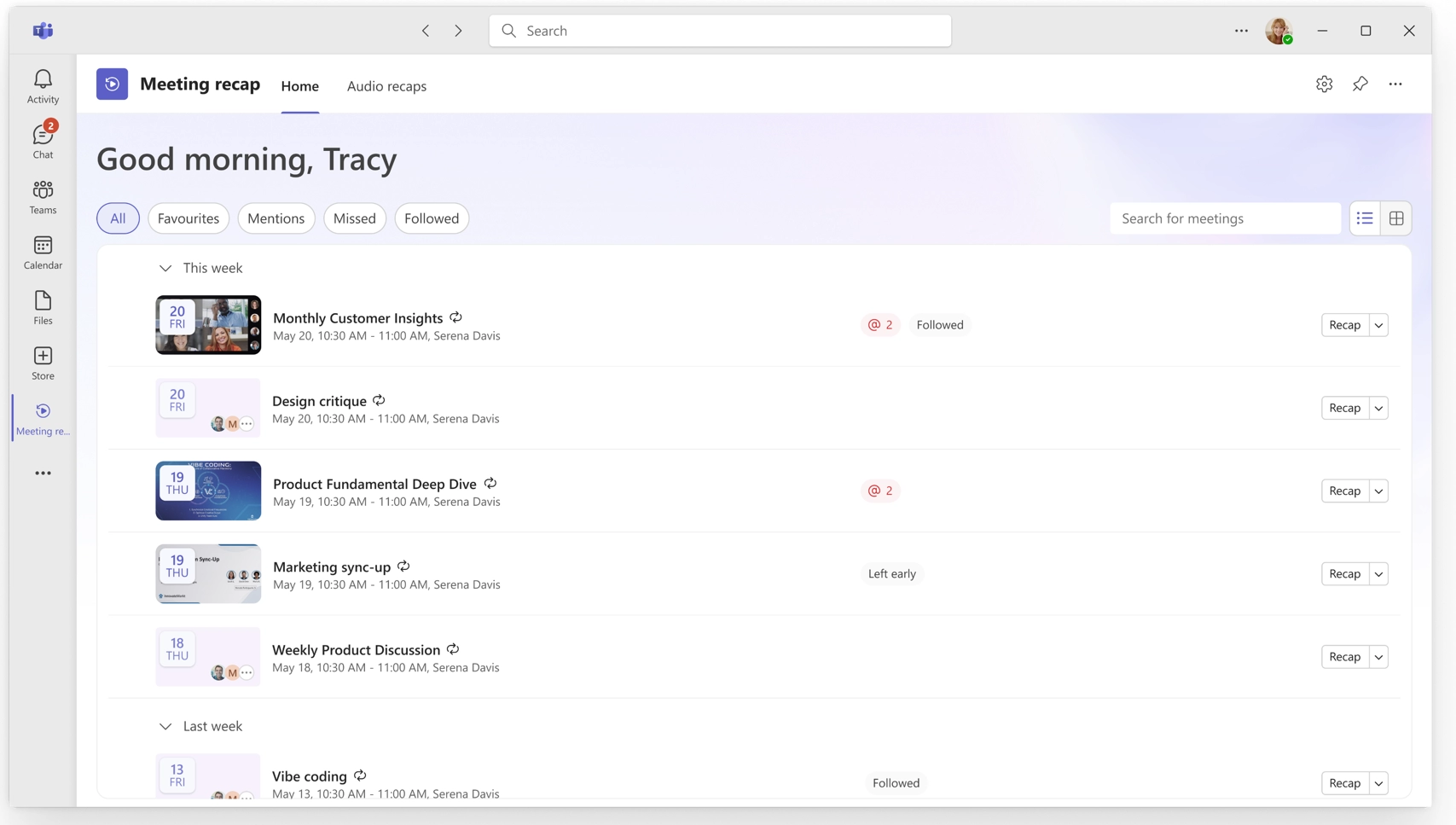
Microsoft Teams is introducing a Meeting Recaps app that brings intelligent meeting recaps together in one place. The app can be pinned to the Teams sidebar, making it easier for users to find and catch up on past meetings.

How this affects your organization

What will happen:

  • Users can access meeting recaps from a dedicated app in the Teams sidebar.
  • Users can browse meetings with recaps from the past 30 days.
  • Quick filters help users find relevant meetings, including meetings where they were mentioned.
  • Users can generate a podcast-style Audio Recap across multiple meetings.
  • Audio Recaps provide a convenient way to catch up on meeting information while on the go.

2. Microsoft Teams: Planner tabs in Shared and Private channels

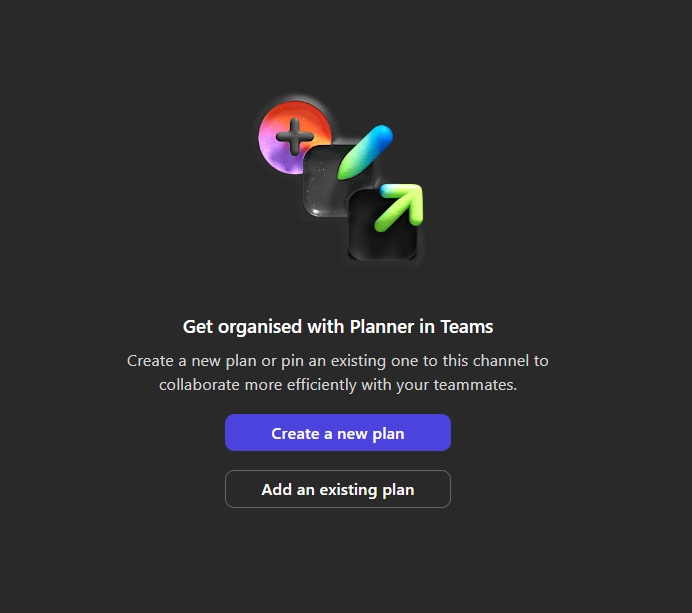
Microsoft Teams is expanding its Planner integration by allowing users to add Planner tabs to Shared and Private channels. This enables teams to plan and track work directly within the channels where collaboration takes place.

Only basic plans will be available in Shared and Private channels. Premium capabilities will be introduced at a later date.

When this will happen

  • General Availability (Worldwide): Rollout begins in late August 2026 and is expected to complete by the end of August 2026.

How this affects your organization

Who is affected:

  • Microsoft Teams users working in Shared or Private channels.
  • Microsoft 365 administrators managing Teams and Planner.

What will happen:

  • Users can add Planner tabs to Shared and Private channels.
  • Teams can plan and track work directly within these channels.
  • Only basic Planner plans will be supported.
  • Premium capabilities will be available at a later date.
Jasjit Chopra
Jasjit Chopra

CEO at Penthara Technologies

About the Author

Microsoft MVP LogoLinked-in

Jasjit Chopra is the CEO of Penthara Technologies and a Microsoft Most Valuable Professional (MVP) with over two decades of hands-on experience in Microsoft 365, SharePoint, and Security. He has led 100+ digital transformation projects across six countries, securing 50,000+ users, migrating 250+ TB of data, and automating processes that save organizations thousands of hours each year. A recognized leader at the crossroads of AI, security, and workplace modernization, Jasjit is passionate about simplifying complexity, mentoring technology professionals, and helping businesses build secure, intelligent, and future-ready digital environments.

Leave a Reply

Your email address will not be published. Required fields are marked *

More From This Category

What's new in Microsoft | June 2026 Updates

Explore the latest Microsoft 365 updates including Copilot enhancements, AI meeting recaps, Teams improvements, and new productivity features.

Read More
What's new in Microsoft | May 2026 Updates

Explore the latest Microsoft 365 updates including Copilot enhancements, AI meeting recaps, Teams improvements, and new productivity features.
Read More
What's new in Microsoft | April 2026 Updates

Explore the latest Microsoft 365 updates including Copilot enhancements, AI meeting recaps, Teams improvements, and new productivity features.
Read More
1 2 3 9
chevron-right