What's new in Microsoft | September 2026 Updates

Explore the latest Microsoft 365 updates including Copilot enhancements, AI meeting recaps, Teams improvements, and new productivity features.

Table of contents
A. Microsoft Copilot
1. Microsoft 365 Copilot: New Home, Code, and Autopilot experiences
2. Microsoft Copilot: In-app browsing for Windows and Mac
3. Microsoft 365 Copilot: Record in the mobile app
4. Microsoft Teams: Teams Phone Agent for Copilot
5. Microsoft Word: Citations and improved image and shape arrangement in Copilot
B. Microsoft Teams
1. Microsoft Teams: Personal message reminders for chats and channels
2. Microsoft Teams: Redesigned mobile header and dashboard for chats and channels
3. Microsoft Teams: Faster file search and sharing
4. Microsoft Teams: Emoji shortcuts on iOS and Android

A. Microsoft Copilot

1. Microsoft 365 Copilot: New Home, Code, and Autopilot experiences

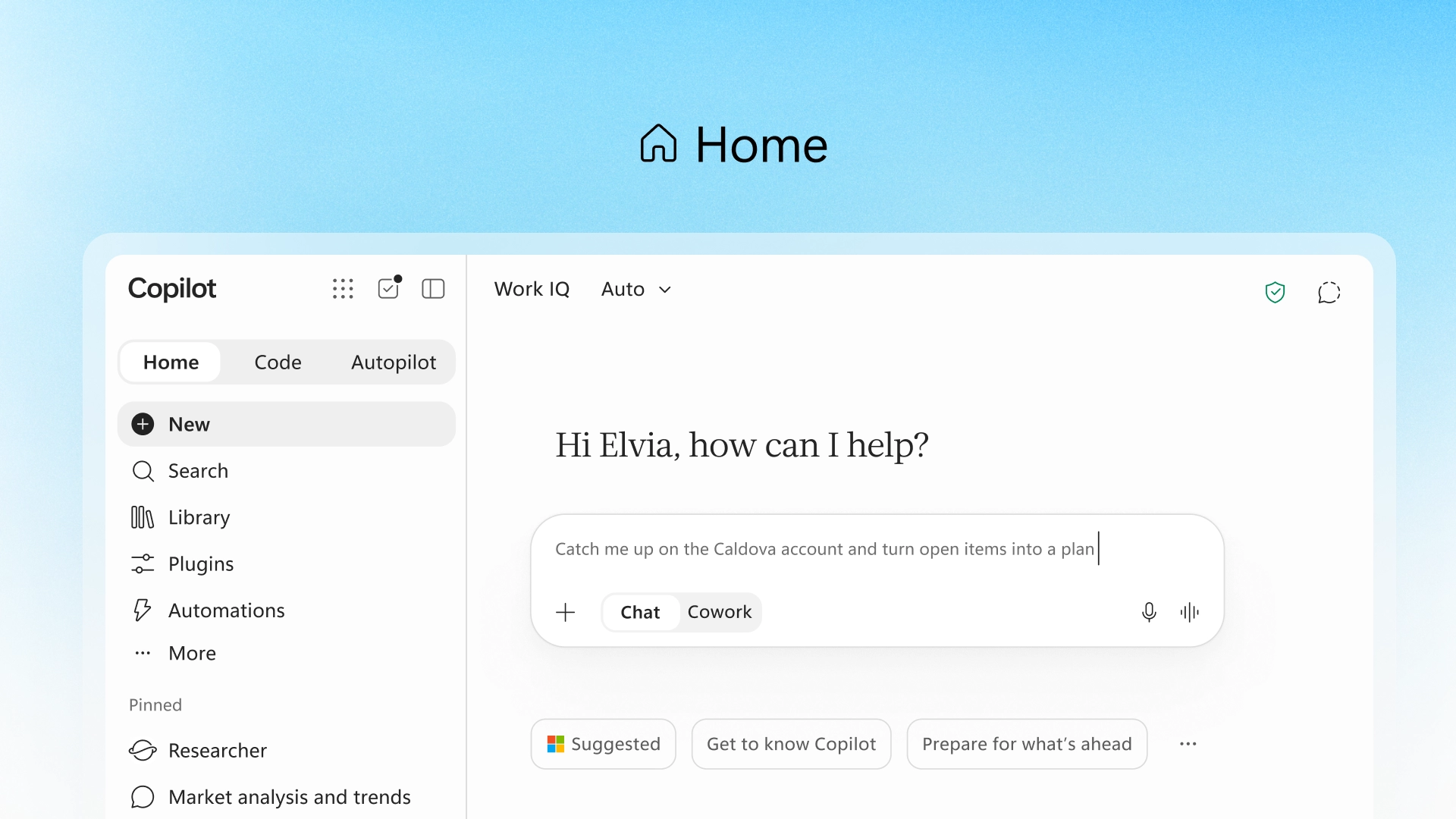
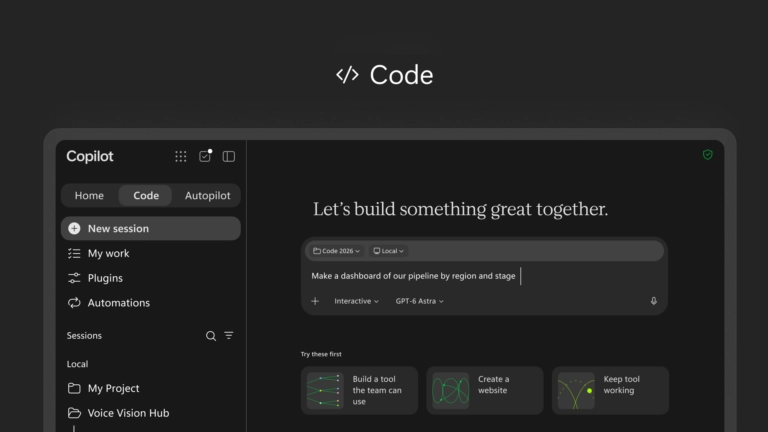
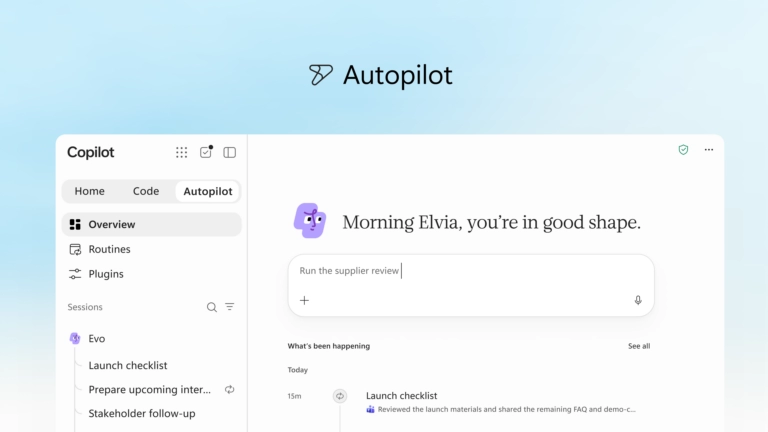
Microsoft is introducing new capabilities in the Copilot app to bring Chat, Cowork, Office apps, solution building, and proactive agents into a more unified experience. Home brings Chat and Cowork together, Code enables users to build purpose-built solutions, and Autopilot provides a persistent agent that can continue working without a prompt.

When this will happen

  • Home: Rolling out to the Frontier program in the coming weeks.
  • Code: Rolling out to Frontier at the end of September, with broader availability in the following weeks.
  • Autopilot: Expanding to private preview at the end of September.

How this affects your organization

What will happen:

  • Copilot Home brings Chat and Cowork together and provides access to recent activity, suggestions, and ongoing work.
  • Office in Copilot brings Word, Excel, and PowerPoint capabilities directly into the Copilot experience.
  • Users can create or update editable documents, workbooks, and presentations while keeping them synchronized with Office apps.
  • Code allows users to describe an app, tracker, dashboard, automation, or workflow in natural language and have Copilot build it.
  • Code runs in a sandboxed environment and can be hosted securely within the organization's Microsoft 365 tenant.
  • Copilot Managed Runtime provides hosting infrastructure for running code securely within the organization's Microsoft 365 environment.
  • Autopilot can monitor channels, follow up on threads, run recurring work, and resume projects without requiring a new prompt.
  • Autopilot operates within the organization's tenant with its own identity, memory, computer, and workspace.
  • Fabric IQ brings trusted Power BI data and semantic models into Copilot Chat and Cowork.
  • Copilot is also being expanded to use Dynamics 365 and Power Platform data and workflows in public preview.
  • A new plugin registry will provide a unified catalog for Microsoft, partner, and custom-built plugins, with centralized IT management.
  • New FinOps capabilities provide administrators with controls for AI spending, model availability, and usage management.

2. Microsoft Copilot: In-app browsing for Windows and Mac

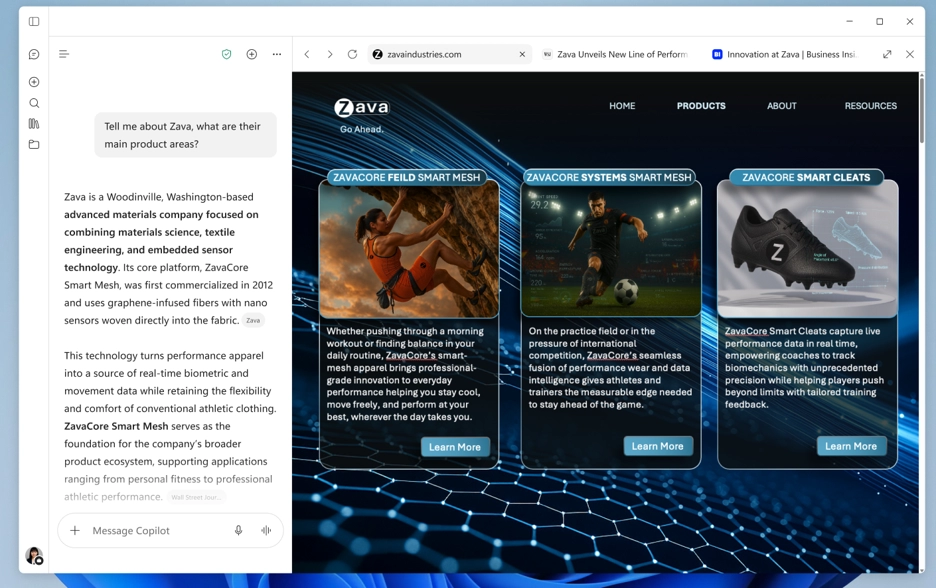
The Microsoft Copilot app for Windows and Mac now supports opening websites shared in Copilot chat directly within the desktop app. Administrators can opt in selected devices to test the experience before broader rollout.

When this will happen

  • Opt-in availability: Available now.

How this affects your organization

Who is affected:

  • Administrators managing Microsoft Copilot on Windows and Mac devices.
  • Users on devices enabled for the early-access experience.

What will happen:

  • Administrators can opt in selected Windows and Mac devices for in-app browsing.
  • Users can open links from Copilot chat in a side pane within the Copilot desktop app.
  • Multiple websites can be opened as separate tabs within the side pane.
  • Users can switch between open website tabs as needed.
  • Users can close the side pane when the websites are no longer needed.
  • Organizations can test the experience, validate behavior in managed environments, and prepare users and support teams for the updated experience.

3. Microsoft 365 Copilot: Record in the mobile app

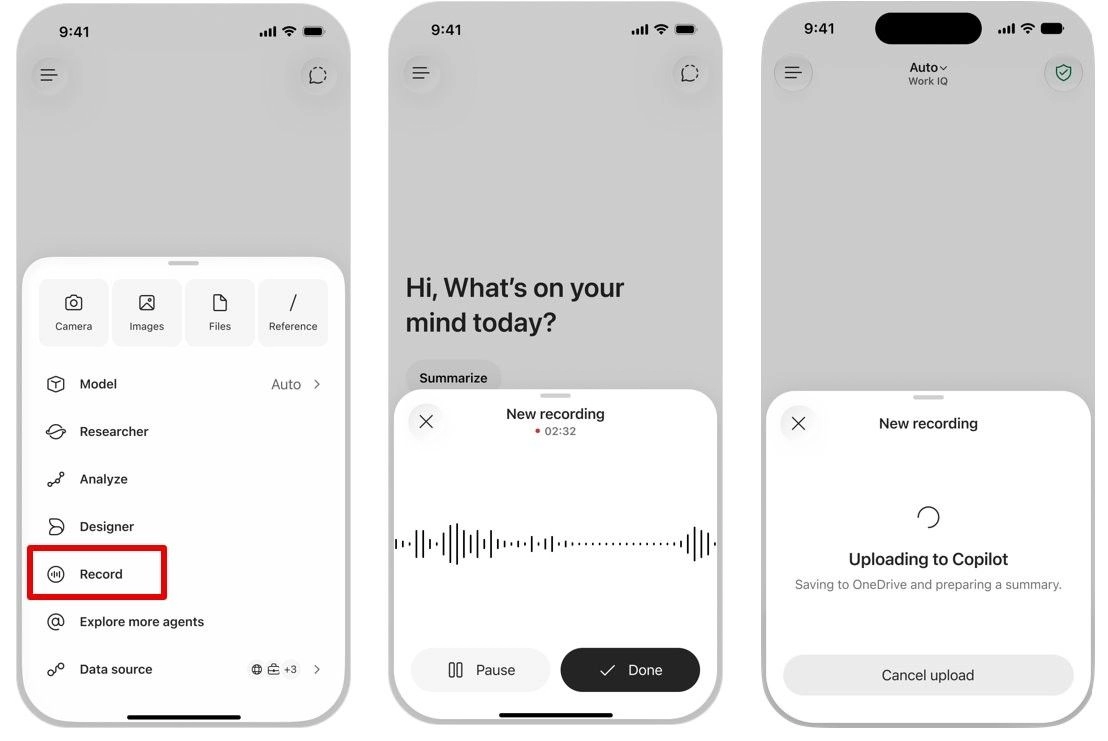
Record in the Microsoft Copilot mobile app allows users to capture in-person conversations and voice notes and turn them into content they can work with in Copilot. The feature generates an AI-powered transcript and summary, making it easier to preserve conversations, ideas, and other information captured on the go.

When this will happen
Rolled out in September.

How this affects your organization

What will happen:

  • Users can record in-person conversations and voice notes through the Copilot mobile app.
  • Copilot generates a transcript and summary of recorded audio in Copilot Chat.
  • Users can ask follow-up questions about the recorded content.
  • Users can extract action items from recorded conversations.
  • Users can continue working with the captured content directly in Copilot.

4. Microsoft Teams: Teams Phone Agent for Copilot

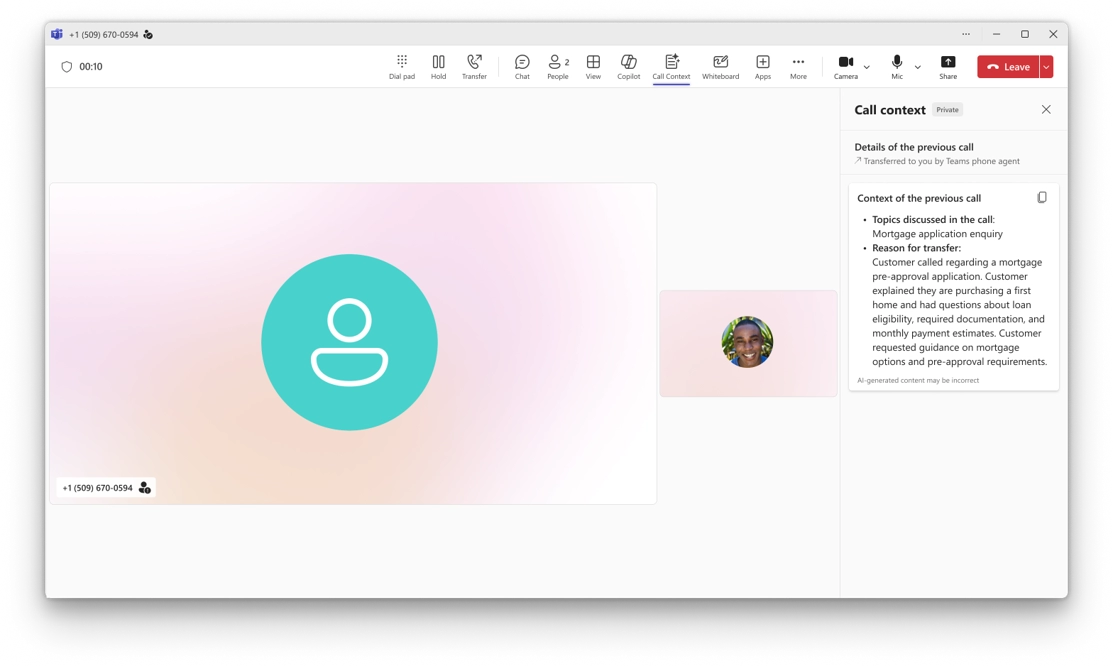
Teams Phone Agent is an AI-powered calling receptionist that helps customer-facing organizations and departments handle routine phone requests. It can answer common questions, manage appointments, and route callers to the appropriate department or employee.

When this will happen
Rolled out in September.

How this affects your organization

What will happen:

  • Teams Phone Agent can handle incoming calls for organizations using Teams Phone.
  • The agent can answer common customer questions.
  • Callers can use the agent to book or reschedule appointments.
  • The agent supports more than 60 languages.
  • Calls can be intelligently routed to the appropriate department or employee.
  • An AI-generated summary of the conversation can be provided when a call is transferred.
  • Employees can focus on conversations that require human assistance while routine requests are handled by the agent.

5. Microsoft Word: Citations and improved image and shape arrangement in Copilot

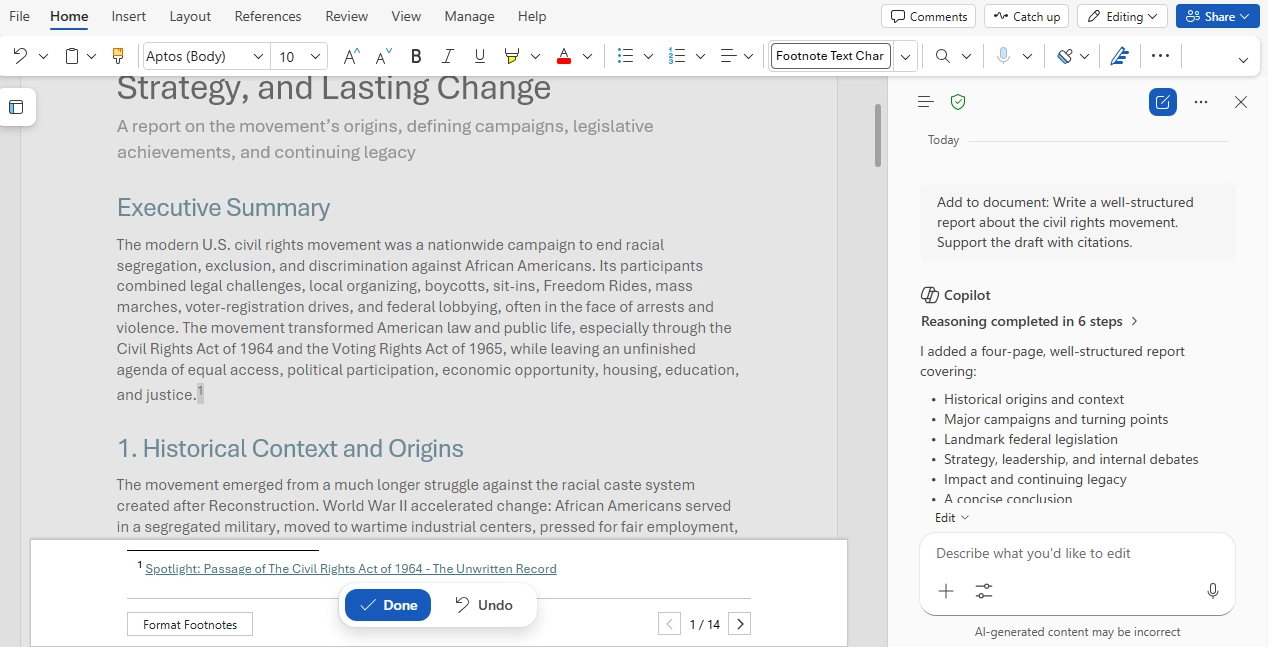
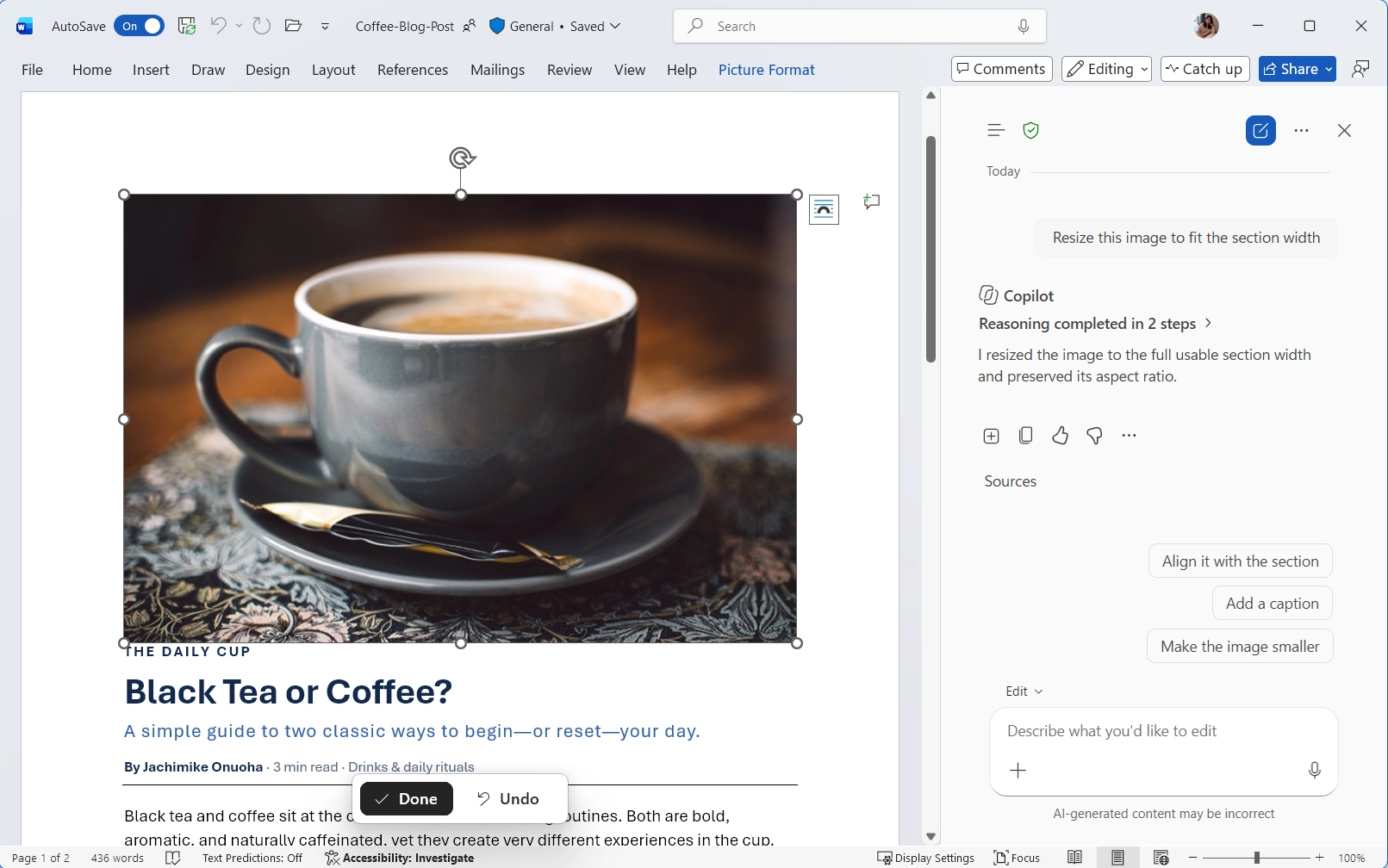
New Copilot capabilities in Word provide greater transparency around the sources used in responses and make it easier to arrange visual elements within documents.

When this will happen
Both features rolled out in September.

How this affects your organization

What will happen:

  • Users can view citations to relevant web and work content directly within Copilot responses.
  • Citations help users understand where the information in Copilot's responses comes from.
  • Users can arrange and modify images and shapes directly within Word documents using Copilot.
  • Copilot can help create more polished and organized layouts for visual elements.
  • Users can create professional-looking documents with less manual formatting effort.

B. Microsoft Teams

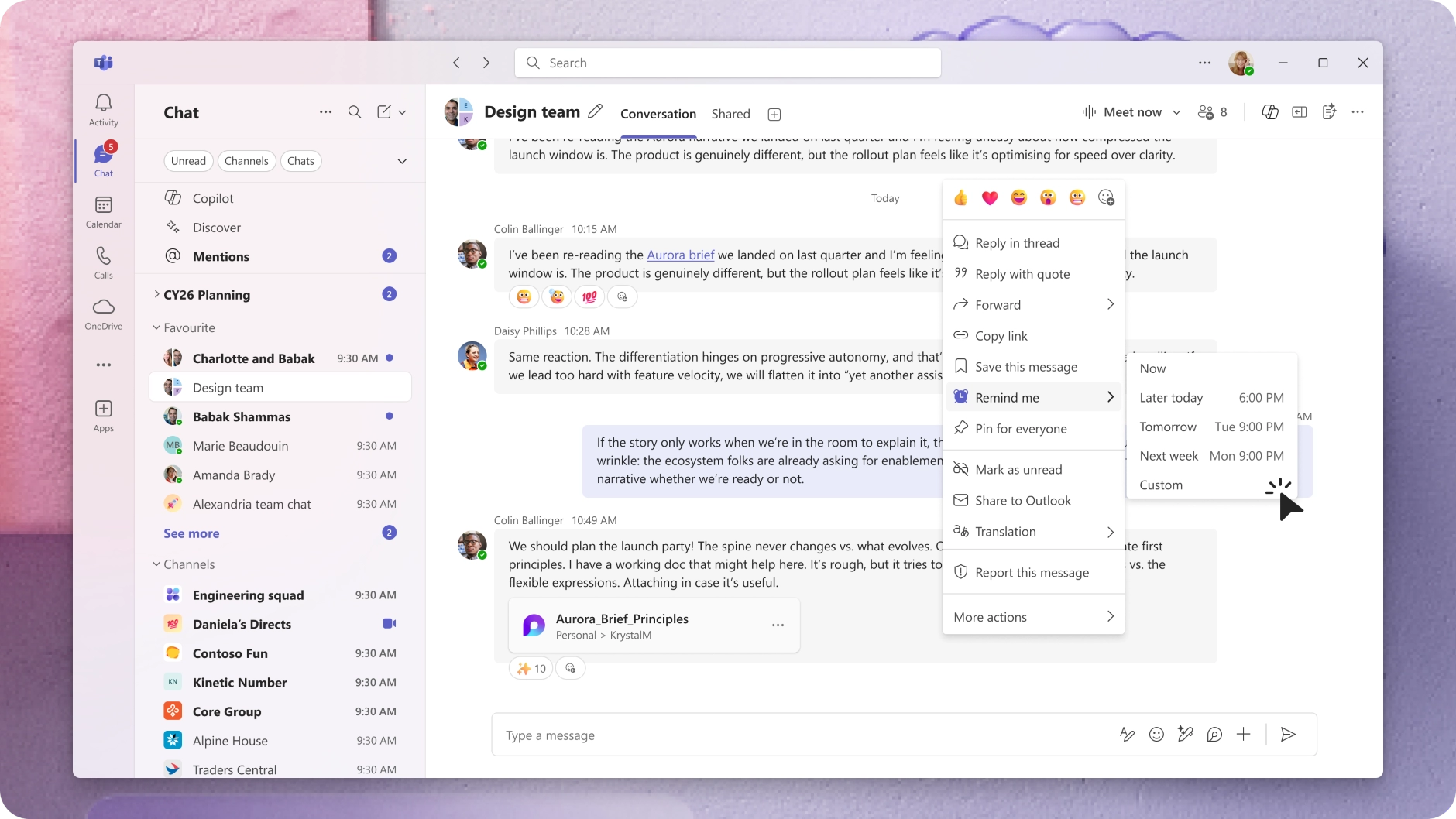
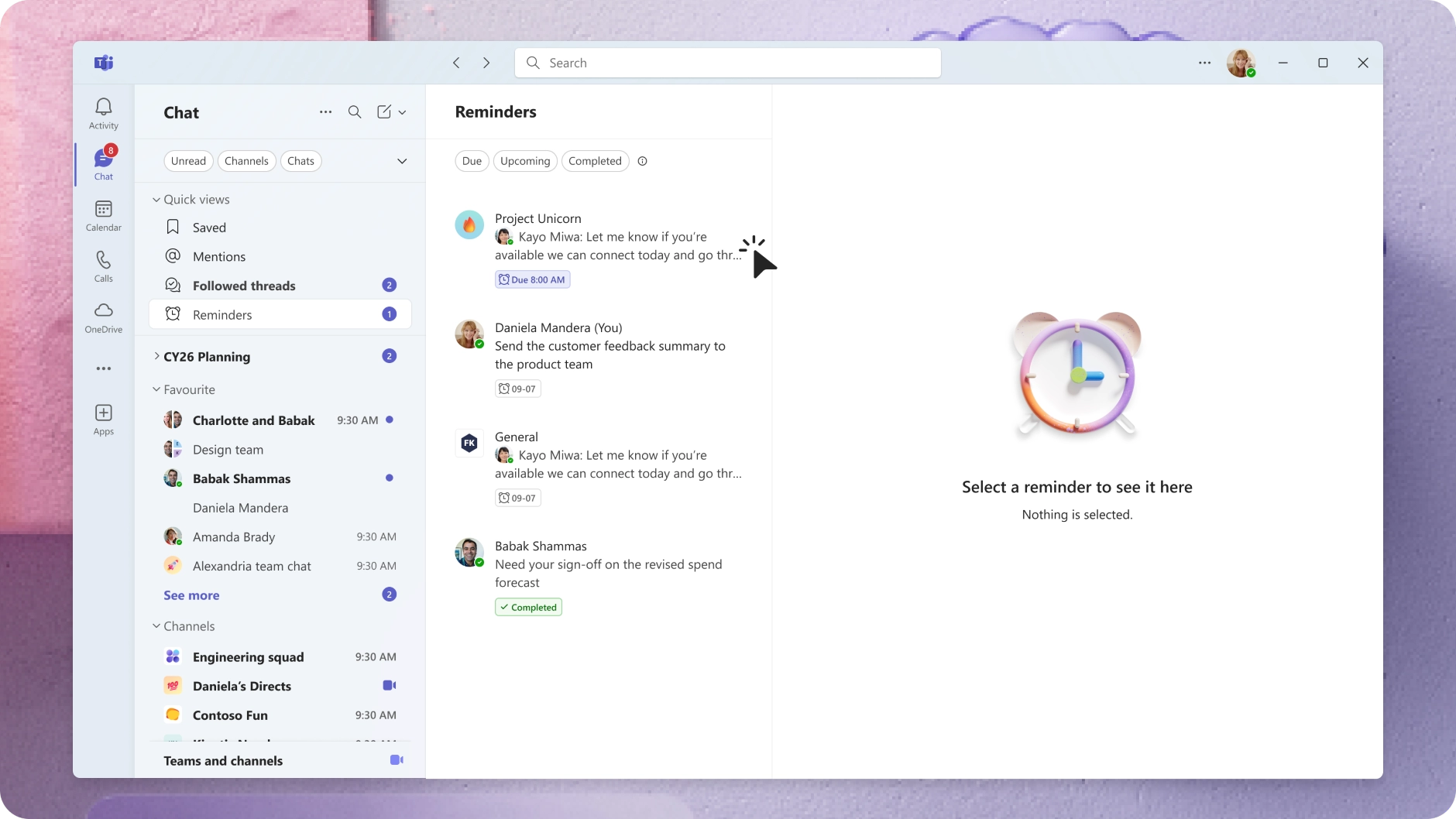
1. Microsoft Teams: Personal message reminders for chats and channels

Microsoft Teams is introducing personal reminders for chat and channel messages, helping users turn important messages into actionable follow-ups. Users can manage reminders directly in Teams and receive notifications when they are due.

When this will happen

  • Targeted Release: Rollout begins in early November 2026 and is expected to complete in mid-November 2026.
  • General Availability: Rollout begins in mid-November 2026 and is expected to complete in December 2026.
  • Available worldwide, GCC, GCC High, and DoD.

How this affects your organization

Who is affected:

  • All Microsoft Teams users in the organization.

What will happen:

  • Users can set reminders on chat and channel messages.
  • Users can create, update, complete, and delete reminders.
  • A dedicated Reminders view will show upcoming, active, and completed reminders.
  • Toast notifications will appear when reminders are due.
  • Badge counts will appear on the Teams chat icon.
  • Reminders are private to each user and retain the context of the related message.
  • The feature is enabled by default and follows existing Teams notification settings.
  • No admin controls or configuration are required.

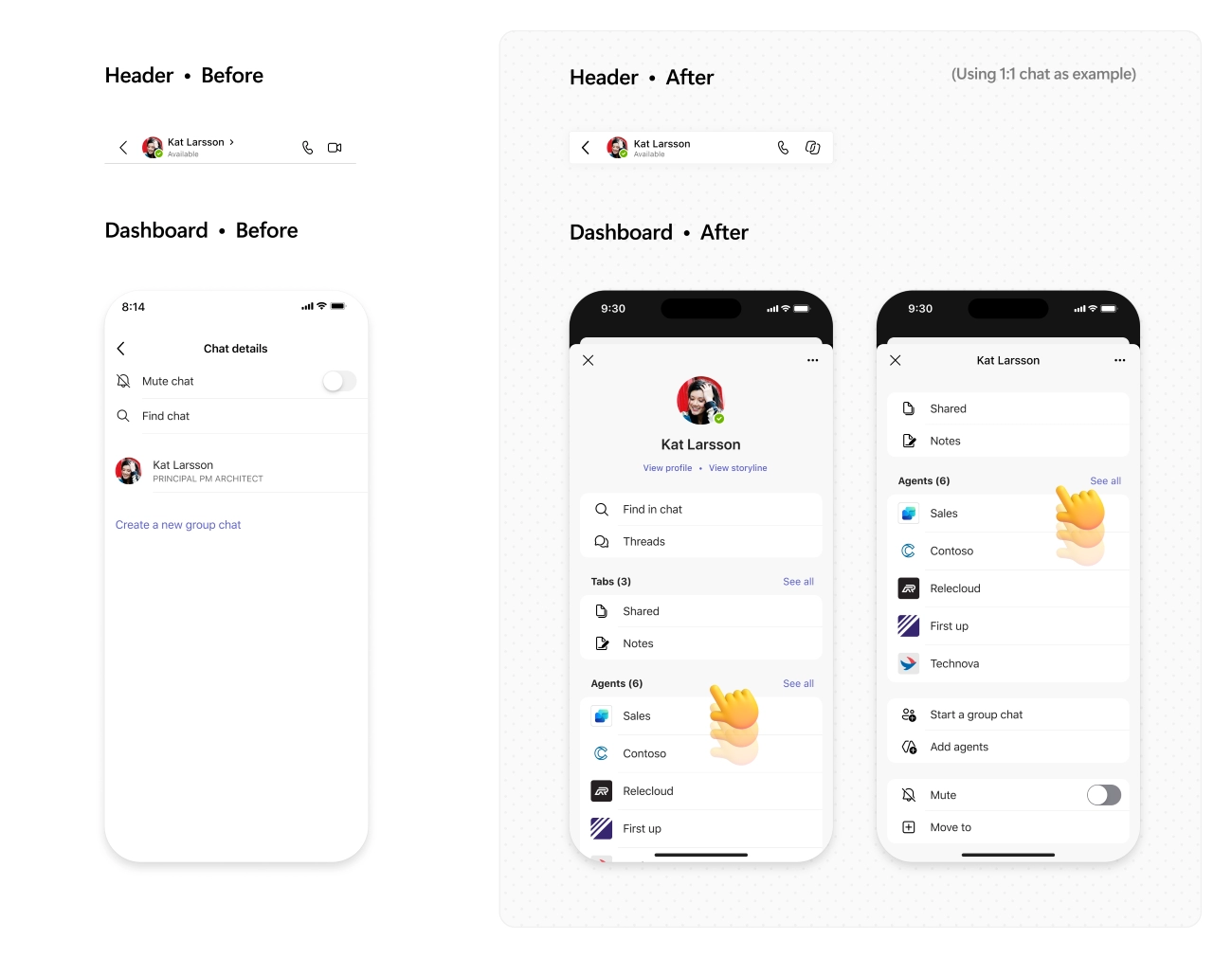
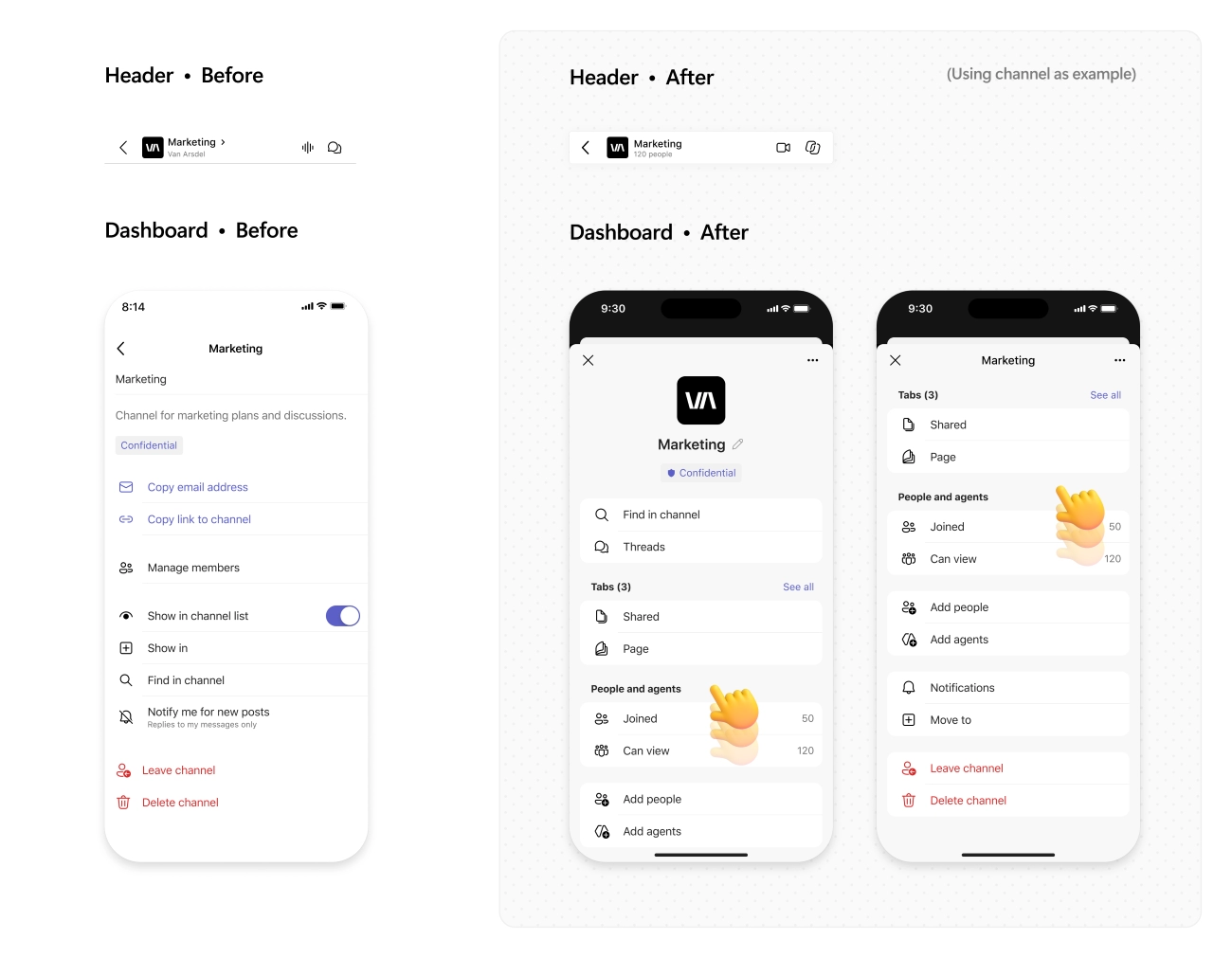
2. Microsoft Teams: Redesigned mobile header and dashboard for chats and channels

Microsoft Teams is updating the mobile experience with a redesigned header and lightweight dashboard for chats and channels. The update brings channel details, people, and pinned content into a more streamlined experience and aligns navigation more closely with the desktop experience.

When this will happen

  • Targeted Release: Beginning in late September 2026.
  • General Availability: Beginning in early October 2026 for Worldwide, GCC, GCC High, and DoD.

How this affects your organization

Who is affected:

  • Users who access Microsoft Teams on mobile devices.

What will happen:

  • Chats and channels will have a redesigned header experience on mobile.
  • A new lightweight dashboard will provide access to channel details, people, and pinned content.
  • Navigation across chats and channels will become more consistent with the Teams desktop experience.
  • Users can get oriented and complete common tasks more quickly on mobile.

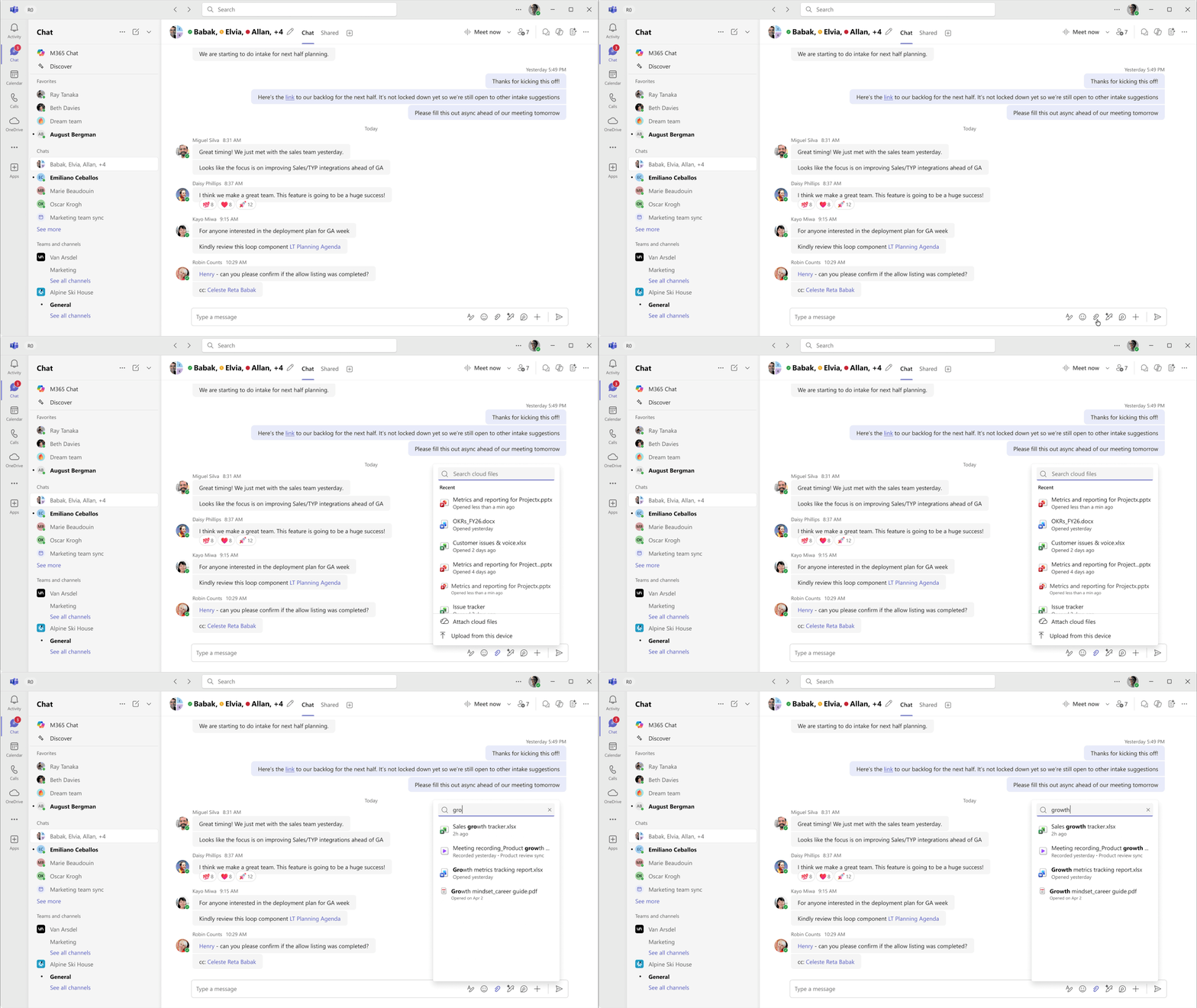
3. Microsoft Teams: Faster file search and sharing

Microsoft Teams now makes it easier to find and share files directly from the attachment experience. Users can search for cloud-based files without leaving the current conversation or interrupting collaboration.

How this affects your organization

What will happen:

  • Users can search for cloud-based files directly from the attachment experience.
  • Users can find and share the right files without switching away from the current conversation.
  • File sharing becomes faster and more streamlined within Teams.

4. Microsoft Teams: Emoji shortcuts on iOS and Android

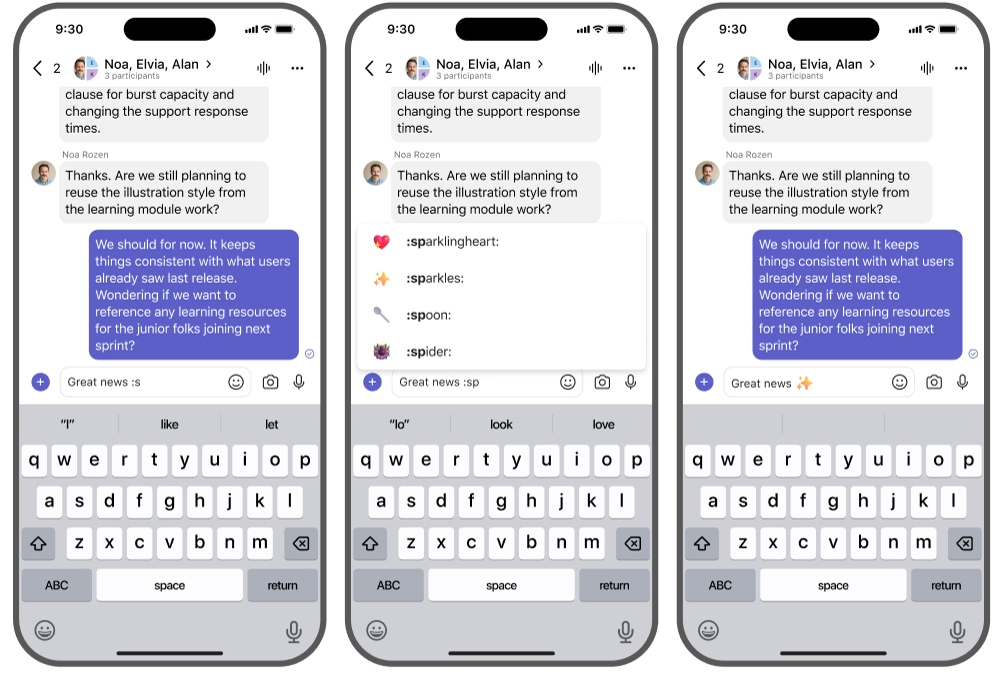
Microsoft Teams now supports emoji shortcuts on iOS and Android, bringing the desktop emoji shortcut experience to mobile. Users can type emoji names directly in the compose box and select from autocomplete suggestions.

How this affects your organization

What will happen:

  • Users can type emoji names between colons in the compose box, such as :smile:.
  • Teams converts supported shortcuts into emojis when entered.
  • Autocomplete suggestions help users find and insert emojis faster.
  • Custom emojis are also supported on iOS and Android.
Jasjit Chopra
Jasjit Chopra

CEO at Penthara Technologies

About the Author

Microsoft MVP LogoLinked-in

Jasjit Chopra is the CEO of Penthara Technologies and a Microsoft Most Valuable Professional (MVP) with over two decades of hands-on experience in Microsoft 365, SharePoint, and Security. He has led 100+ digital transformation projects across six countries, securing 50,000+ users, migrating 250+ TB of data, and automating processes that save organizations thousands of hours each year. A recognized leader at the crossroads of AI, security, and workplace modernization, Jasjit is passionate about simplifying complexity, mentoring technology professionals, and helping businesses build secure, intelligent, and future-ready digital environments.

Leave a Reply

Your email address will not be published. Required fields are marked *

More From This Category

What's new in Microsoft | August 2026 Updates

Explore the latest Microsoft 365 updates including Copilot enhancements, AI meeting recaps, Teams improvements, and new productivity features.

Read More
What's new in Microsoft | July 2026 Updates

Explore the latest Microsoft 365 updates including Copilot enhancements, AI meeting recaps, Teams improvements, and new productivity features.
Read More
What's new in Microsoft | June 2026 Updates

Explore the latest Microsoft 365 updates including Copilot enhancements, AI meeting recaps, Teams improvements, and new productivity features.
Read More
1 2 3 … 10
chevron-right