What's new in Microsoft | December 2025 Updates

Discover the latest Microsoft 365 and Copilot updates, including smarter Copilot search, AI-powered Teams meetings, PowerPoint enhancements, and improved image generation tools.
Table of contents
A. Microsoft Copilot
1. Microsoft 365 Copilot app: Simplified navigation and new Library experience
2. Glance cards available for users without a Copilot license
3. Dynamic filters for people and data sources
4. Copilot Notebooks coming to OneNote
5. Microsoft Teams: New Facilitator capabilities for smarter meetings
6. Microsoft PowerPoint: Explain this in Copilot
7. Microsoft PowerPoint: Image editor integration
8. Microsoft PowerPoint: Organization Images for approved visual assets
9. OpenAI's GPT-Image-1.5 model is now available in Microsoft 365 Copilot
B. Microsoft Teams
1. Open core apps in separate windows
2. Message preview for channels, mentions, and reactions notifications
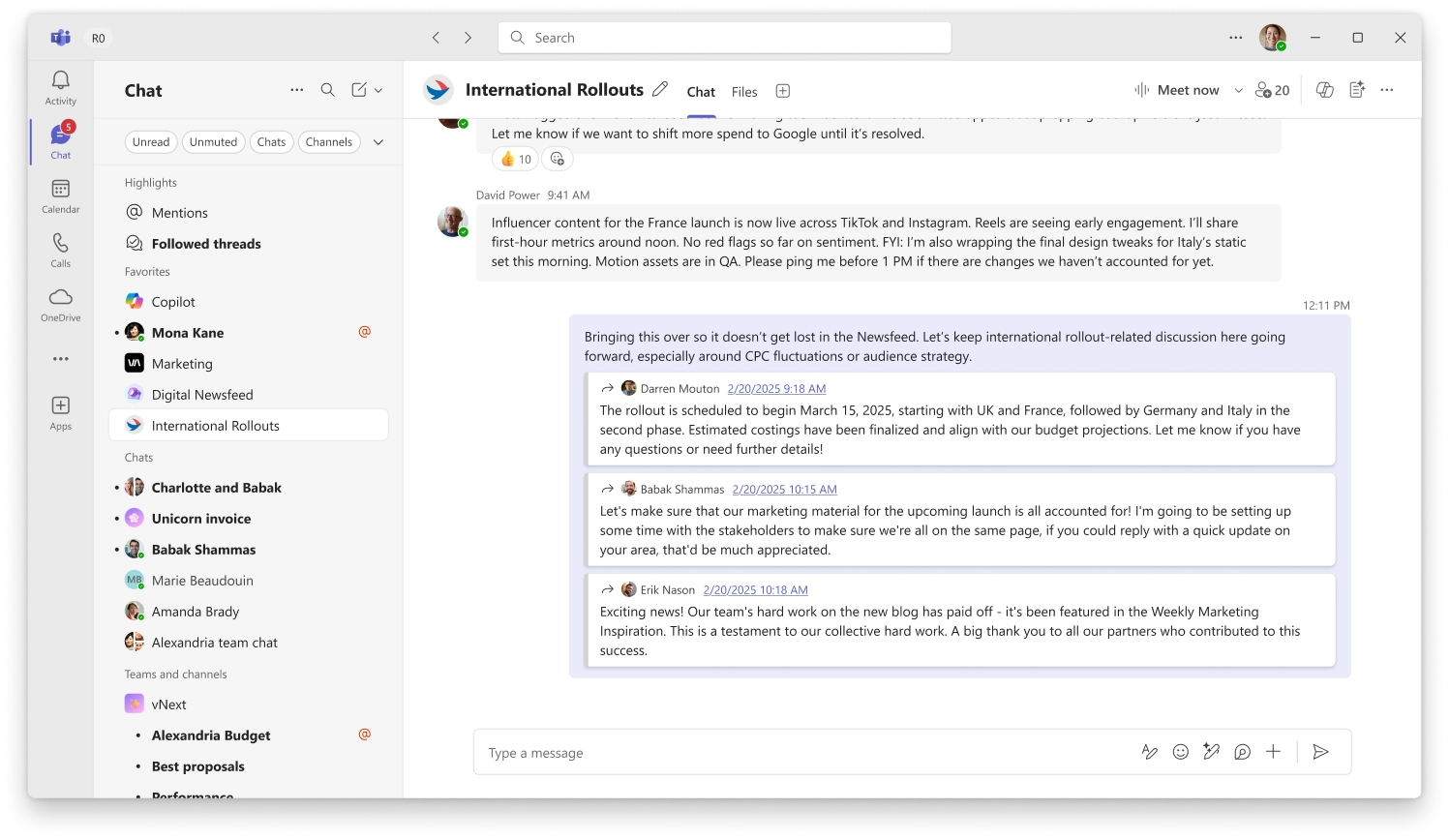
3. Select multiple messages to forward

A. Microsoft Copilot

1. Microsoft 365 Copilot app: Simplified navigation and new Library experience

The Microsoft 365 Copilot app now includes a simplified and more intuitive navigation experience to help users find content faster and get more value from AI. Updates focus on improved discovery, easier access to recent work, and centralized management of Copilot-generated content.

When this will happen
General Availability: Rolling out now.

How this affects your organization

Who is affected:
Users of the Microsoft 365 Copilot app on supported platforms.

What will happen:
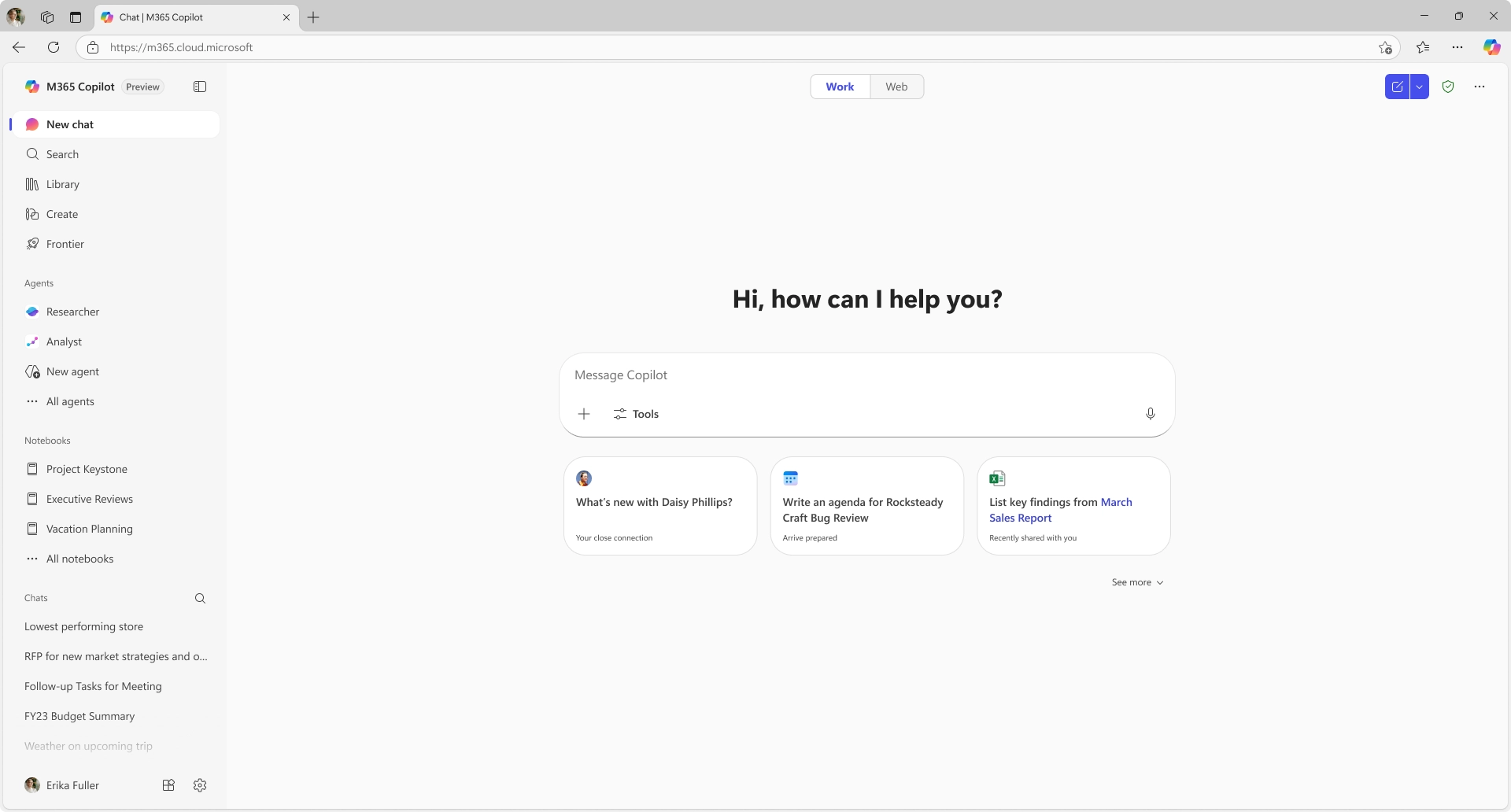
  • The navigation pane includes an expanded chat history and chat search for easier access to prior conversations.
  • The recent Notebooks list is expanded to improve visibility of active work.
  • A new Library entry in the navigation pane centralizes Copilot-generated content such as images and Pages.
  • A new Frontier tab provides access to frontier experiences, including Opal and Word, Excel, and PowerPoint agents.
Copilot app navigation pane update

2. Glance cards available for users without a Copilot license

Glance cards in Copilot Search are now available to users without a Microsoft 365 Copilot license. These cards provide quick, contextual insights directly in the flow of work, reducing the need to run full searches or switch between apps.

When this will happen
General Availability: Available now.

How this affects your organization

Who is affected:
Users accessing Copilot Search without a Microsoft 365 Copilot license.

What will happen:
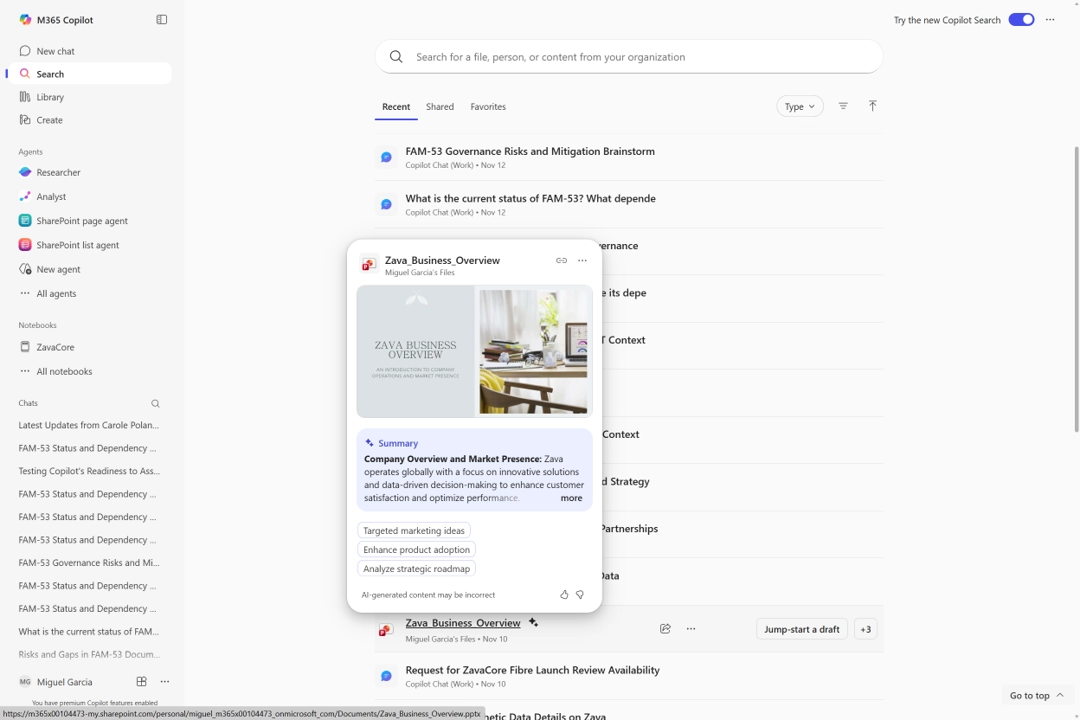
  • Glance cards will surface relevant, at-a-glance information such as recent documents, upcoming meetings, and suggested actions.
  • Users can gain contextual insights without performing a full search.
  • This experience helps reduce navigation across apps and supports faster decision-making.
Glance_Card_Search

3. Dynamic filters for people and data sources

Microsoft 365 Copilot Search now includes dynamic, data source–specific filters to help users refine results more precisely. By typing prompts such as person: or source:, users receive guided suggestions that make it easier to complete queries and narrow results.

How this affects your organization

Who is affected:
Users of Microsoft 365 Copilot Search.

What will happen:
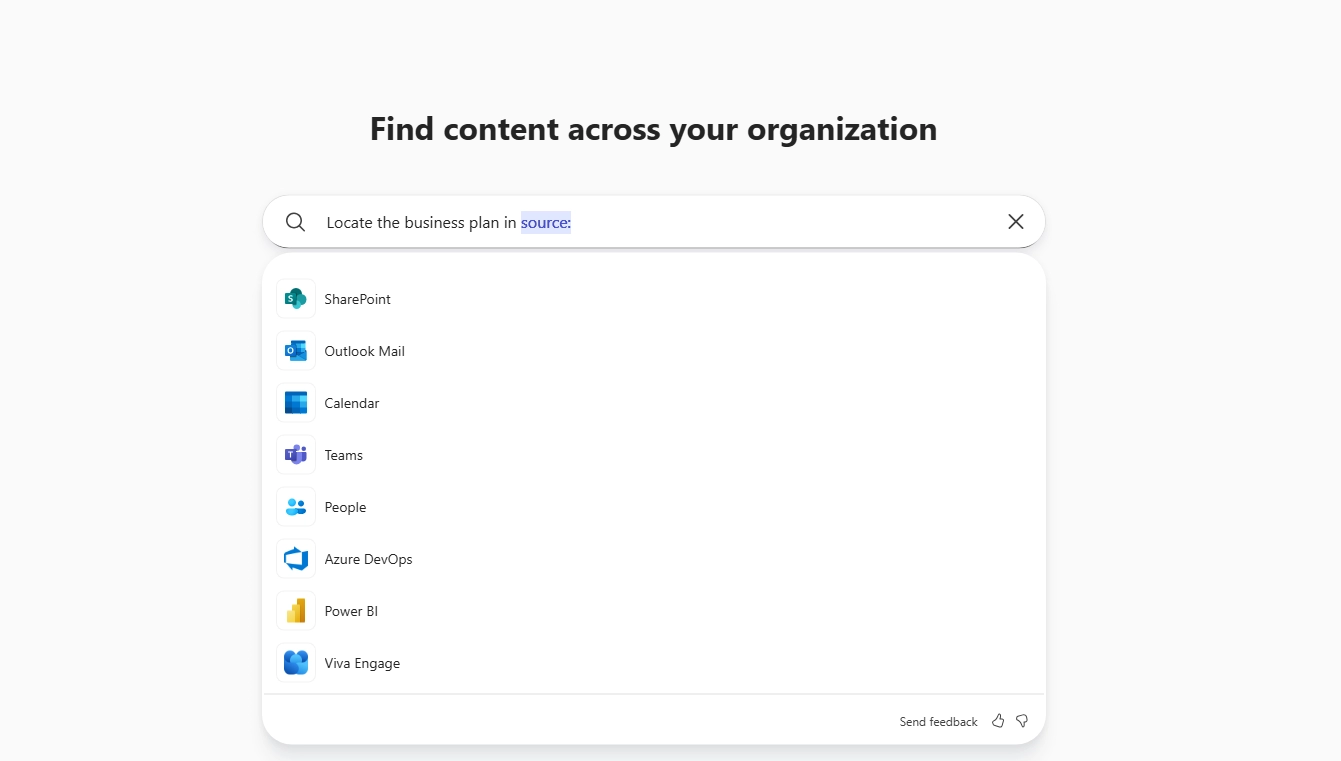
  • Copilot Search will suggest relevant people or data sources when users type person: or source:.
  • After a person or source is selected, subsequent suggestions and results are scoped to that selection.
  • Searches become faster and more targeted, reducing time spent refining queries manually.
Search source

4. Copilot Notebooks coming to OneNote

Copilot Notebooks is coming to OneNote, combining OneNote’s role as a central hub for capturing and organizing information with targeted AI assistance. Users can bring together notes, files, images, recordings, and other project materials, and Copilot will ground insights, updates, and suggestions in that unified content. This creates a context-rich workspace that reduces app switching and supports more connected collaboration.

How this affects your organization

Who is affected:
Users of OneNote with access to Copilot Notebooks.

What will happen:
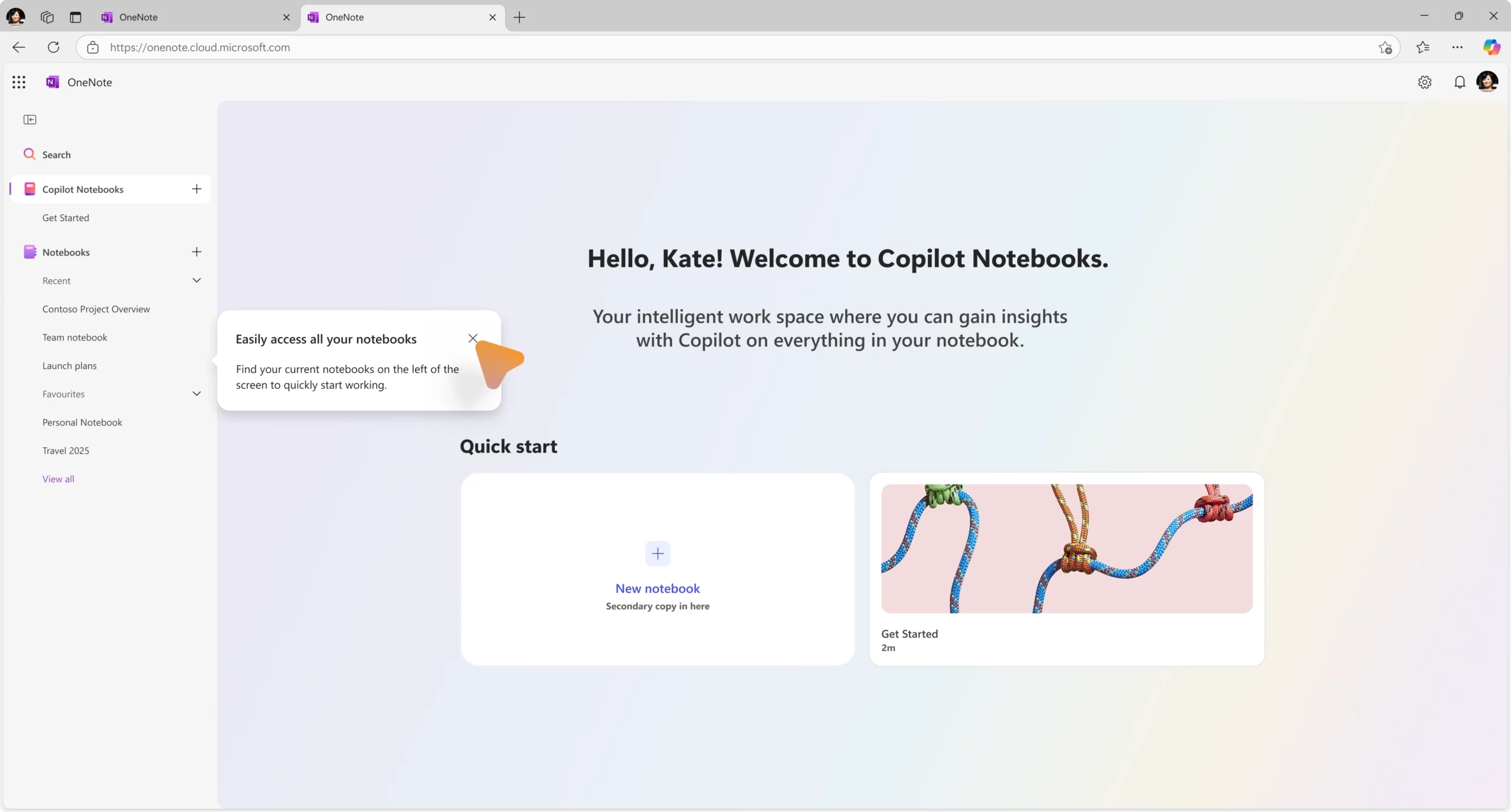
  • Users can organize project content in OneNote and use it as grounded context for Copilot.
  • Copilot will generate insights and suggestions based on the collected notebook content.
  • Projects can be managed more efficiently with clearer context and fewer handoffs between apps.
Copilot Notebooks - OneNote Web

5. Microsoft Teams: New Facilitator capabilities for smarter meetings

Facilitator continues to help meetings stay focused, productive, and on track. New capabilities add richer context awareness and proactive support, reducing the need for manual follow-up and additional tools.

How this affects your organization

Who is affected:
Users with access to Facilitator in Microsoft Teams meetings.

What will happen:
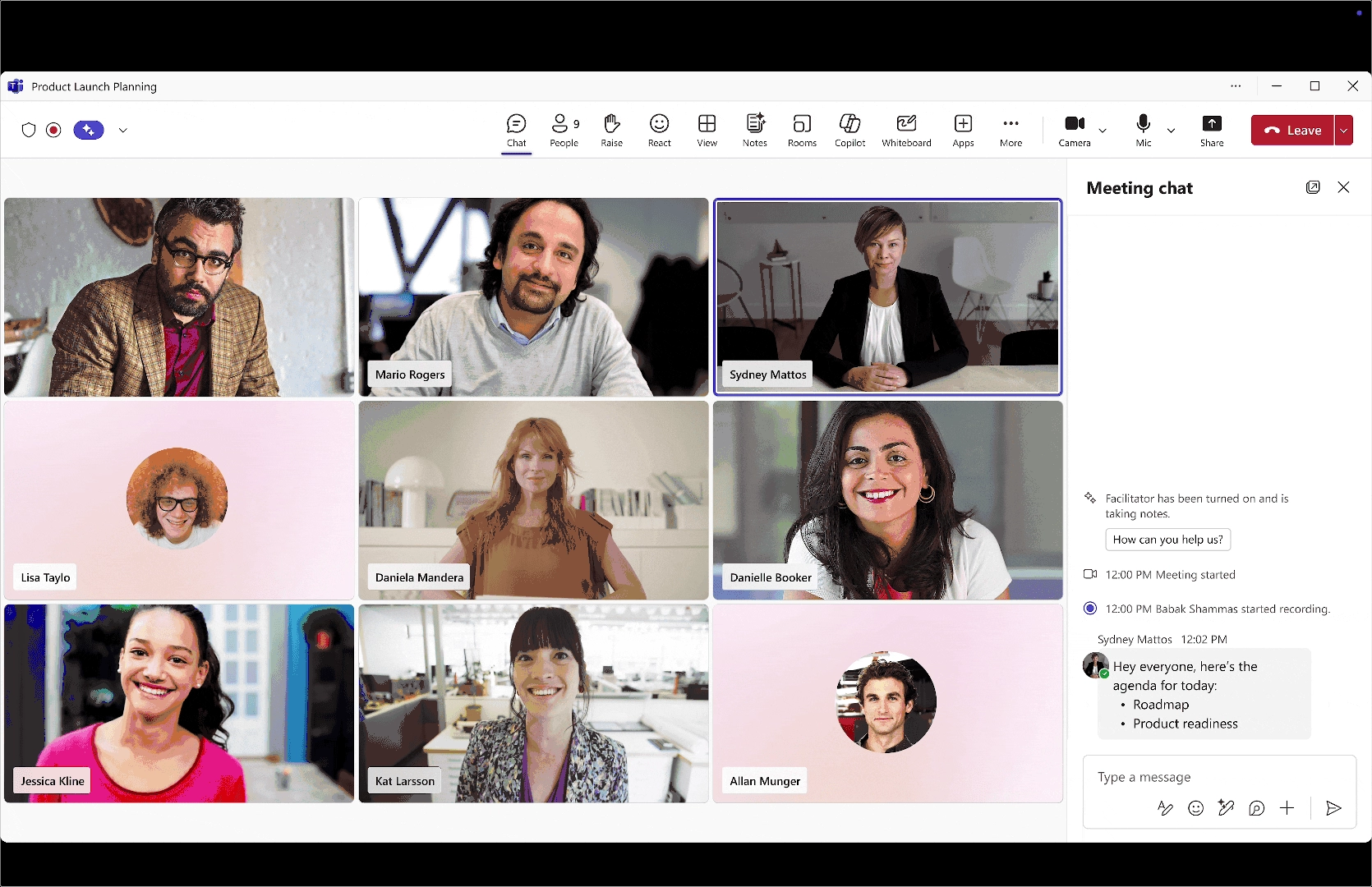
  • Agenda detection and progress tracking: Facilitator can now recognize agendas shared in meeting chat, in addition to the meeting invite and meeting notes. When detected, a live progress tracker appears at the top of the meeting to show current status and next steps.
  • Invitee nudging: If an invited participant has not joined and their name is mentioned twice during the meeting, Facilitator sends a polite chat prompt encouraging them to join.
  • Document drafting: Facilitator can generate draft documents in Word or Loop based on meeting discussion, including formats such as blogs, whitepapers, or project briefs.
  • Task capture and management: Tasks mentioned during the meeting are captured and assigned automatically. Users can also add, update, or reassign tasks through chat commands.
Facilitator agent end-to-end

6. Microsoft PowerPoint: Explain this in Copilot

Copilot in PowerPoint now includes an Explain this capability that helps users quickly understand selected content. Users can choose an acronym, text box, table, or an entire slide and receive a contextual explanation tailored to the selected object.

How this affects your organization

Who is affected:
Users with access to Copilot in Microsoft PowerPoint.

What will happen:
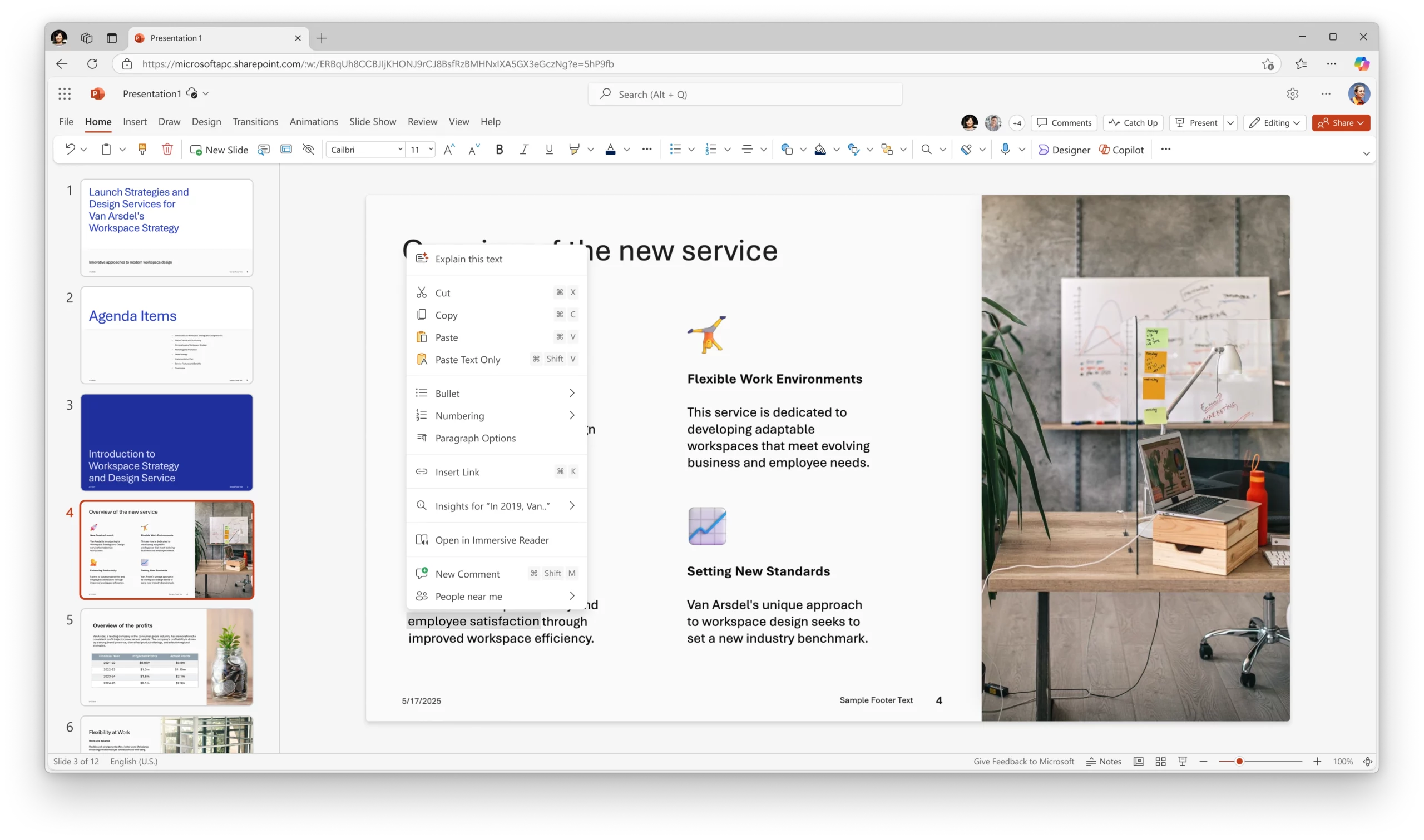
  • Users can select content on a slide and ask Copilot to explain it.
  • Copilot provides clear, contextual explanations based on the selected object.
  • This capability helps reduce confusion around complex information and supports faster understanding without leaving the presentation.
PPT - Explain this text

7. Microsoft PowerPoint: Image editor integration

PowerPoint now includes an integrated image editor that allows users to edit images directly within slides using a modern, intuitive interface. This removes the need to switch between apps and helps maintain focus while building presentations.

How this affects your organization

Who is affected:
Users creating or editing presentations in Microsoft PowerPoint.

What will happen:
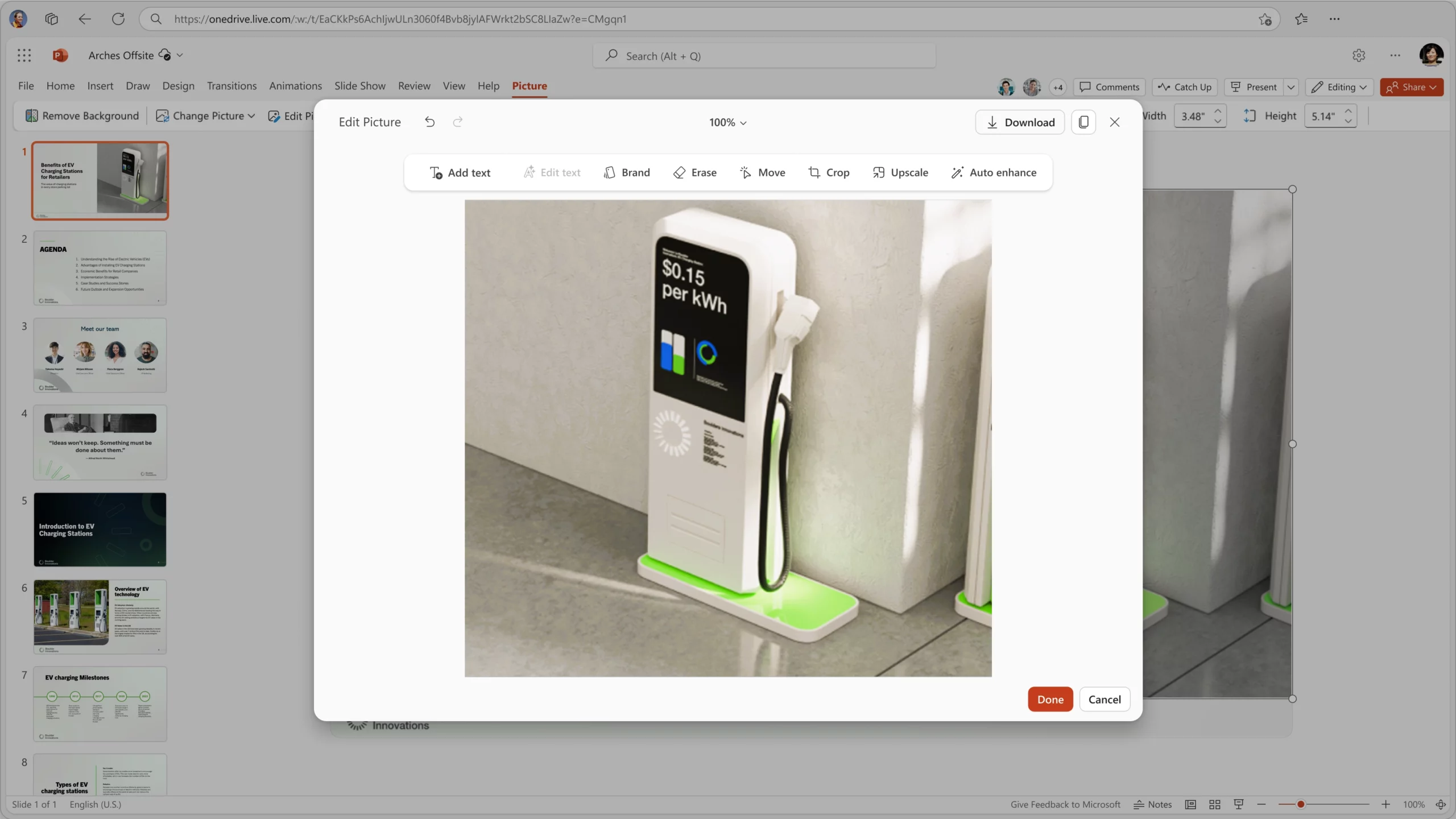
  • Images can be edited directly within PowerPoint without leaving the app.
  • Built-in editing tools support refining visuals, enhancing marketing materials, and improving slide design.
  • The workflow for creating polished, professional presentations becomes faster and more streamlined.
PPT - Edit image in PPT

8. Microsoft PowerPoint: Organization Images for approved visual assets

PowerPoint now supports Organization Images, an integrated asset library connected to an organization’s image sources. This capability allows users to find and insert company-approved visuals directly into presentations, supporting brand consistency and faster content creation.

When this will happen
Availability details will be shared in a future update.

How this affects your organization

Who is affected:
Users creating presentations in Microsoft PowerPoint.

What will happen:
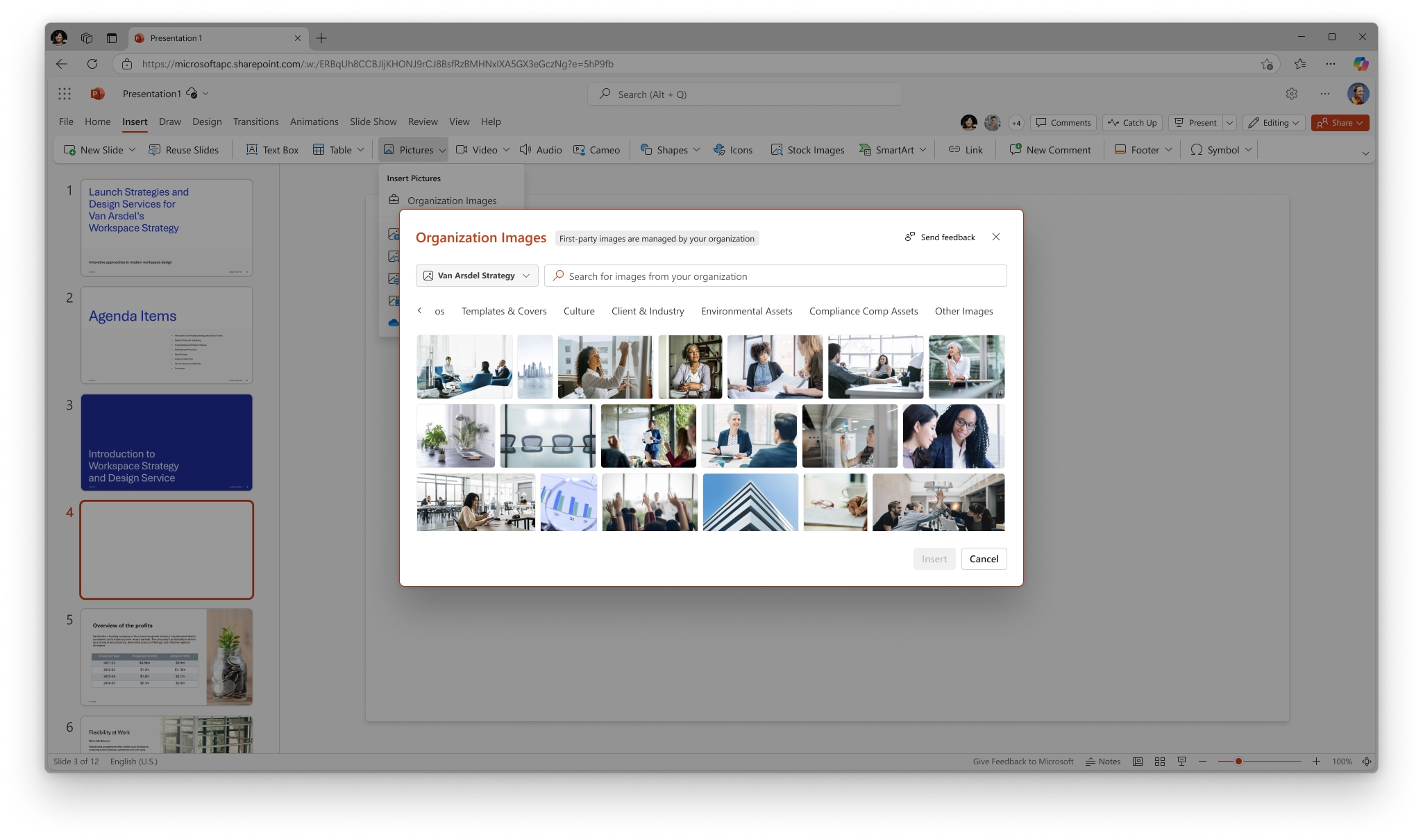
  • A new Organization Images option will appear under Insert > Picture.
  • Users can browse and insert pre-approved assets such as logos, icons, and photos provided by the organization.
  • Approved visuals are instantly accessible within PowerPoint, reducing the need to search for assets outside the app and helping maintain consistent branding across slides.
PPT - Organization images

9. OpenAI's GPT-Image-1.5 model is now available in Microsoft 365 Copilot

Microsoft 365 Copilot image generation experiences are being updated with OpenAI’s latest image generation model, GPT-Image-1.5. This update improves prompt adherence, image editing precision, visual quality, and generation speed across Copilot Chat entry points and the Create experience in the Microsoft 365 Copilot app.

When this will happen
Rollout start (web, Windows, macOS, and mobile): Late December 2025
Rollout end (web, Windows, macOS, and mobile): Late January 2026
General Availability (Worldwide): Mid-December 2025 to late January 2026

How this affects your organization

Who is affected:
Tenants where Copilot image generation experiences are currently available.
Access varies by license:

  • Users with a Microsoft 365 Copilot license receive priority access.
  • Users without a Microsoft 365 Copilot license receive standard access, subject to service capacity.

What will happen:

  • GPT-4o will be replaced by GPT-Image-1.5 for supported Microsoft 365 Copilot image generation scenarios.
  • New image generation and supported image editing requests will automatically use GPT-Image-1.5.
  • No new admin controls are introduced; existing policies and configurations continue to apply.

B. Microsoft Teams

1. Open core apps in separate windows

Core Teams experiences can now be opened in their own windows, giving users more flexibility to organize their workspace and multitask more efficiently.

When this will happen
General Availability: Available now.

How this affects your organization

Who is affected:
Microsoft Teams users.

What will happen:
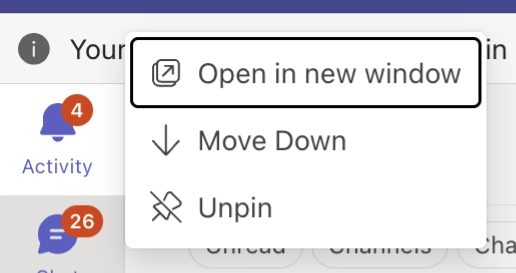
  • Users can open Chat, Calls, Calendar, Activity, and other core Teams apps in separate windows.
  • Apps can be popped out by right-clicking the app icon or using the app flyout.
  • This supports parallel workflows, such as reviewing chats while managing calls or monitoring notifications alongside the calendar.
1.	Open core apps in separate windows

2. Message preview for channels, mentions, and reactions notifications

Microsoft Teams is expanding message previews across more notification types to improve visibility and consistency. This enhancement helps users quickly understand the context of a notification and decide on next actions without switching views.

What will happen:
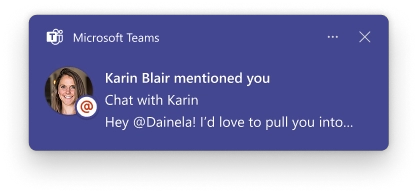
  • Message previews will be included in additional notification types, including channel messages, mentions, and reactions.
  • Users can assess the relevance and urgency of notifications more quickly.
  • The notification experience becomes more consistent across supported platforms.
2.	Message preview for channels, mentions, and reactions notifications

3. Select multiple messages to forward

Microsoft Teams now supports multi-select forwarding, allowing users to forward multiple messages together while preserving context and order. This enhancement simplifies sharing conversations and improves collaboration.

What will happen:
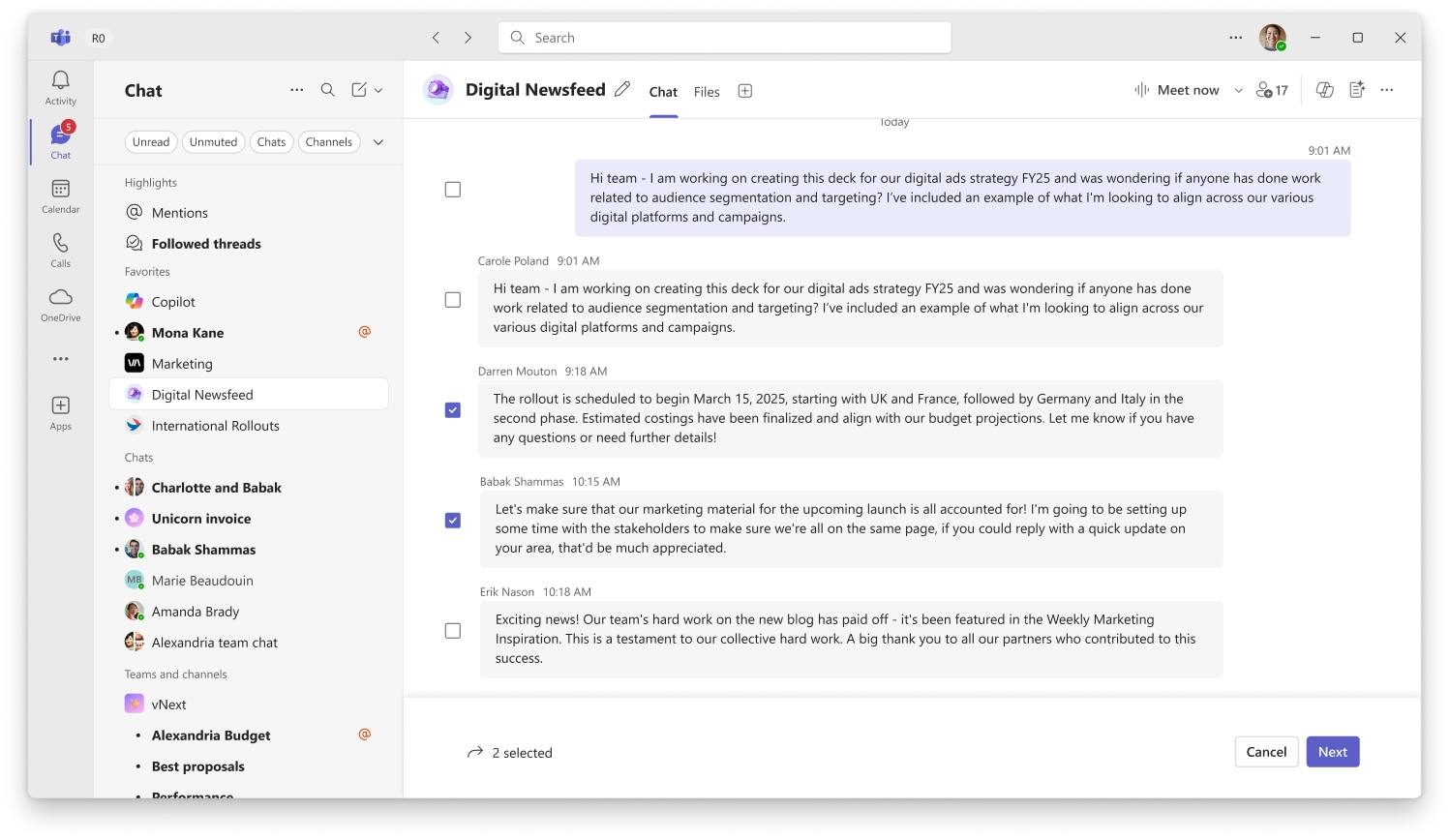
  • Users can select up to five messages from a chat or channel and forward them together in a single message.
  • Forwarded messages retain their original order to preserve context.
  • This capability supports clearer and more efficient sharing of conversations.
Select multiple messages to forward
Multiple messages forwarded screenshot
Jasjit Chopra
Jasjit Chopra

CEO at Penthara Technologies

About the Author

Microsoft MVP LogoLinked-in

Jasjit Chopra is the CEO of Penthara Technologies and a Microsoft Most Valuable Professional (MVP) with over two decades of hands-on experience in Microsoft 365, SharePoint, and Security. He has led 100+ digital transformation projects across six countries, securing 50,000+ users, migrating 250+ TB of data, and automating processes that save organizations thousands of hours each year. A recognized leader at the crossroads of AI, security, and workplace modernization, Jasjit is passionate about simplifying complexity, mentoring technology professionals, and helping businesses build secure, intelligent, and future-ready digital environments.

Leave a Reply

Your email address will not be published. Required fields are marked *

More From This Category

What's new in Microsoft | November 2025 Updates

Discover the key Microsoft 365 and Copilot updates for November 2025, including new GPT-5 reasoning modes, advanced Copilot agents, enhanced Teams collaboration features, and improved AI-driven meeting and productivity tools.

Read More
What's new in Microsoft | October 2025 Updates

Explore the October 2025 Microsoft 365 and Copilot updates, including GPT-5 as the default Copilot model, enhanced Teams collaboration, new meeting productivity tools, improved AI search, and new Copilot Studio agents for HR, IT, and app creation.

Read More
What's new in Microsoft | September 2025 Updates

Explore Microsoft’s September 2025 updates across Microsoft 365 Copilot, Teams, and Edge – featuring multi-image uploads in Copilot Chat, personalized memory enhancements, streamlined email drafting in Outlook, and powerful meeting tools like Facilitator and Countdown Timer.

Read More
1 2 3 6
chevron-right