Your Microsoft 365 tenant can leak data silently - no malware, no alerts. Learn how simple misconfigurations enable ongoing email and data exfiltration.

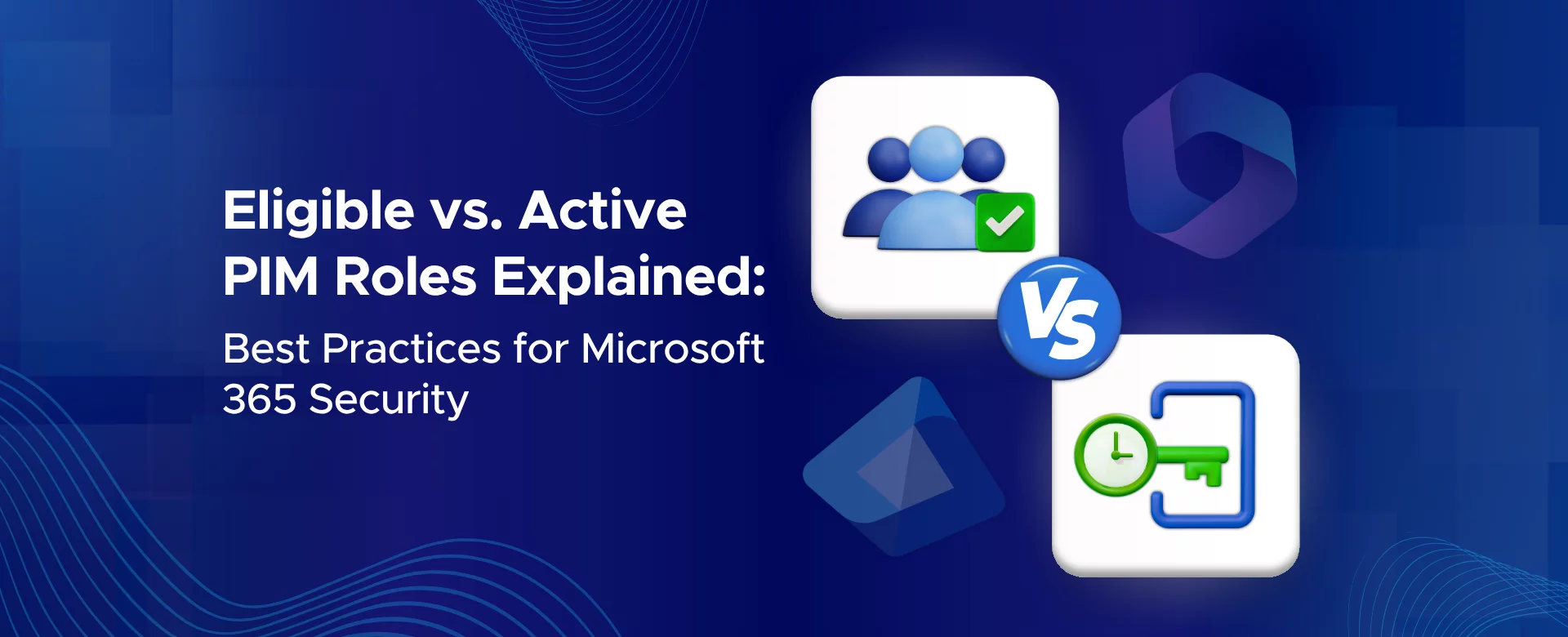
Privileged Identity Management (PIM) in Microsoft 365 is all about keeping admin access safe.
Why?
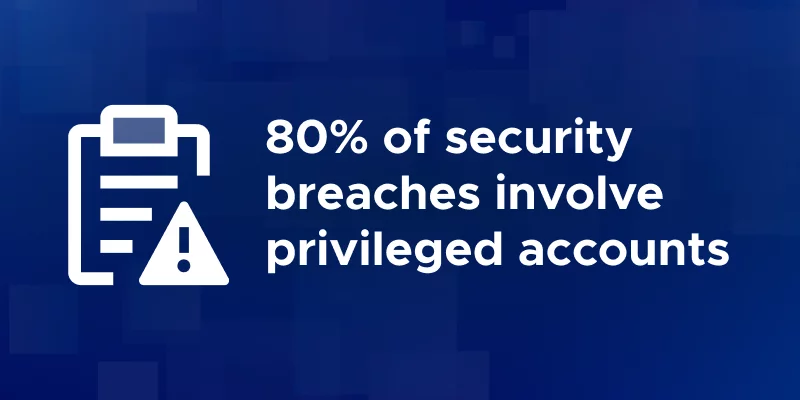
Because permanent admin rights are risky. If attackers get hold of them, the damage can be huge. In fact, most breaches happen because of compromised privileged accounts.
That’s where PIM helps. Instead of giving someone always-on admin power, you can assign them as eligible. This means they only become active when they actually need it - through a process called just-in-time (JIT) access.
Think of it like a keycard. You don’t keep the door open 24/7. You swipe in only when you need to enter.
In Microsoft 365 PIM, there are two types of role assignments:
This guide explains the difference between eligible and active PIM roles, how to configure them in Microsoft 365, and the best practices to keep your organization secure.
By the end, you’ll know:
Let’s break it down step by step.
To learn more about securing your environment beyond role management, explore our Microsoft 365 security consulting services, designed to strengthen your overall access control and compliance posture.
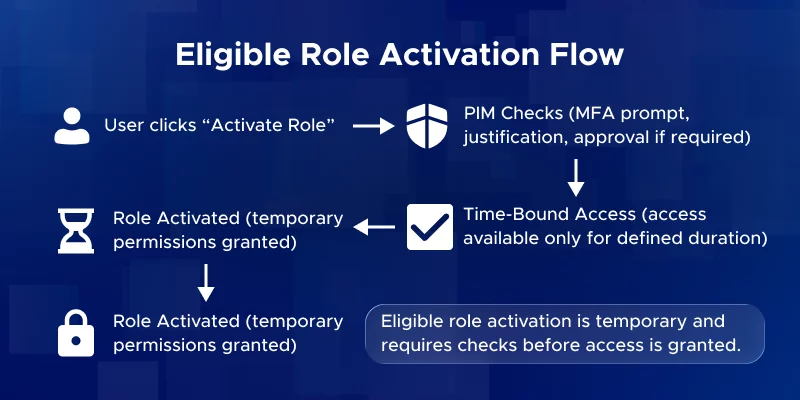
An eligible role means the user could get admin permissions, but only after activating them.
Until they activate, the role sits idle - no permissions granted.
Activation usually involves:
This is just-in-time (JIT) access. The user only gets elevated rights for a set time, and once it expires, the access disappears.
Example: Alice is an eligible Exchange Admin. She can’t manage mailboxes until she activates her role. At that moment, she becomes active, does her task, and then loses access automatically.
Once you've decided a role should be eligible rather than active, the natural next decision is whether activation should require manual or automatic approval - and that depends on how sensitive the role is and how often it gets used.
An active role means the user already has the permissions, all the time.
No activation step. No waiting. Just immediate access as long as the assignment lasts.
This is the traditional way of assigning admin roles.
Example: Bob is an active Security Administrator. He always has those permissions whenever he signs in.
In PIM, active assignments can be:
| Aspect | Eligible Assignment | Active Assignment |
|---|---|---|
| Requires manual activation? | Yes – user must “Activate” the role on demand before use. | No – user has the role privileges at all times once assigned. |
| Default state for user | Not privileged until activated (zero standing access). | Always privileged (standing access). |
| Best for | Regular admins who only need occasional privileged access (JIT). | Break-glass accounts, service accounts, or constantly-needed roles |
| Time-bound option | Yes – can set start/end for eligibility (after end date, can’t activate) | Yes – can expire the active assignment at a future date |
| Security benefits | Least privilege: Reduces attack surface since role is dormant until needed. Actions are auditable upon activation | Immediate access (no delays) but higher risk if account is compromised, since attacker has admin access any time. |
| User experience | Extra step: user must request/activate when admin tasks arise. | Transparent: no extra steps; privileges always available. |
Summary
The key difference is when and how access is granted. Eligible roles provide the same permissions as active ones but with additional security controls, helping reduce risk while still enabling necessary admin work.
Moving admin accounts from active to eligible roles is one of the five configurations that directly improve your Identity Secure Score - and it does so without meaningfully disrupting how those admins work day to day.
Admins can manage PIM in the Entra admin center (Azure AD).
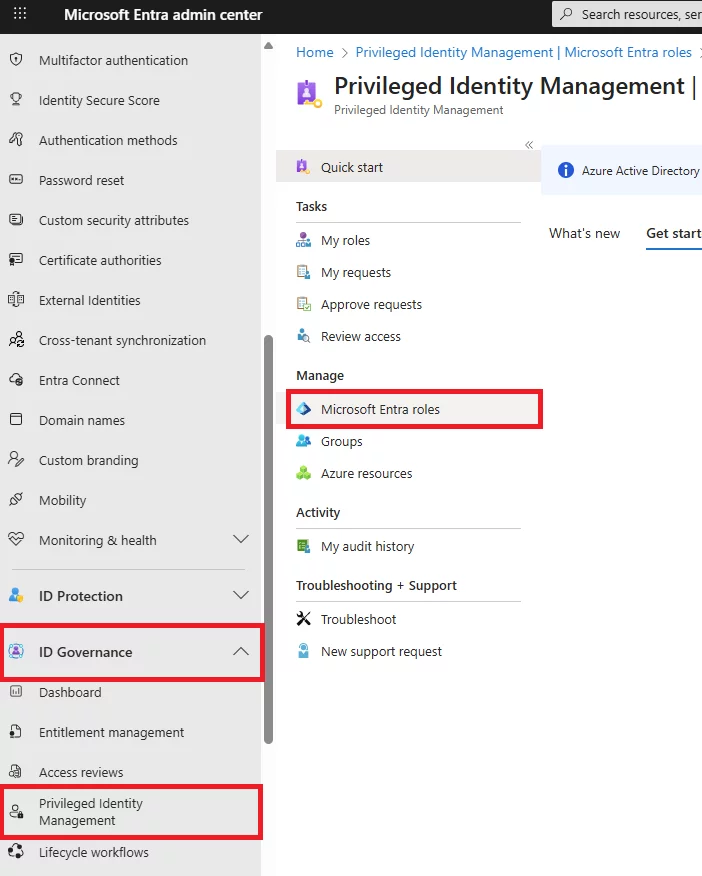
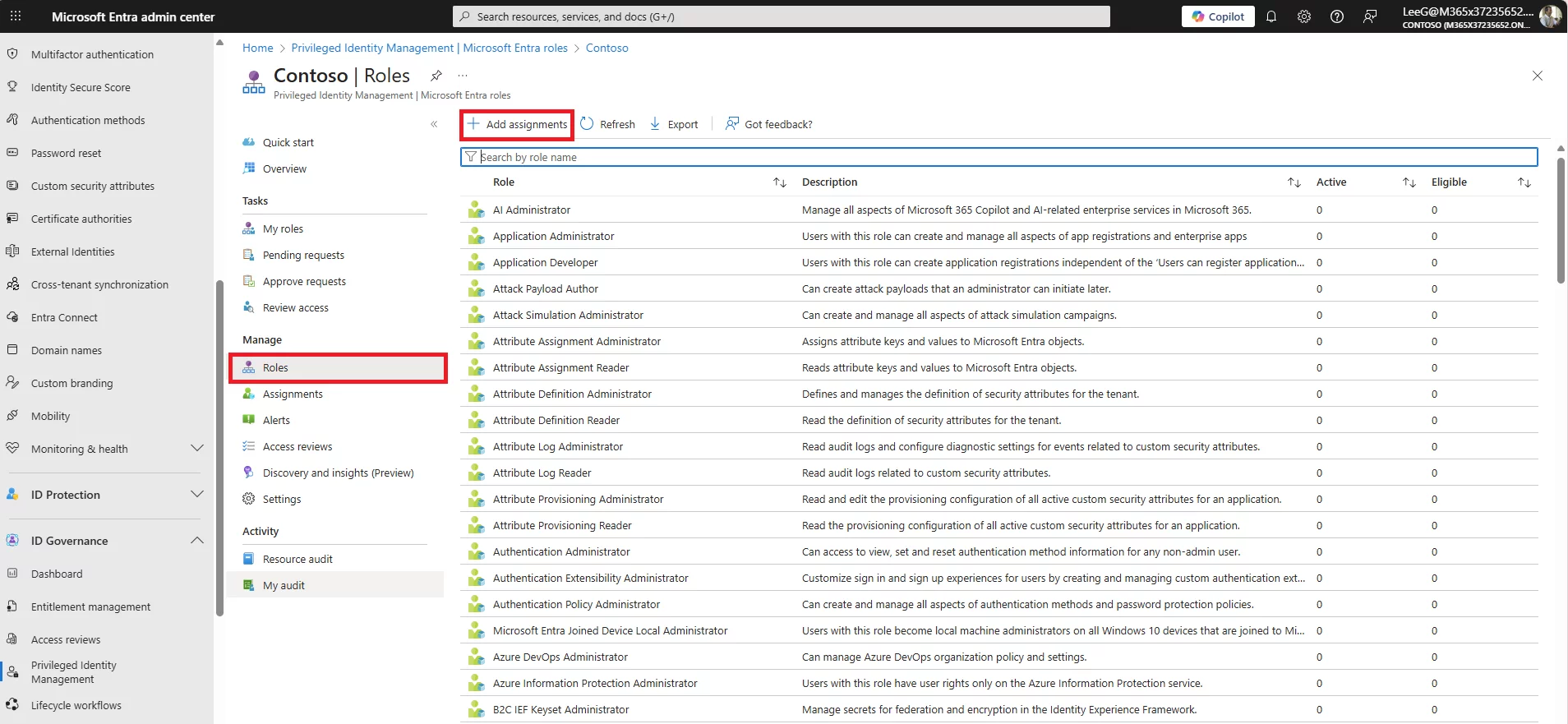
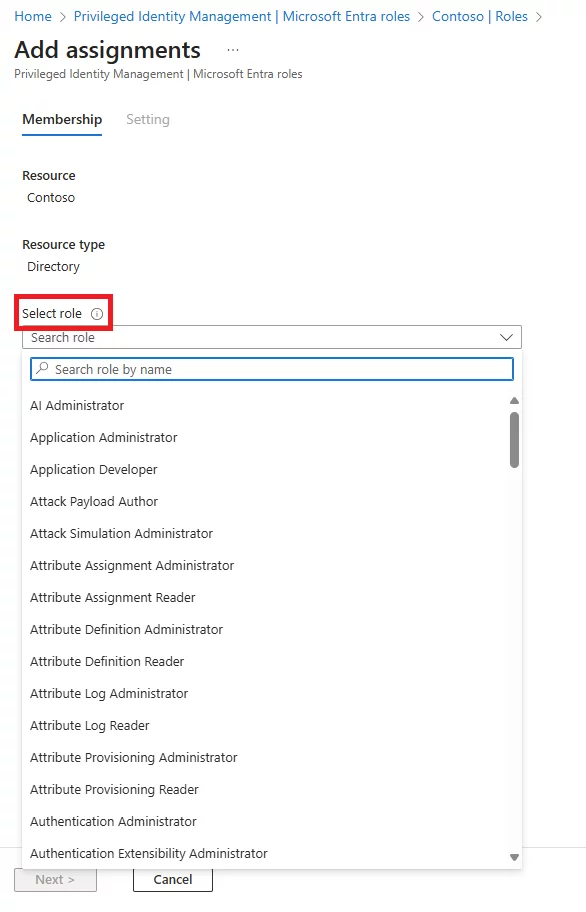
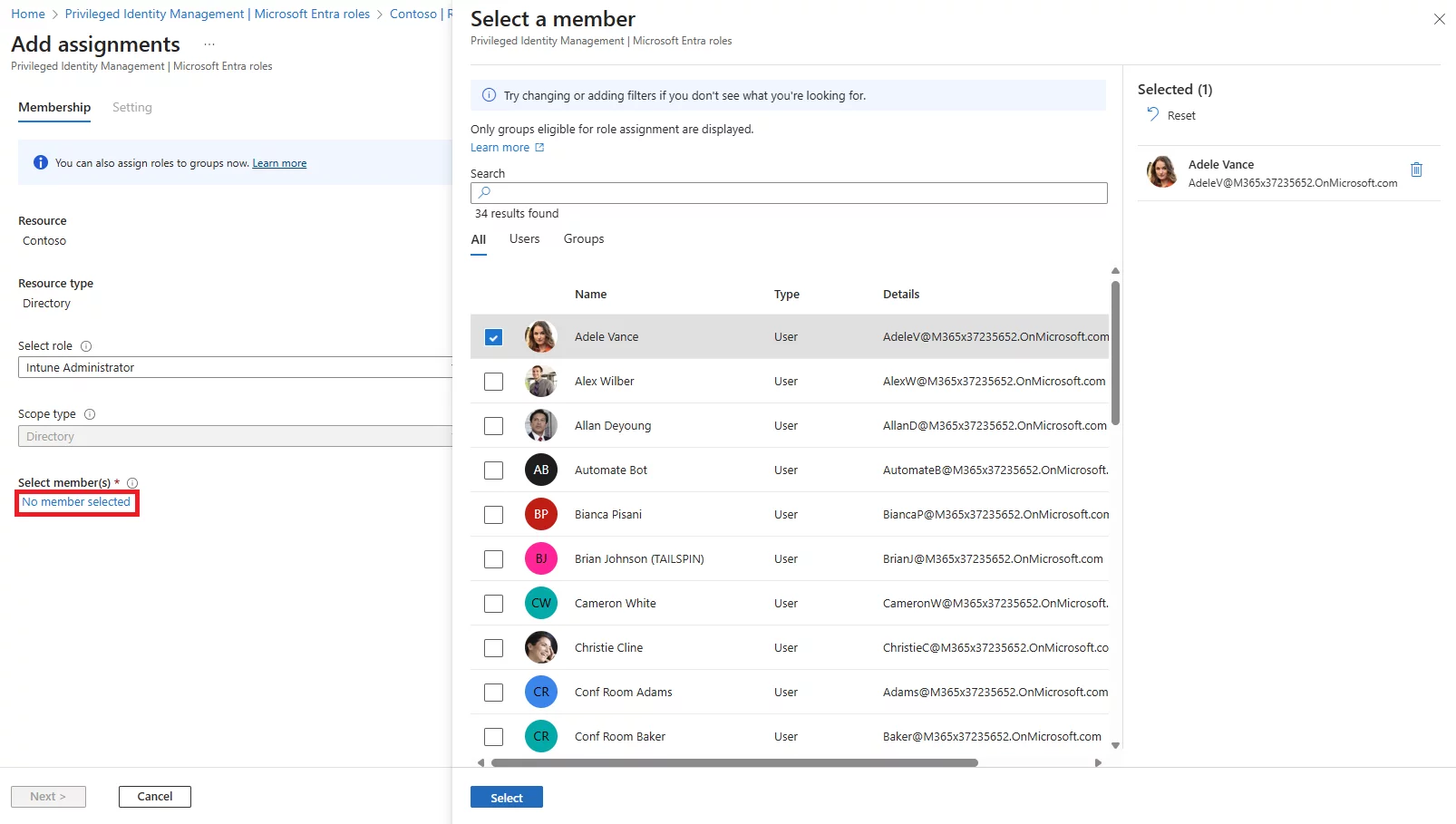
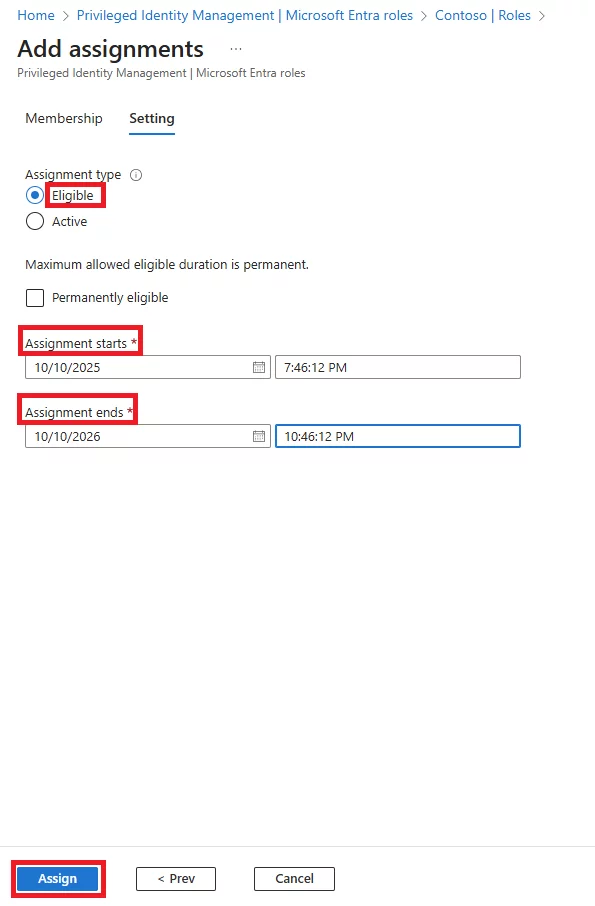
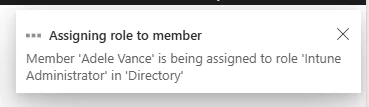
For Active assignments, the steps are the same, except you select Active.
Active roles can also be time-bound or permanent.
Technical Note:
Service principals (applications) can only receive active assignments. If an admin tries to assign a PIM role to a service principal, the portal will force it to Active.
Assignments and settings can also be managed via Microsoft Graph API or PowerShell.
For example, the New-MgRoleManagementDirectoryRoleAssignment cmdlet can create role assignments programmatically.
This is useful for large enterprises or DevOps scenarios where you want to automate:
PIM roles are represented as role management policy objects in Graph.
After assigning a role, admins can configure PIM role settings (policies):
These policies govern how eligible roles behave and add extra security controls.
In addition to MFA, the process of activation can require a human checkpoint; learn when to use Auto vs Manual Approval for Microsoft PIM Roles to balance security and speed.
Once administrators have assigned a user an Eligible role in PIM, here’s what that user needs to do when they need elevated access:
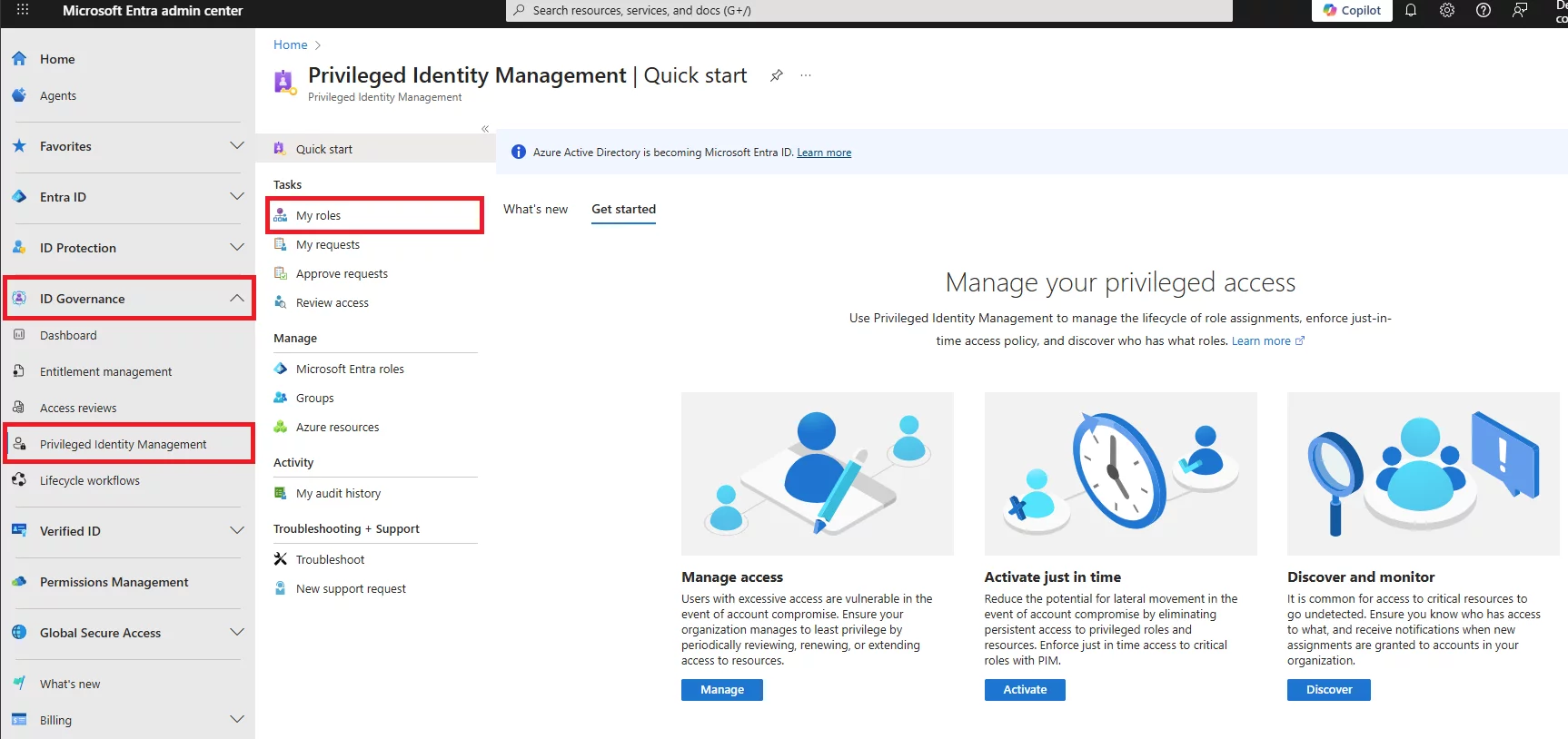
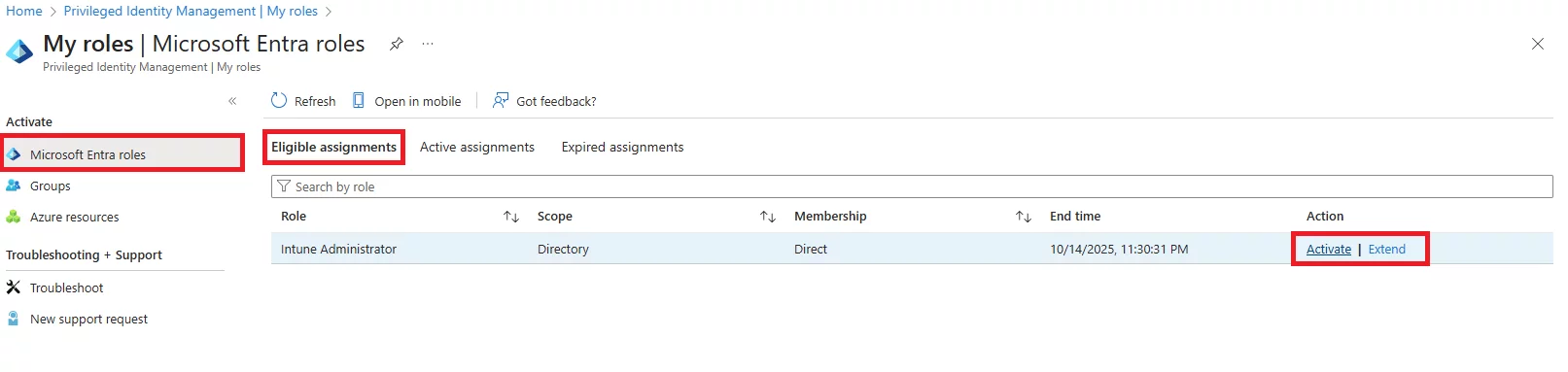
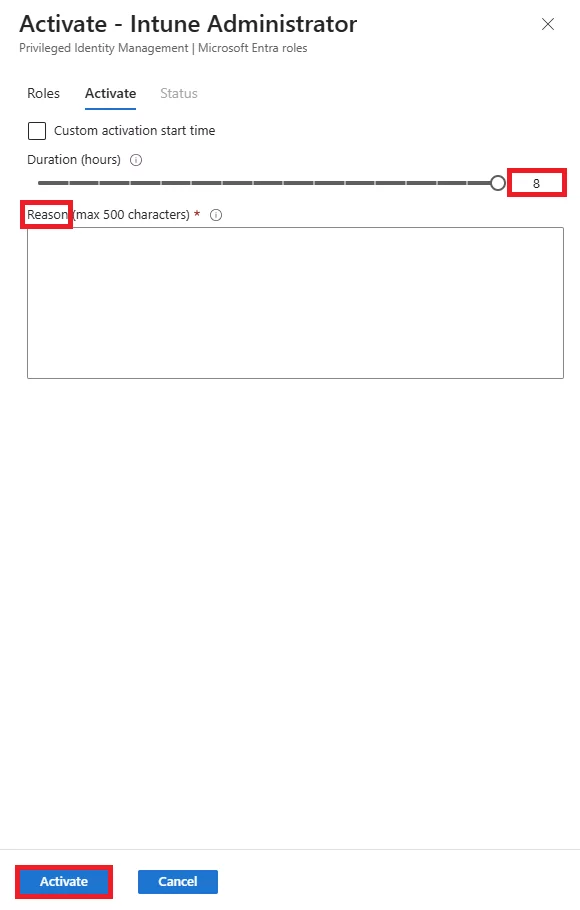
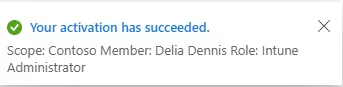
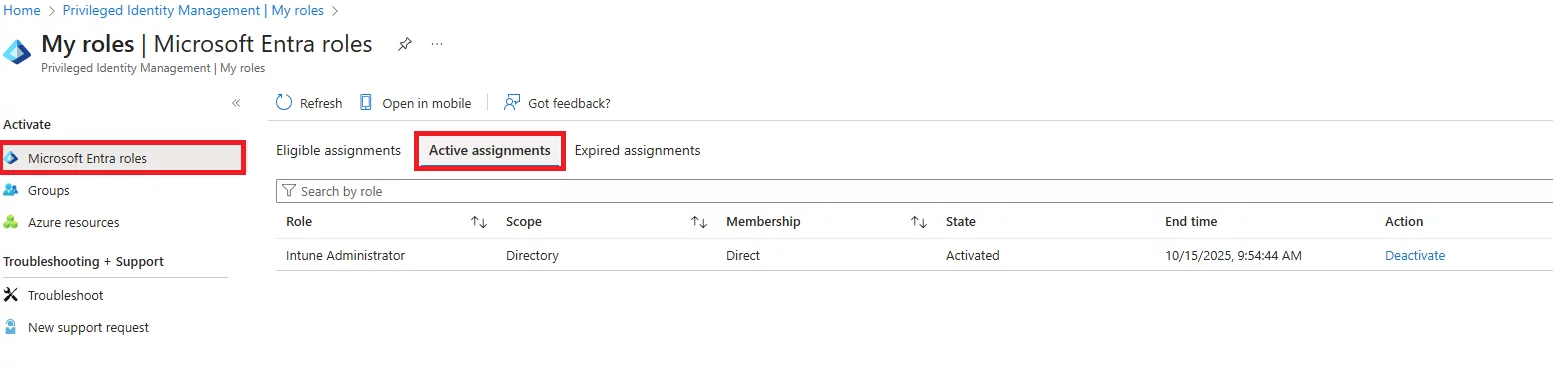
To maximize security while keeping PIM practical, configure the following settings for eligible roles (defaults apply per your org’s risk tolerance):
Even with just-in-time access through eligible roles, the accounts holding those roles are still vulnerable to credential attacks - configuring Entra ID Smart Lockout as a complementary control protects those accounts from brute force even when PIM is in place.
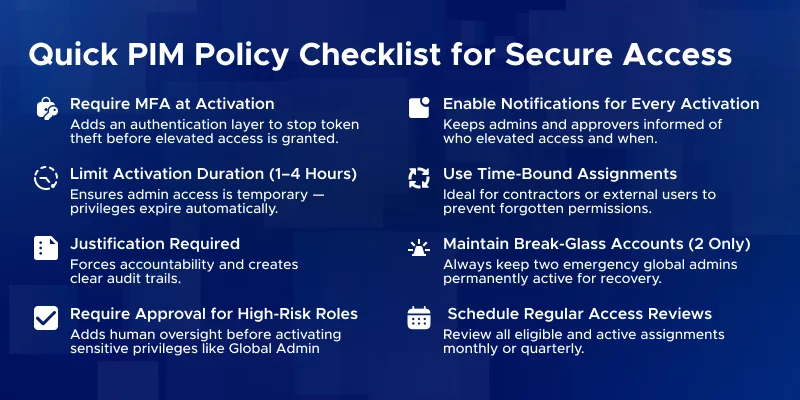
Eligible by default → Use Active only for exceptional cases (emergency, service accounts, rare continuous needs).
Default Stance – Eligible by Default:
When Active Makes Sense:
| Role | Recommended Assignment | Notes |
|---|---|---|
| Global Administrator | Eligible + Approval | Highest risk, except emergency accounts |
| Privileged Role Administrator | Eligible + Approval | Controls PIM itself |
| Exchange / SharePoint Admin | Eligible | Approval optional for daily tasks |
| User Administrator | Eligible | Low-risk, approval optional |
| Security Reader (read-only) | Can be Active | Minimal risk |
| Compliance Officer / Auditor | Active (read-only) | For continuous access to reports |
| Service Account / Backup Script | Active | Limit scope and monitor |
| Developers needing occasional access | Eligible | Auto-approval possible for convenience |
Compliance & Governance:
Balancing Security and Usability:
For a more holistic view of how privileged identity fits within your security strategy, don’t miss our article top strategies to optimize your Microsoft 365 security posture and strengthen administrative resilience.
Audit and Access Reviews
Keep a close eye on who has roles and how they’re used. PIM provides audit logs and Access Review tools. Best practice: check permanent active roles and eligible assignments quarterly (or monthly) to ensure they’re still needed.
Look for patterns like users activating high-privilege roles for everyday tasks - this could indicate over-scoped access. Adjust roles accordingly. To further minimize exposure and protect inactive sessions, learn how to enforce session timeout policies in Microsoft 365 across all user devices.
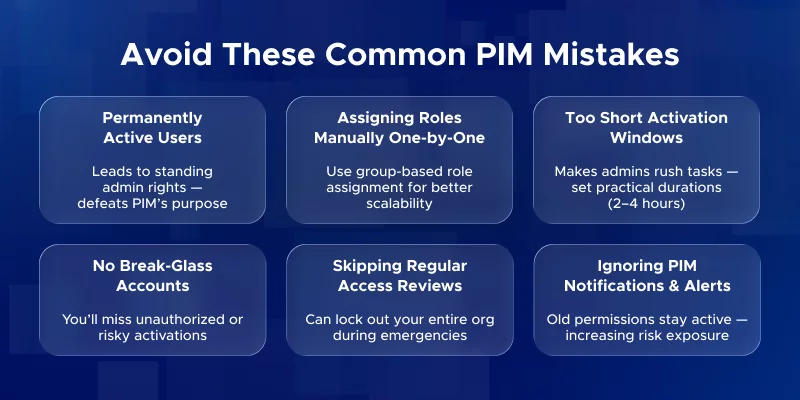
Common Pitfalls
Using PIM Beyond Microsoft 365
PIM works for Azure RBAC roles and privileged groups too. While this guide focuses on Microsoft 365, the same principles of eligible and active assignments apply.
For organizations managing Azure workloads, Microsoft Azure consulting services can help design secure and scalable RBAC and identity governance frameworks.
Training and Adoption
Invest in admin training on how PIM works. Demonstrate the activation workflow, the security benefits, and best practices. With clear guidance and hands-on practice, admins quickly adapt to just-in-time access and see it as an efficient tool rather than extra overhead.
Conclusion
Secure PIM deployment combines smart configuration, role discipline, and regular monitoring. Use eligible roles by default, reserve active roles for exceptions, review assignments regularly, and train your team. Following these steps keeps your Microsoft 365 environment secure, compliant, and practical, while empowering admins to work efficiently.
Secure your Microsoft 365 environment with a structured, least-privilege approach. Schedule a consultation today and let our team design, deploy, and support the right PIM strategy for your organization.
Q: What is the difference between a role and a role assignment?
A: A role defines a set of permissions (what you can do). A role assignment links a user or group to that role, granting them those permissions.
Q: What are the three types of RBAC controls in Azure?
A: Azure uses Role Assignments, Role Definitions, and Scopes.
Q: What is the difference between IAM and PIM?
A: IAM (Identity and Access Management) is the broad system that handles who can access what. PIM (Privileged Identity Management) is a layer on top of IAM that manages privileged roles, providing just-in-time access, approvals, and audit logs.
Q: What is the difference between eligible and active PIM roles?
A: Eligible roles must be activated each time you need them – temporary, just-in-time access. Active roles are always on – the user has admin permissions at all times. Eligible = “on demand,” Active = “standing access.”
Q: When should I use an eligible role vs an active role in PIM?
A: Use eligible roles by default for day-to-day administration. Use active roles only for exceptions like break-glass accounts or service accounts that cannot use JIT activation. Eligible roles reduce risk by limiting exposure.
Q: How do users activate an eligible PIM role?
A: Users go to the PIM portal (or Teams/PIM app), select their eligible role, click Activate, and complete any requirements like MFA or providing justification. If approval is required, they wait for it. Once done, the role is active for the set duration (e.g., 1–4 hours).
Q: Can eligible PIM roles expire or be time-bound?
A: Yes. Eligible assignments can have a set expiry date, after which the user loses eligibility. Each activation also expires after a configured duration, after which the user must activate again.
Q: What triggers the activation of an eligible PIM role?
A: Activation is manual. The user must intentionally start it in PIM. Scripts can automate this via PIM API, but it’s always a deliberate action, not automatic.
Q: Are active PIM roles more risky than eligible roles?
A: Yes. Active roles give standing access, so if compromised, the attacker immediately has permissions. Eligible roles add MFA, approval, and logging, which creates security checkpoints and audit trails.
Q: How to activate eligible assignments in Azure?
A: Through the Entra/PIM portal, select your eligible role, click Activate, satisfy any MFA/approval/justification requirements, and the role becomes active for the set duration.
Q: What are the permission levels in Azure?
A: Azure permission levels are defined by roles – e.g., Reader (view-only), Contributor (modify resources), Owner (full access). PIM controls elevated roles within these permissions.
Q: What is the scope type of roles in Entra?
A: Role scope defines where permissions apply: subscription, resource group, or specific resource. Eligible/active assignments inherit the role’s scope.
Q: How are NotActions used in a role definition?
A: NotActions define exceptions to permissions. For example, a role may allow all Contributor actions except deleting VMs. This refines what a role can do.
Q: Why is Add Role Assignment disabled?
A: This usually happens due to missing permissions or scope restrictions. The admin must have a high-enough role at the target scope to assign roles.
Monthly updates, news & events from Microsoft to help your business grow.

CEO at Penthara Technologies


 Your Microsoft 365 Tenant Has a Silent Data Leak. It Requires No Malware.
Your Microsoft 365 tenant can leak data silently - no malware, no alerts. Learn how simple misconfigurations enable ongoing email and data exfiltration.
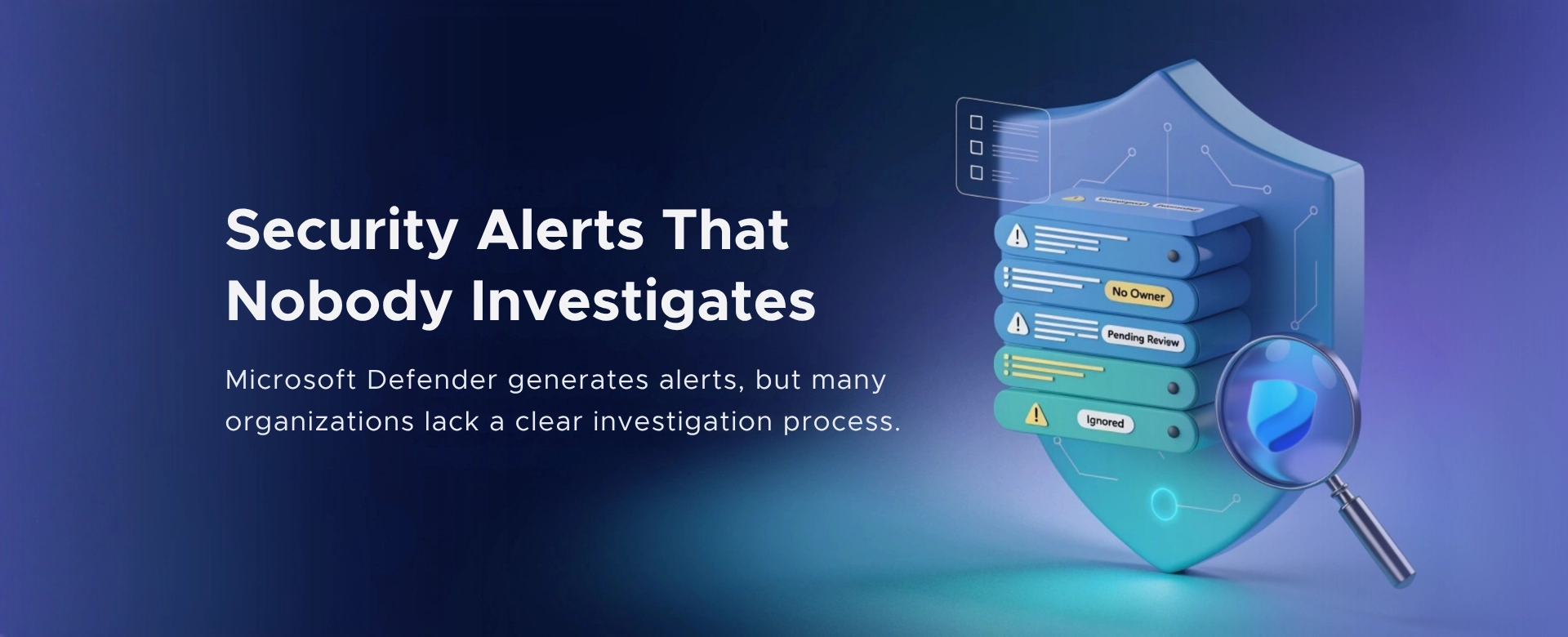 Security Alerts That Nobody Investigates - And Why That’s More Dangerous Than Having None
Security alerts mean nothing if no one investigates them. Ignored alerts create false confidence - and give attackers the time they need to cause real damage.
 The Silent M365 Risk Most CXOs Discover Too Late: External Access That Never Expired
A hidden Microsoft 365 risk many CXOs overlook - expired external access that quietly breaks Zero Trust and exposes organizations to serious security gaps.